Notes:
• Create an account on one of the streaming sites above before using downloader. Also, make sure the Digital
Music Library is connected to the Internet. You can verify if the Digital Music Library is connected to the Internet
from Status > Network > LAN.
• To use this function, the time settings should be acquired from the NTP server automatically.
• Do not move the folder under the “download” folder that contains the account name in its folder name to another
folder. If the folder is moved, the Digital Music Library may download the same music files again.
Adding Accounts
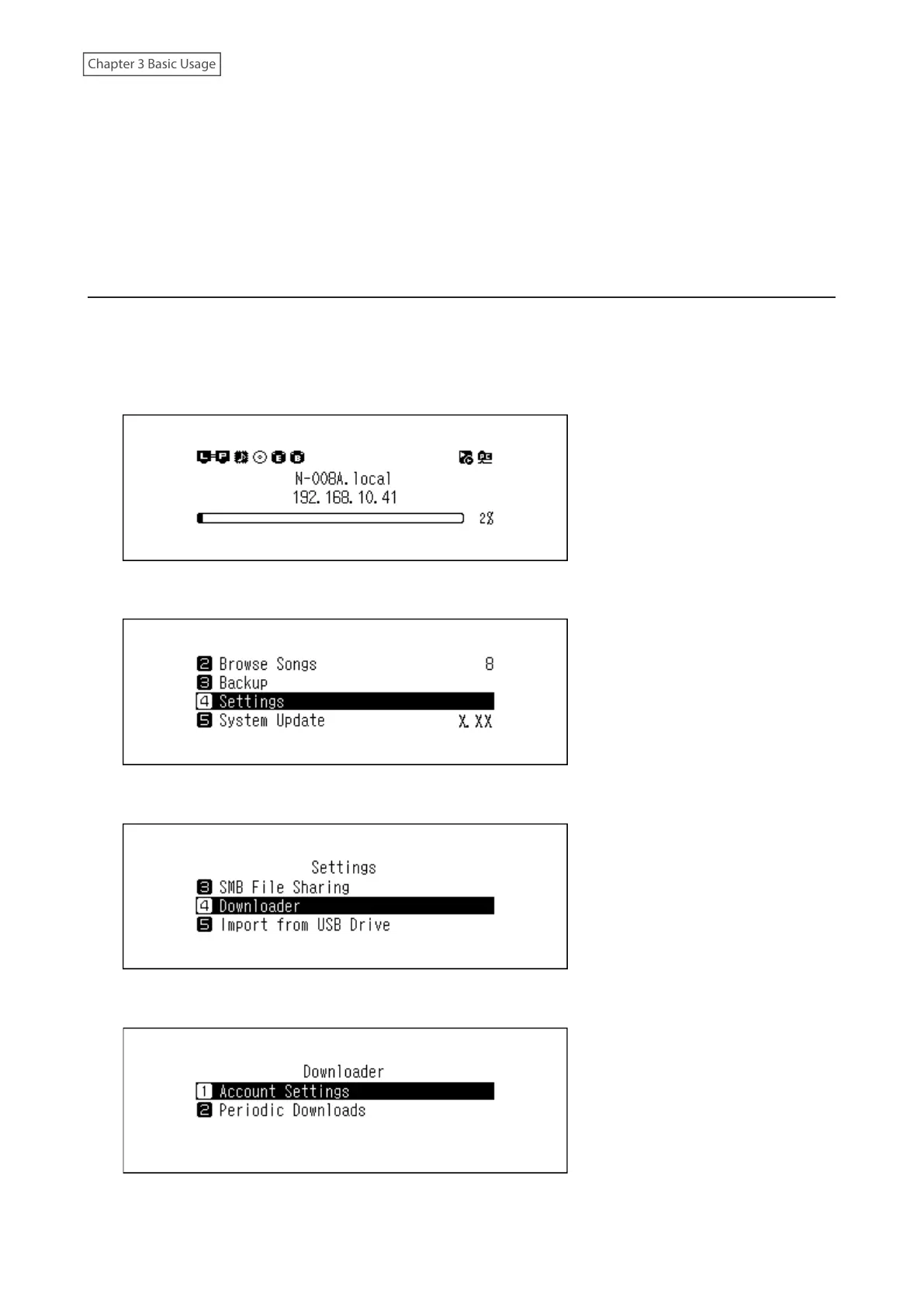
To add an account from a streaming site to the Digital Music Library, follow the procedure below.
1 Create an account on the streaming site.
2 Press the Menu/Enter button to display the menu list at the home screen.
3 Press the Up/Down buttons and select “Settings”, then press the Menu/Enter button.
4 Press the Up/Down buttons and select “Downloader”, then press the Menu/Enter button.
5 Press the Up/Down buttons and select “Account Settings”, then press the Menu/Enter button.
25



 To Next Page