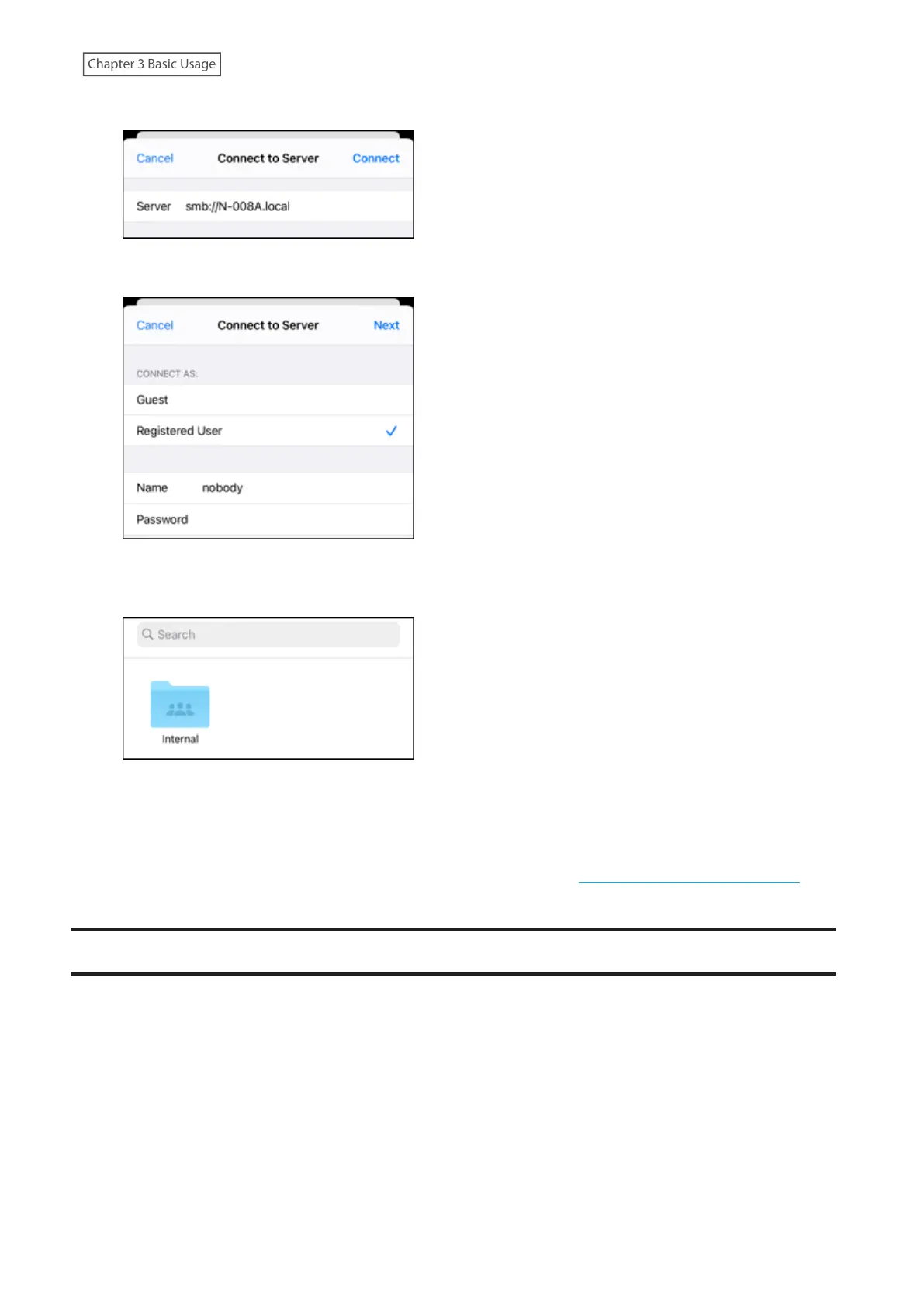
3 Enter “smb://” and the Digital Music Library’s IP address or friendly name, then tap Connect.
4 Enter “nobody” for both the username and password, then tap Next.
5 The shared folders on the Digital Music Library will be displayed. Tap the “Internal” folder. If no folders are
displayed, wait for about 30 seconds and try it from step 2 again.
Note: Even when you close the shared folder, from the next time on you can open it from “Browse”.
Using Computers
To confirm imported music files using a computer, follow steps 1–3 from the “Importing Files from a Computer”
section above to open the shared folder. If the imported files are displayed, importing was finished properly.
Downloading Music Files from Streaming Sites
Downloader can download music files from streaming sites automatically. Once you purchase the music files from a
mobile device or computer, the Digital Music Library can download the files from the streaming site, even if you’re
not at home.
Supported streaming sites are listed below:
• HIGHRESAUDIO
• Qobuz
• OTOTOY
*
• e-onkyo music
*
• mora
*
*These streaming sites are available only in Japan. “e-onkyo music” is not the same as “Onkyo Music”, which is no
longer in service.
24



 To Next Page