SECTION 6
DISASSEMBLY AND ASSEMBLY
119
Replacing Paper Path Motor or Drive Belt
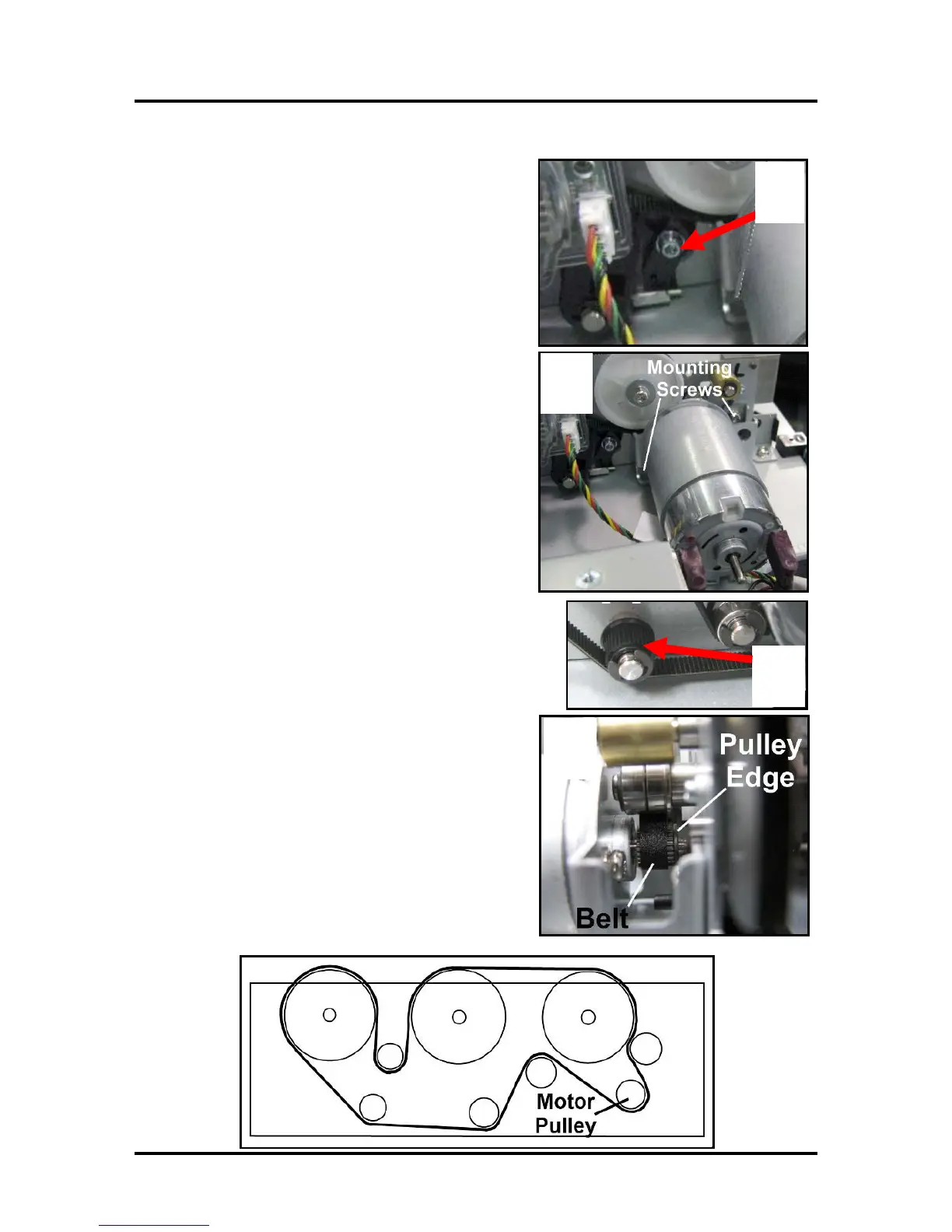
1. Loosen (do not remove) the screw that secures the
Belt Tensioner [A]. Pivot the Belt Tensioner
“clockwise”, to release the belt tension. While
holding it in this position, secure the screw.
2. Remove (2) screws that attach the Motor Assembly
[B] to the lower Print Engine Clamshell. Pull the
Motor straight out so the Motor Pulley clears the
drive belt.
NOTE: If replacing the Motor, unplug the two
wire connectors from the motor.
3. If replacing the drive belt on a Z3/Z4/MR Print
Engine (with enclosed encoder), follow the steps
on the previous page for removing the Encoder
Cover (steps A-C only). See “Replacing Encoder or
Encoder Sensor", “Printers with Z3/Z4/MR Print
Engines”.
Then remove the drive belt.
Tip: This would be a good opportunity to remove each
of the black plastic idlers [C]; to clean and lubricate
their inner hubs and shafts. Inspect and replace worn
idlers.
4. Install the drive belt and/or Motor in reverse order.
NOTE: Make sure that the belt stays inside the
raised edges of the motor pulley and roller studs
[D].
5. Loosen (do not remove) the screw that secures the
Belt Tensioner. Allow the Belt Tensioner to rotate
“counter-clockwise”, by itself. Spin the transport to
center the belt. Then tighten the screw to secure the
Belt Tensioner’s position.
Belt Routing Diagram



 To Next Page