APPENDICES
175
REMOVE THE SERVICE STATION
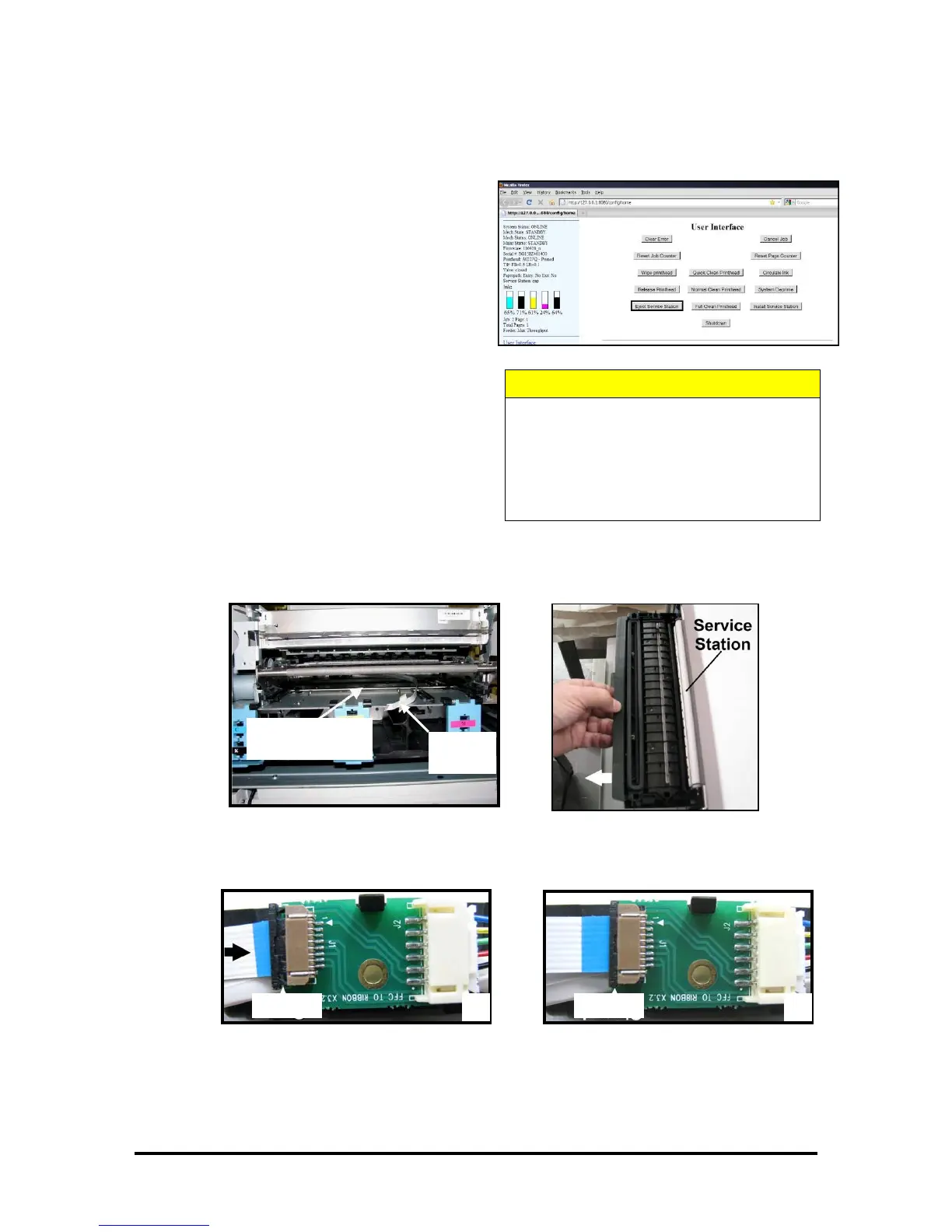
1. Using the M Series Toolbox, Eject the
Service Station.
Press the Eject Service Station button
located in the User Interface window.
2. Once the printer has ejected the Service
Station; Power-down the printer using
the ON/OFF button. Then Switch the
Main Power Switch Off.
3. Carefully slide the Service Station out
of the Service Station Slot.
CAUTION: The Ribbon Cable is still connected to the Service Station. Do not pull the
Station too far out or you will damage the cable or connections.
4. Disconnect the Ribbon Cable. Slide the Latch open on the Service Station Circuit Board to
release the Ribbon Cable.
CAUTION
WHENEVER POWERING DOWN UNIT, ALWAYS:
1. PRESS THE POWER BUTTON ON THE
CONTROL PANEL.
2. WAIT FOR THE PRINTER TO STOP
PROCESSING.
3. THEN PRESS THE MAIN POWER SWITCH
ON THE REAR PANEL.
Cable
Slot


 To Next Page