SECTION 6
MAINTENANCE
163
Lubricating the Service Station Friction Points
Friction points on the Service Station should be lubricated to ensure optimum performance and reduce
wear. This maintenance should be performed when installing a new Service Station or as needed.
Use a plastic-safe synthetic grease or lubricant (Super Lube 21030 or equivalent).
DO NOT USE PETROLEUM-BASED LUBRICANT/GREASE.
DO NOT ALLOW LUBRICATION TO MAKE CONTACT WITH THE
ELECTRONICS (Boards, Sensors, Printhead) or SERVICE STATION
COMPONENTS (Cap, Wiper Roller).
WE DO NOT
SUGGEST THE USE OF SPRAY LUBRICATNTS.
A safer way to lubricate is to use a small paint brush and grease.
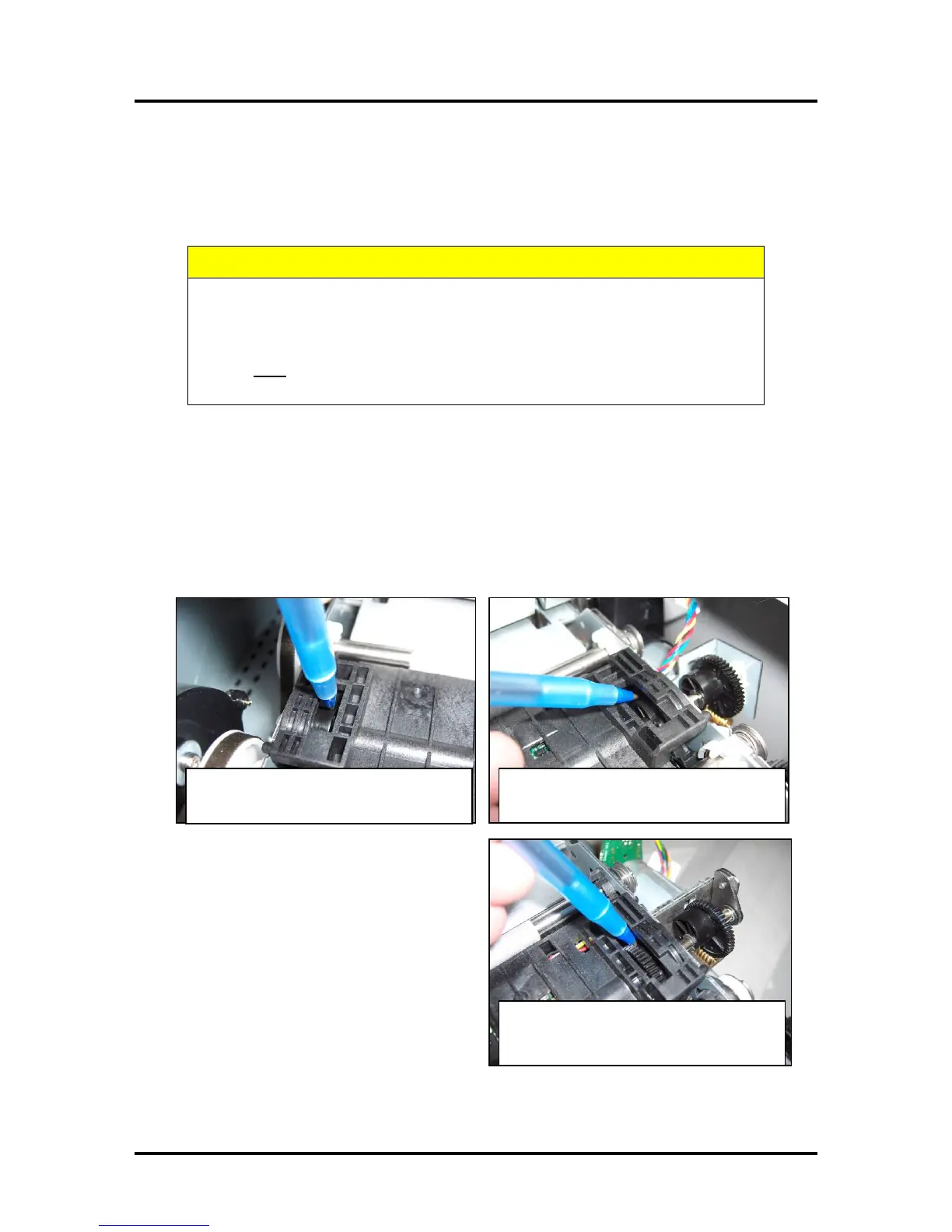
Lubricate Lifting Arm Cams
1. Open the Print Engine Clamshell by releasing and lifting the two locking levers.
2. Apply lubricant to the Lifting Arm Cam through the opening as shown. (1 on each side).
CAUTION: Be very careful not to get any lubricant on the cup-shaped Flag for the Lift Arm
Sensor. This cup-shaped Flag is attached to the left side of the Lift Arm Cam (operator side).
Lifting Arm Cam, Z3/Z4/MR Engine
(non-operator side)
Lifting Arm Cam, Z2i Engine
Cam is to the right of the gear.
(operator side)



 To Next Page