SECTION 5
MEASUREMENTS & ADJUSTMENTS
39
SECTION 5 – Measurements and Adjustments
CAUTION
ALWAYS WEAR A WRIST STRAP THAT IS GROUNDED WHEN
TOUCHING ELECTRONIC DEVICES.
Drive Belt Tension Adjustment
REQUIREMENT:
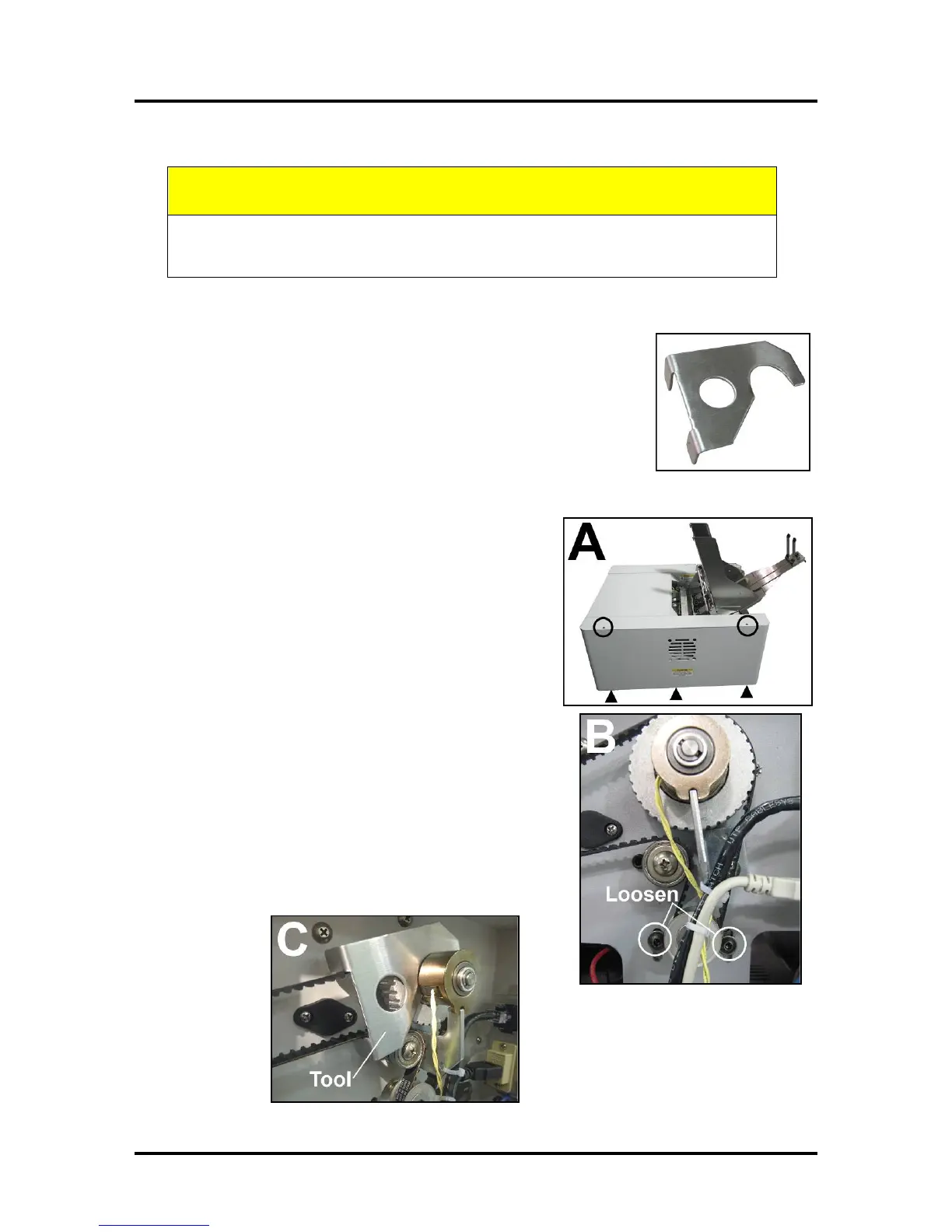
To ensure the Drive Belt has the proper tension, use the 42-101-33T Belt
Tension Tool to properly adjust Motor Belt Drive tension without guesswork.
ADJUST BELT TENSION:
[A] Unplug the Printer. Remove the right-hand Side Cover
(5 screws).
[B] Loosen the two screws that mount the Main Drive Motor
to the Frame.
[C] Install the Tool so the two ears fit around the outer edges
of the Drive Belt. Then fit the other end into the gap between
the Clutch Assembly and Belt Pulley.
[D] Reach inside the Frame to hold the Motor in place and
retighten the Motor mounting screws.
[E] REMOVE the Belt Tension Adjustment Tool.
[F] Reinstall the right-hand Side Cover.



 To Next Page