SECTION 6
MAINTENANCE
136
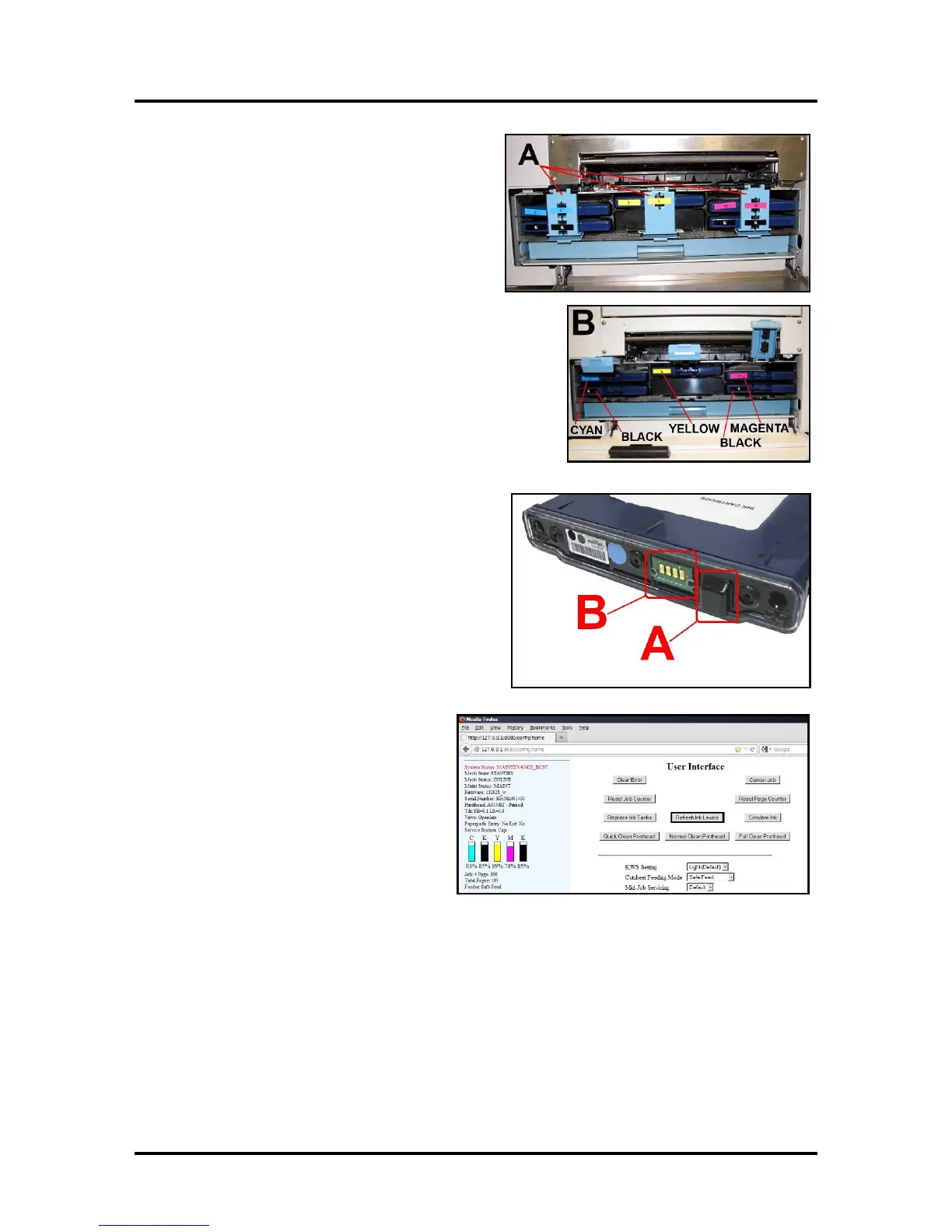
2. Open the Ink Tank Door, release the Ink Tank
Latch(es) [A] needed and remove the Ink
Tank(s) [B] that did not refresh.
3. Clean the Ink Level Prism [A] and QA Chip
contacts [B] with a clean, dry, lint-free cloth.
NOTE: You can dampen the cloth with
distilled water to wipe the Prism, but
DO NOT get the QA Chip contacts wet.
4. Reinstall the Ink Tank(s) (labels up),
latch the Ink Tank Latch(es) and click
“Continue” on the Confirm screen,
then “Refresh Ink Levels” on the
User Interface screen.
5. Close the Ink Tank Door.
Storage
New Ink Tanks should be stored in their original packaging and kept away from heat.
Opened Ink Tanks should remain in the Printer.
Nominal Ink expiration date: 24 months following date of manufacture (ink fill date).
Disposal
The Ink Tank may be disposed of in a normal manner.
Clean up spills with soap and water. Abrasive soap is effective in cleaning ink off your hands.



 To Next Page