Operation and Control
28 D53182 02/2024
11 Turn control for setpoint adjustment 12 Confirmation key (applies setting made with the turn
control)
13 Activation key for adjustment of interior lighting
(additional option)
14 Interior lighting display (additional option)
15 Appliance state and programme display 16 Activation key for the appliance state
17 Activation key for adjustment of temperature
monitoring
18 Temperature monitoring display
19 Graphic representation 20 Activation key for graphic representation
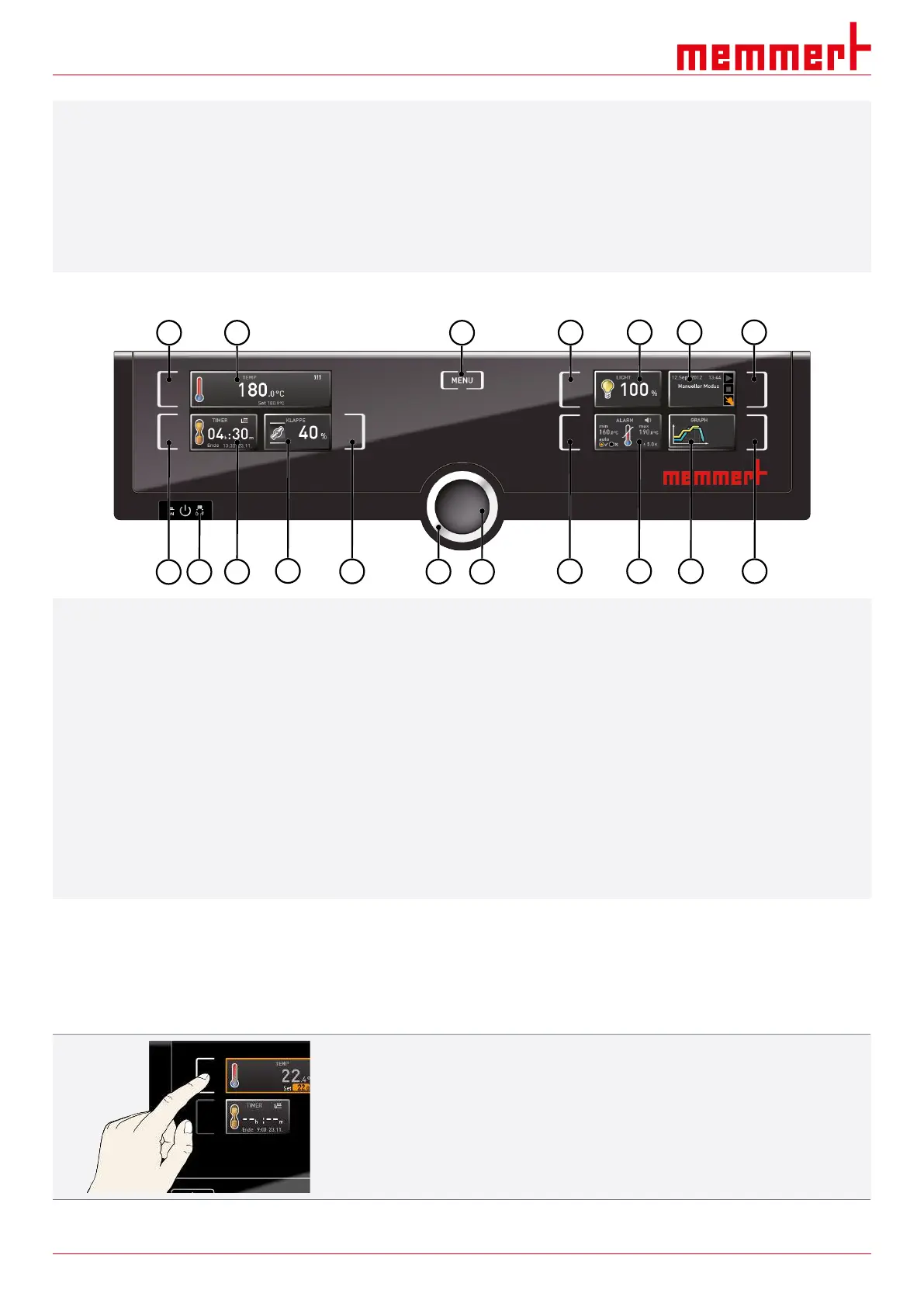
ControlCOCKPIT of UN appliances in operating mode:
1 2
3
4
5
6
7
8
9
10
11
12 13 14
15 16
17 18
1 Activation key for temperature setpoint input 2 Setpoint and actual temperature display
3 Switch to menu mode 4 Activation key for digital backwards counter with target
time setting, adjustable from 1 minute to 99 days
5 Main switch 6 Display of digital backwards counter with target time
setting, adjustable from 1 minute to 99 days
7 Air flap position display 8 Activation key for air flap position adjustment
9 Turn control for setpoint adjustment 10 Confirmation key (applies setting made with the turn
control)
11 Activation key for adjustment of interior lighting
(additional option)
12 Interior lighting display (additional option)
13 Appliance state and programme display 14 Activation key for the appliance state
15 Activation key for adjustment of temperature
monitoring
16 Temperature monitoring display
17 Graphic representation 18 Activation key for graphic representation
6.4.2 Basic Operation
In general, all settings are made as follows:
Activate the desired parameter (e.g. temperature):
1. To do so, press the activation key to the left or right of the respective display.
ð The activated display is outlined in colour, the other displays are dimmed.
ð The setpoint value (Set) is highlighted in colour.



 To Next Page