Menu Mode
42 D53182 02/2024
8. Menu Mode
In menu mode, you can make basic settings, load programmes and export protocols, as
well as adjust the appliance.
i
Before changing the menu settings, read the description of the respective functions on
the following pages to avoid possible damage to the appliance and/or chamber load.
▶ To enter Menu mode, press the MENU key.
ð The appliance then returns to operating mode. Only changes applied by pressing the
confirmation key are saved.
ð To exit the menu mode at any time, press the MENU key again.
8.1 Overview
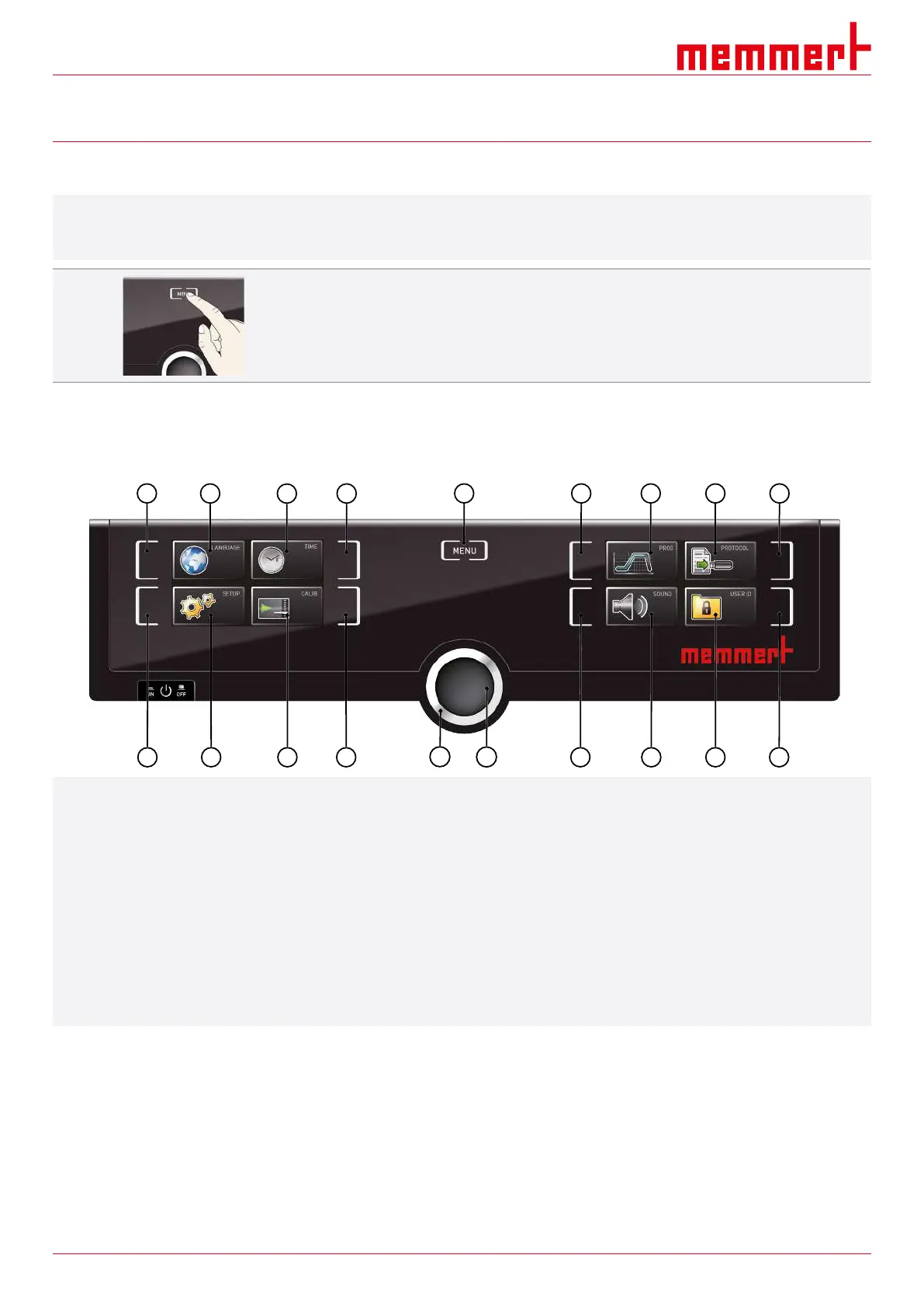
Press the MENU key to toggle between displays in Menu mode:
1
2
3
4
5
6
7 8
9
10
11
12 13
14
15
16 17
18
19
1 Language selection activation key 2 Language selection display
3 Date and time display 4 Date and time setting activation key
5 Exit menu mode and return to the operating mode 6 Setup activation key (basic appliance settings)
7 Setup display (basic appliance settings) 8 Adjustment display
9 Adjustment activation key 10 Turn control for adjustment
11 Confirmation key (applies setting made with the turn
control)
12 Programme setup activation key
13 Programme setup display 14 Protocol display
15 Protocol activation key 16 Acoustic signal adjustment activation key
17 Acoustic signal adjustment display 18 User ID display
19 User ID display activation key
8.2 Basic Operation in Menu Mode Using the Example of Language Selection
In general, all settings in Menu mode are made in the same way as operating mode:
Activate the respective display, use the turn control for setting and press the confirmation
key to apply the change.
A more detailed description of what you need to do is provided below, using the example
of language selection. All other settings can be made accordingly. The possible settings
are described below.



 To Next Page