76
Procedure:
1. In order to connect your DAW playback to Anubis you must first have a Source available to
host your DAW Playout Stream 1-2 (if stereo)
Note: Ex-factory Anubis comes with a DAW 1-2 Source. If this one is not available in the Sources page,
create it, refer to the Settings>Sources manual section.
2. Launch your DAW making sure it is loading Merging’s Driver (or MassCore for Pyramix users)
and then open ANEMAN.
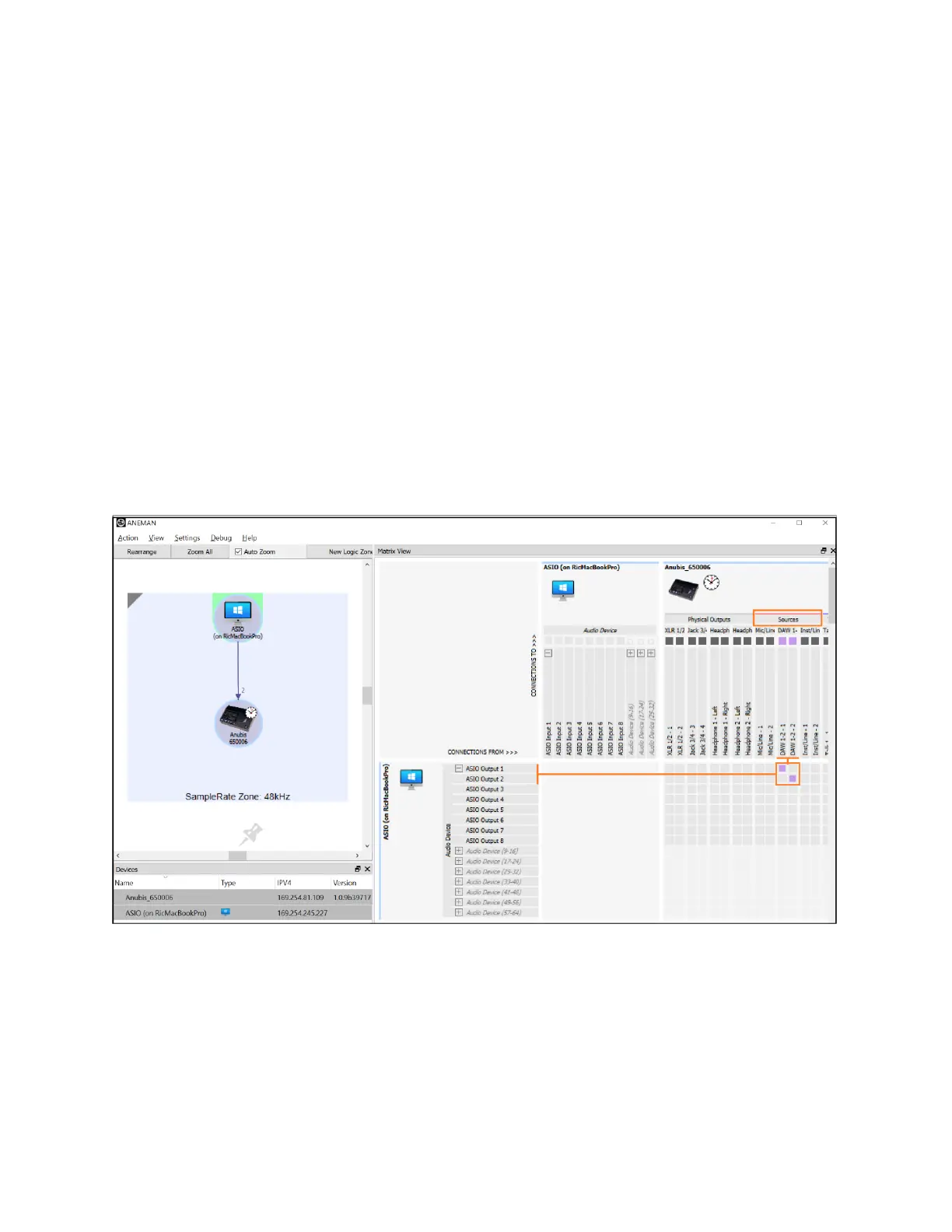
3. Within ANEMAN connect the RAVENNA ASIO Driver Output 1-2 (or VAD Outs 1-2) to the DAW
Source 1-2. Users can choose and apply either a Multicast or a Unicast connection.
Unicast: from one source to one destination i.e. One-to-One
Multicast: from one source to multiple destinations stating an interest in receiving the traffic i.e.
One-to-Many
ANEMAN DAW 1-2 Source connection
(Open the Matrix view and select both Anubis and the Driver to establish a connection)
Note: If the connection is not successful, make sure that both your Anubis and Driver are at the Same
Sampling Rate and Latency Frame mode (e.g. AES67-48 samples).
Mac OS users will only see the connections properly established once the DAW playback is engaged.
4. Patch your Monitor Set. Ex- Factory Speaker Sets: A, B, and Headphones 1, 2 should already be
patched to their respective physical outputs. This can be verified and changed if desired under
the Settings>Monitors Patch section.



 To Next Page