Metor 6M PAGE 23
Installation and Operating Manual
92102916 REV 5 6. ASSEMBLY
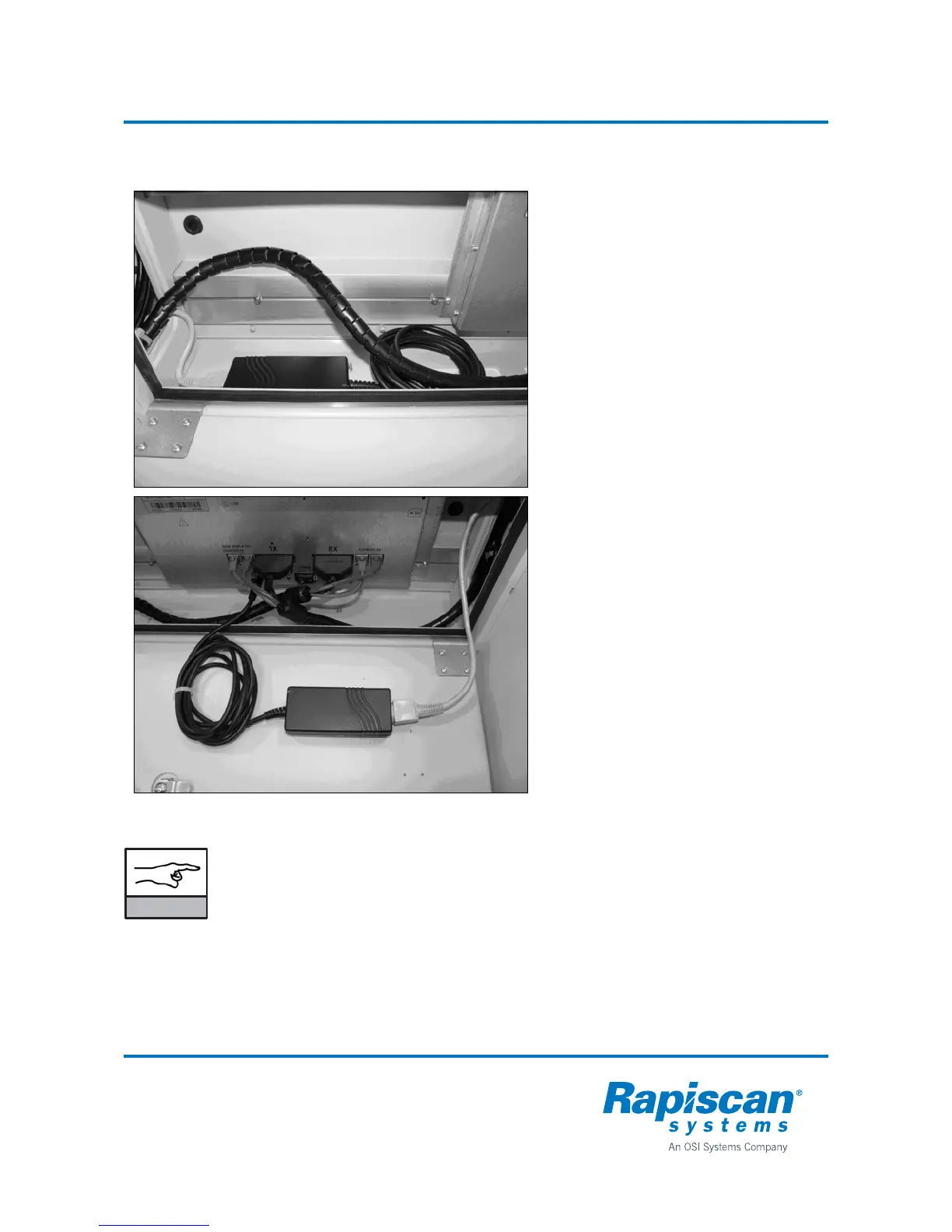
Installation of the power supply inside the cross piece
Should it be necessary to put the power
supply inside the cross piece do as
follows:
• Using a draw thread pull an AC cable
through the TX panel cable channel.
• Your AC cable must be at least 2.5 m
long.
• If you are using an extension cable
with male appliance connector at the
other end, it is also possible to push
the cable into the cable channel from
the top.
• When you remove the hat of the
panel you will be able to see into the
cable channel.
• Place the power supply for example
to the side of the cross piece.
• Power supply must be placed next to
the TX panel to prevent interference.
• You can secure the supply using two-
sided tape or Velcro tape.
• Secure the AC cable to the DC cable
and coil cable harness with a cable
tie.
• If there is not sufficient space on the
side you can also attach the power
supply to the hatch using two-sided
tape or Velcro tape.
NOTICE
You must not place the power supply inside the cross piece when using the unit at
temperatures exceeding +50 °C (+122 °F) to prevent overheating.



 To Next Page