MI 3290 Earth Analyser Memory Organizer
47
9.1.4.2 Operations on Structure items
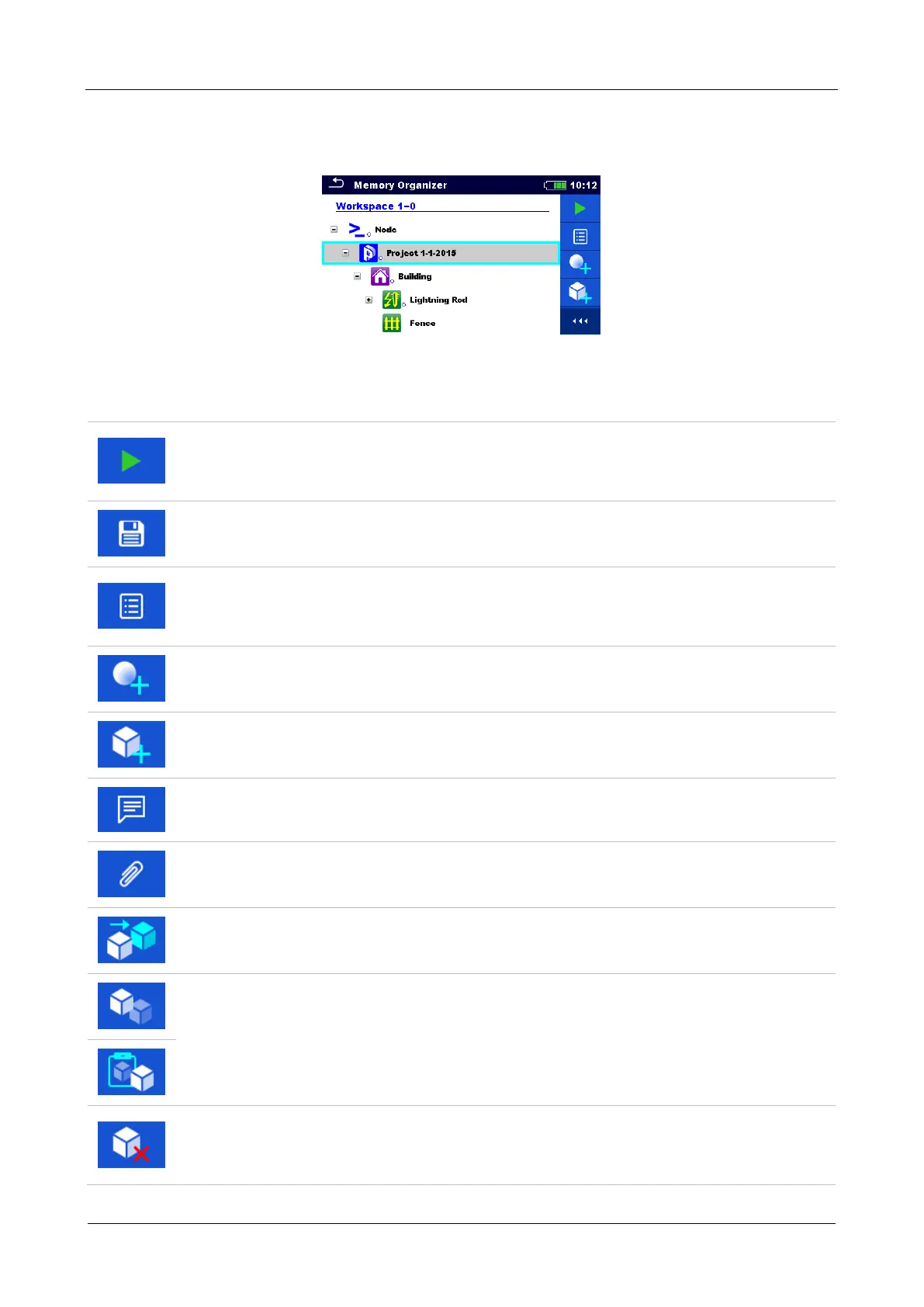
The structure item must be selected first.
Figure 9.4: A structure project is selected in the Tree menu
Options
Starts a new measurement.
Type of measurement (Single test or Auto Sequence®) should be selected first. After
proper type is selected, the instrument goes to Single Test or Auto Sequence®
selection screen. Refer to chapters 10.1 Selection modes.
Saves a measurement.
Saving of measurement under the selected Structure project.
View / edit parameters and attachments.
Parameters and attachments of the Structure items can be viewed or edited.
Refer to chapter 9.1.4.3 View / Edit parameters and attachments of a Structure
for more information.
Adds a new measurement.
The instrument goes to the menu for adding measurement into structure. Refer to
chapter 9.1.4.5 Add a new measurement for more information.
Adds a new Structure item.
A new Structure item can be added. Refer to chapter 9.1.4.4 Add a new Structure
item for more information.
Comments.
Comment is displayed.
Attachments.
Name and link of attachment is displayed.
Clones a Structure.
Selected Structure can be copied to same level in structure tree (clone). Refer to
chapter 9.1.4.6 Clone a Structure item for more information.
Copies & Paste a Structure.
Selected Structure can be copied and pasted to any allowed location in structure
tree. Multiple “Paste” is allowed. Refer to chapter 9.1.4.8 Copy & Paste a Structure
item for more information.
Deletes a Structure item.
Selected Structure item and sub-items can be deleted. User is asked for confirmation
before the deleting. Refer to chapter 9.1.4.11 Delete a Structure item for more
information.














 To Next Page