Witty User Manual - EN - v1.5 P. 142 / 171
5.2 RESULTS
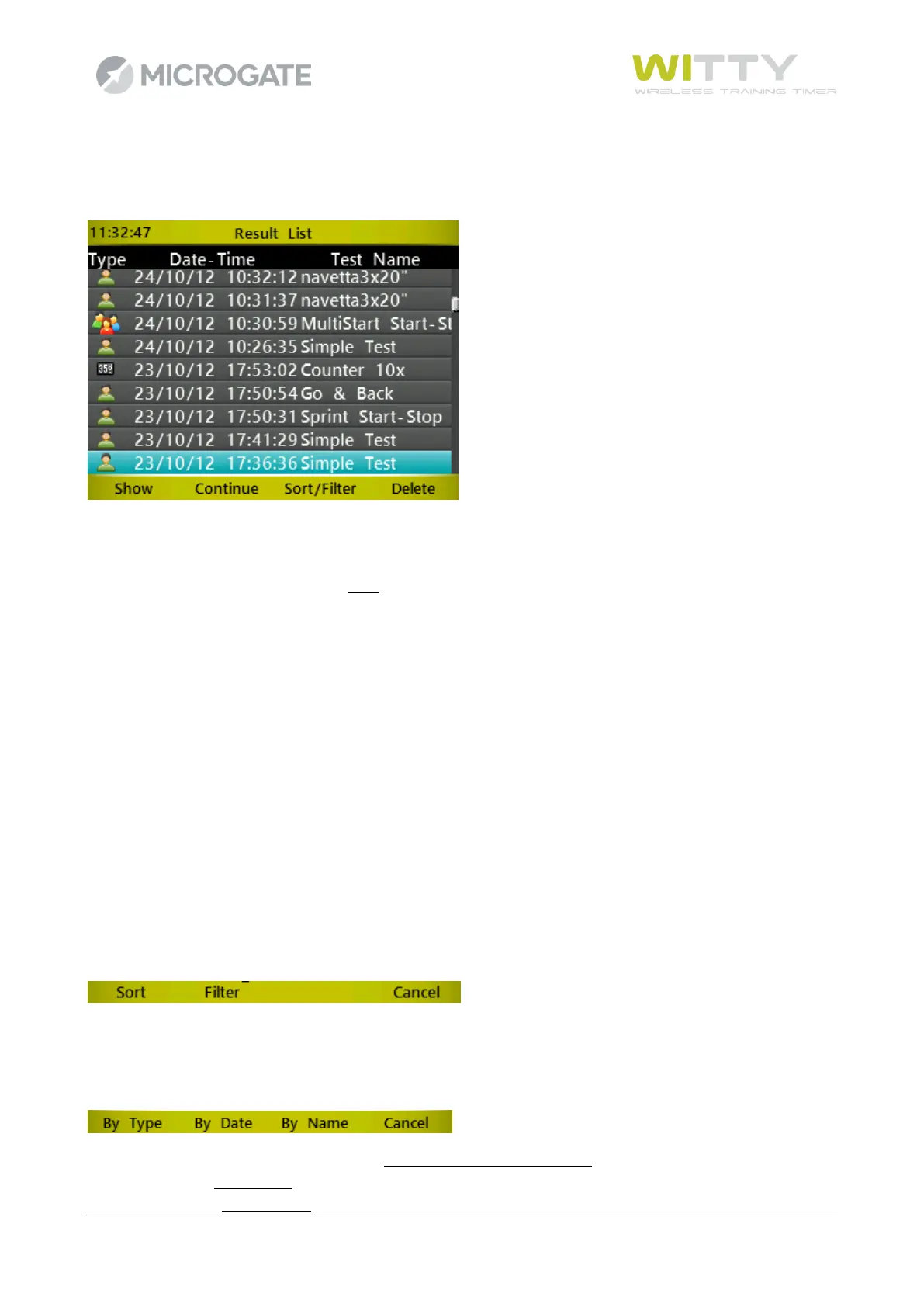
This function allows to show the results of the tests carried out or to continue an interrupted trial.
The data table displays 3 columns with the following:
• the test type (Basic, MultiStart, Counter)
• the date and time of the test start
• the test name (predefined or customized basic test)
Possible Options are:
5.2.1 SHOW
By selecting a test with the <up> or <down> arrow keys and pressing <F1>Show (or <OK>) you access the trial
ranking. The available Options in the ranking are similar to those in the previous chapters.
5.2.2 CONTINUE
Access the timing screen of the selected test and continue the test from the last athlete ready to start (bib
n+1, or the one selected from a start list, or the first athlete with trial number increased by 1).
5.2.3 SORT/FILTER
Select this option to access one of the two sub-options ( <F1>Sort, <F2>Filter); press <F4> to go back to the
previous menu.
5.2.3.1 SORT
By selecting one of the three Options (<F1>By Type, <F2> By Date, <F3>By Name) the result list is sorted by
the selected column.
Sorting by Type the order is the following: Basic, MultiStart, and Counter.
By Date sorting is descending (most recent tests are at the top of the list).
By Name sorting is alphabetical.



 To Next Page