Witty User Manual - EN - v1.5 P. 42 / 171
4.1.1.1 ENABLING·WITTY·SEM AS THE STARTING TRAFFIC LIGHT
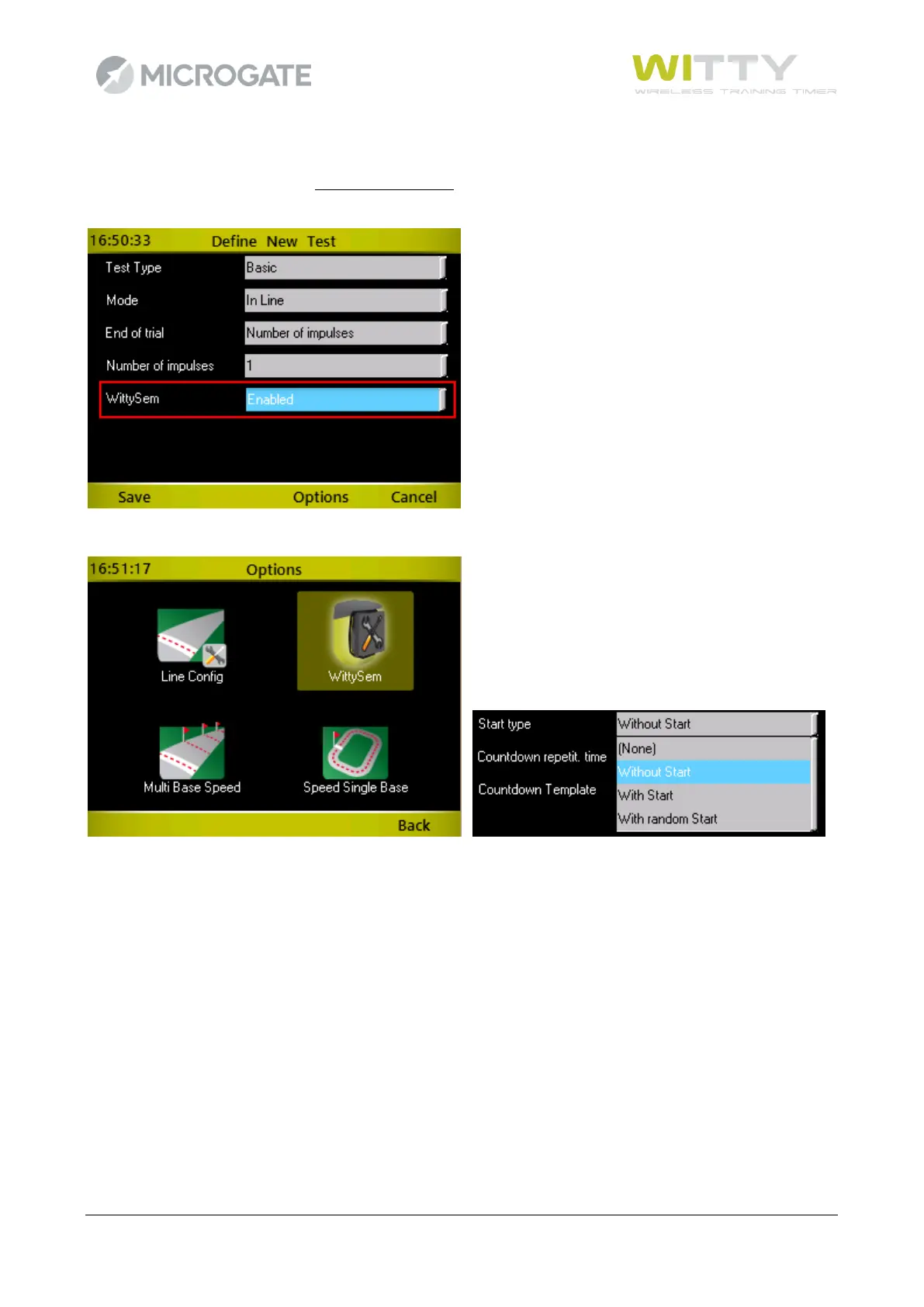
The last parameter that is found in every type of test is the possibility to use the Witty·SEM as a starting
traffic light with a predefined countdown that shows athletes when they can start.
Once this selection has been enabled, press <F3> Options and then select the Witty·SEM Options icon
The next screen is used to select the following parameters:
“Type of start” it can be defined as:
Without start Witty·SEM displays every "n" minutes:seconds (defined with the “Countdown
repetition timer” parameter) the sequence of the selected countdown.
With start Like above, but a radio START impulse is generated at the end of the countdown and
the timer starts to time the current athlete.
With random start Like above, but the start impulse is not generated immediately after the countdown,
but after a random period of time that does not exceed the “Random time” parameter
The second parameter “Countdown repetition time” (mm:ss) indicates how often the cycle is repeated,
whereas “Countdown Template” makes it possible to select one of the 3 predefined types of countdowns
(3, 5, 10 seconds). In the case of “Start type” or “With random start” it is possible to indicate within what
period of time the start is generated (“Random time”)



 To Next Page