LVS-95XX Series Barcode Quality Station Operations Manual
LVS-95XX Series Barcode Quality Station Operations Manual - English Page 55 of 94
6. Blemish (Non-ISO Parameter)
A blemish error is defined as any mark or artifact that destroys the decode on any part of the barcode
symbol.
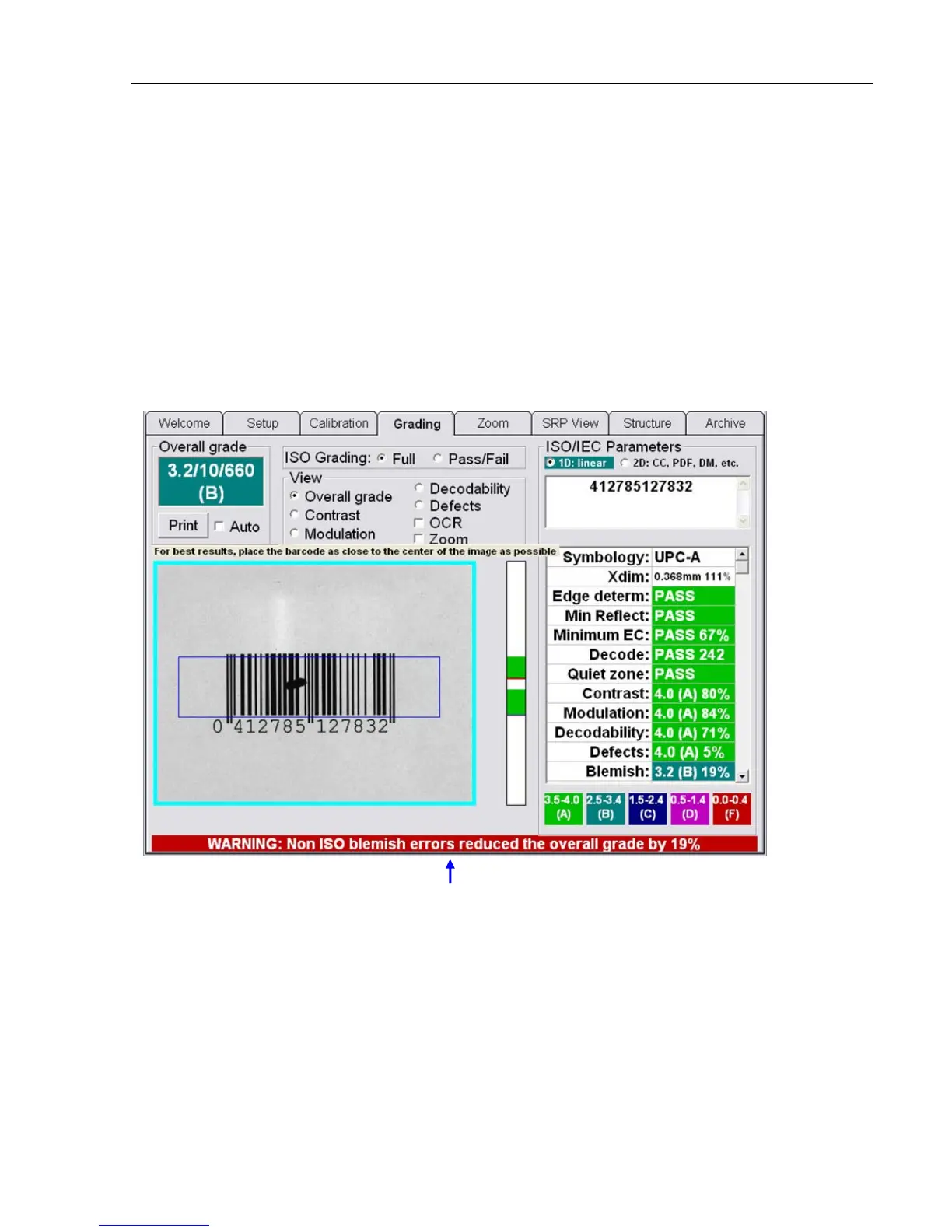
Within the ISO/IEC parameters box, there is a Blemish measurement. Although a blemish error is not
considered to be a part of the ISO standards, it is an extremely useful tool when troubleshooting printing
problems. The Blemish parameter is not figured into the Overall grade unless the Allow non-ISO blemish to
affect grade feature is checked on the Setup Tab screen.
A Blemish is also a measurement of bar height consistency. Be sure to position the blue box so that it
represents the actual height of the barcode image.
A blemish can only be measured where there are decodable lines above and below the offending mark.
Screenshot with the Allow non-ISO blemish to affect grade feature checked:
Warning message that appears when the Allow non-ISO
blemish to affect grade feature is checked.



 To Next Page