LVS-95XX Series Barcode Quality Station Operations Manual
LVS-95XX Series Barcode Quality Station Operations Manual - English Page 86 of 94
Recent Reports (Last 30 Days)
You can recall any report from the archive. When you do, the data is the same as it was when the report was
generated with the exception of the current date/time being attached on the bottom of the report.
For reports older than 30 days, you must enter the proper software commands using SQL language into the
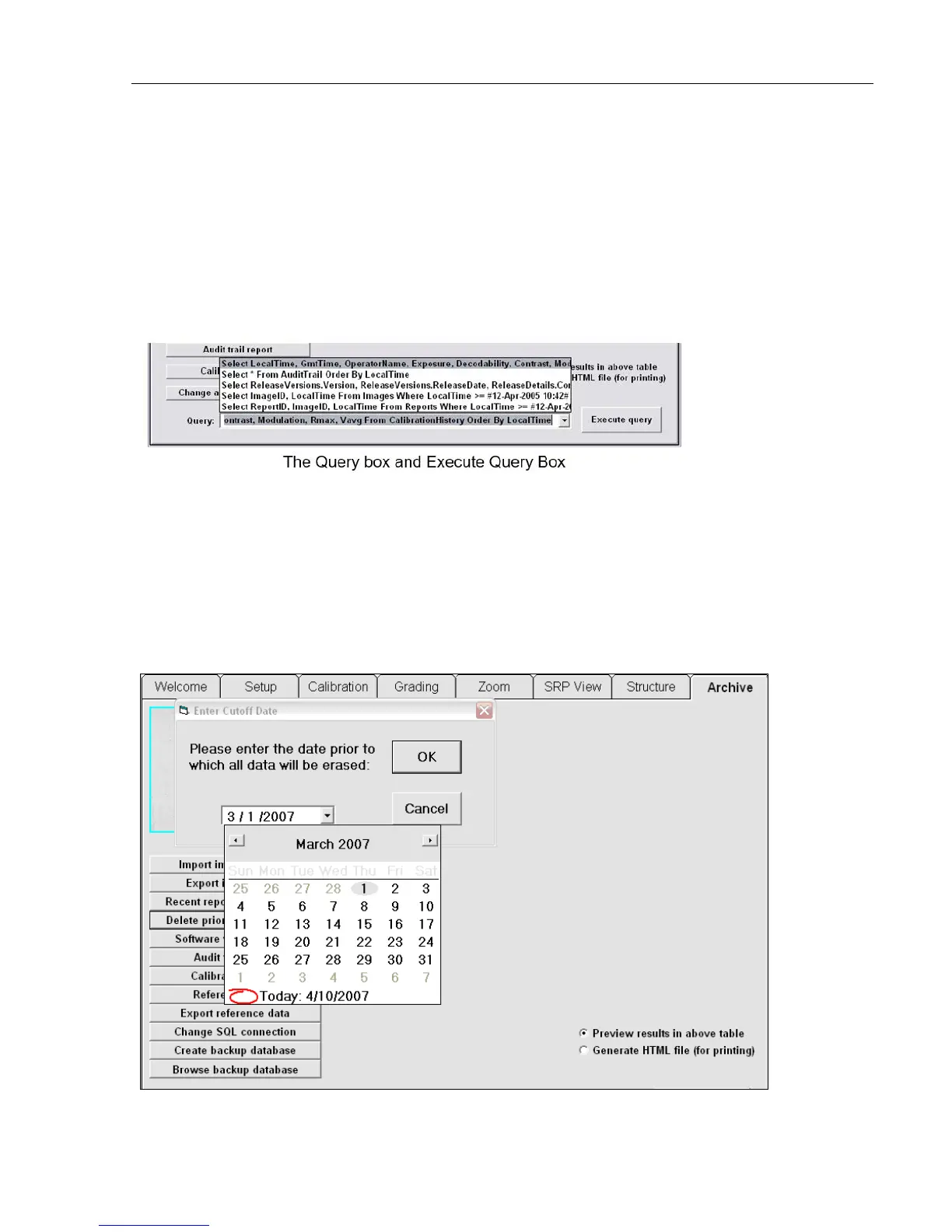
“Query” box. For those who may not be accustomed to SQL commands, the software has made it easy to
use. For instance, by choosing “Recent Reports” the Query box might contain the following command:
Select ReportsID.ImageID.LocalTime From Reports Where
LocalTime>=#23-Apr-2005 11:25# Order By ReportID
Use this same command but change the “23-Apr-2005” date to a desired period of time. Then press the
Execute query button. The software remembers the original command string as well as the modified
command string. All of the different files and reports can be altered in the same manner.
Delete Prior to Specific Date
Click the “Delete Prior to Specific Date” button to delete old files. Use the calendar feature to select the
desired date prior to which all data will be deleted, and then click the OK button.
The date will display according to your Regional settings.



 To Next Page