Home
Microtek
Measuring Instruments
NDT-2000
Page 52
Microtek NDT-2000 - Page 52
69 pages
Manual
Save Page as PDF
To Next Page
To Next Page
To Previous Page
To Previous Page
Loading...
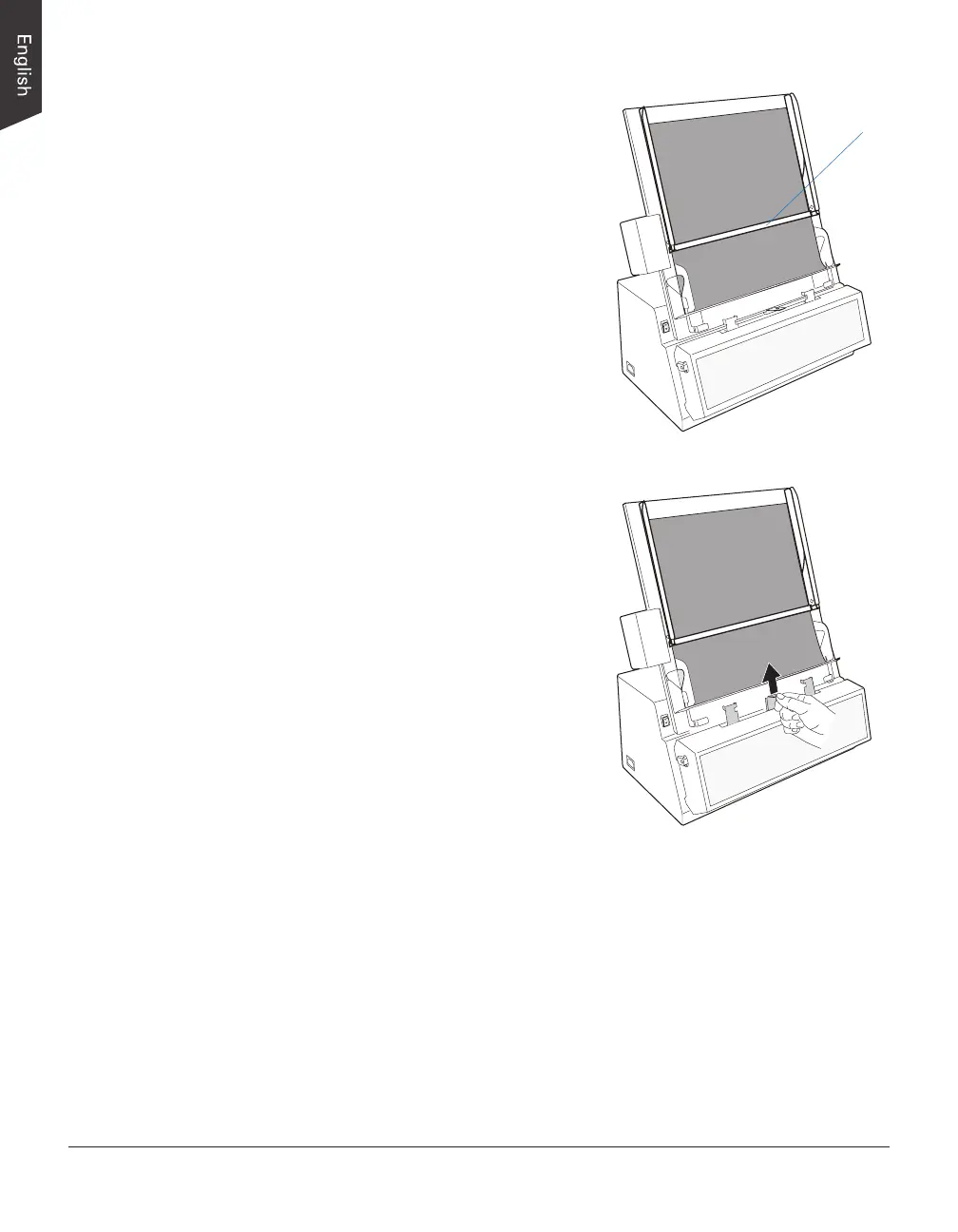
52 NDT-2000 User's Manual
4.
Lower down the Top Bar onto the lms
so the lms are sandwiched between
the Top Bar and the AFF's tray.
5.
If the width of the lm is large than
10.24” (26 cm), pull the Light Shied up,
otherwise pull it down.
Top Bar
51
53
Table of Contents
Main Page
Preface
2
FCC Compliance Statement
3
Safety Precautions
5
Table of Contents
7
Knowing about Your Film Digitizer
9
Features of the NDT-2000
9
System Requirements
10
Unpacking Your Film Digitizer
11
Looking for Damage
11
Unpacking Package Contents
11
Package Contents
14
How to Repack Your Film Digitizer for Shipping
16
Taking a Closer Look
18
Front / Top / Bottom View
18
Rear / Side View
19
Assembling Your Film Digitizer
20
Installing the Feed Tray
20
Installing the Output Tray
21
Output Basket
22
Installing Your Film Digitizer
23
Installing the Software
23
Connecting the Film Digitizer
24
To the Power Cord
24
To the Hi-Speed USB Cable
24
Using Light Shield to Digitize Industrial X-Ray Films
26
Attaching Light Shield into Guide Arms
26
Positioning Industrial X-Ray Films
27
Scanning Industrial X-Ray Films
28
Using Film Holders to Digitize Industrial X-Ray Films
31
Positioning Your Industrial X-Ray Films
31
Using the 8.5" X 4.5" Film Holder
31
Using the 12" X 3 1/3" Film Holder
32
Scanning Industrial X-Ray Films
33
Digitizing Industrial X-Ray Films in Other Sizes
34
Positioning Industrial X-Ray Films
34
Scanning Industrial X-Ray Films
36
Digitizing Industrial X-Ray Films Automatically
37
Care and Cleaning
38
Cleaning the Glass and Components on the
38
Cleaning the Glass Surface on the Digitizer
41
Cleaning the Rollers
42
Maintenance
43
Appendix
44
Fixing Film Jams
44
Troubleshooting
45
Optional Auto Film Feeder (AFF)
47
Installing and Connecting the Auto Film Feeder (AFF)
48
Positioning the X-Ray Films
50
Using Output Tray
53
Scanning X-Ray Films by Using the Auto Film Feeder (AFF)
54
Optional Multi-Channel Film Feeder (MFF)
56
Installing the Multi-Channel Film Feeder (MFF)
57
Using the Multi-Channel Film Feeder (MFF)
58
Positioning the X-Ray Films
64
Using the Film-Rolling Rack
65
Using the Output Tray
66
Scanning X-Ray Films by Using the Multi-Channel Film Feeder (MFF)
67
Specifications
69
Other manuals for Microtek NDT-2000
Assemble
2 pages


 To Next Page