EasyManua.ls Logo

Midas PRO1 - GUI Menu Flowchart

Midas PRO1
582 pages
Print Icon
To Next Page IconTo Next Page
To Previous Page IconTo Previous Page
Loading...
294 Chapter 32: GUI Menu
PRO1 Live Audio System
Operator Manual
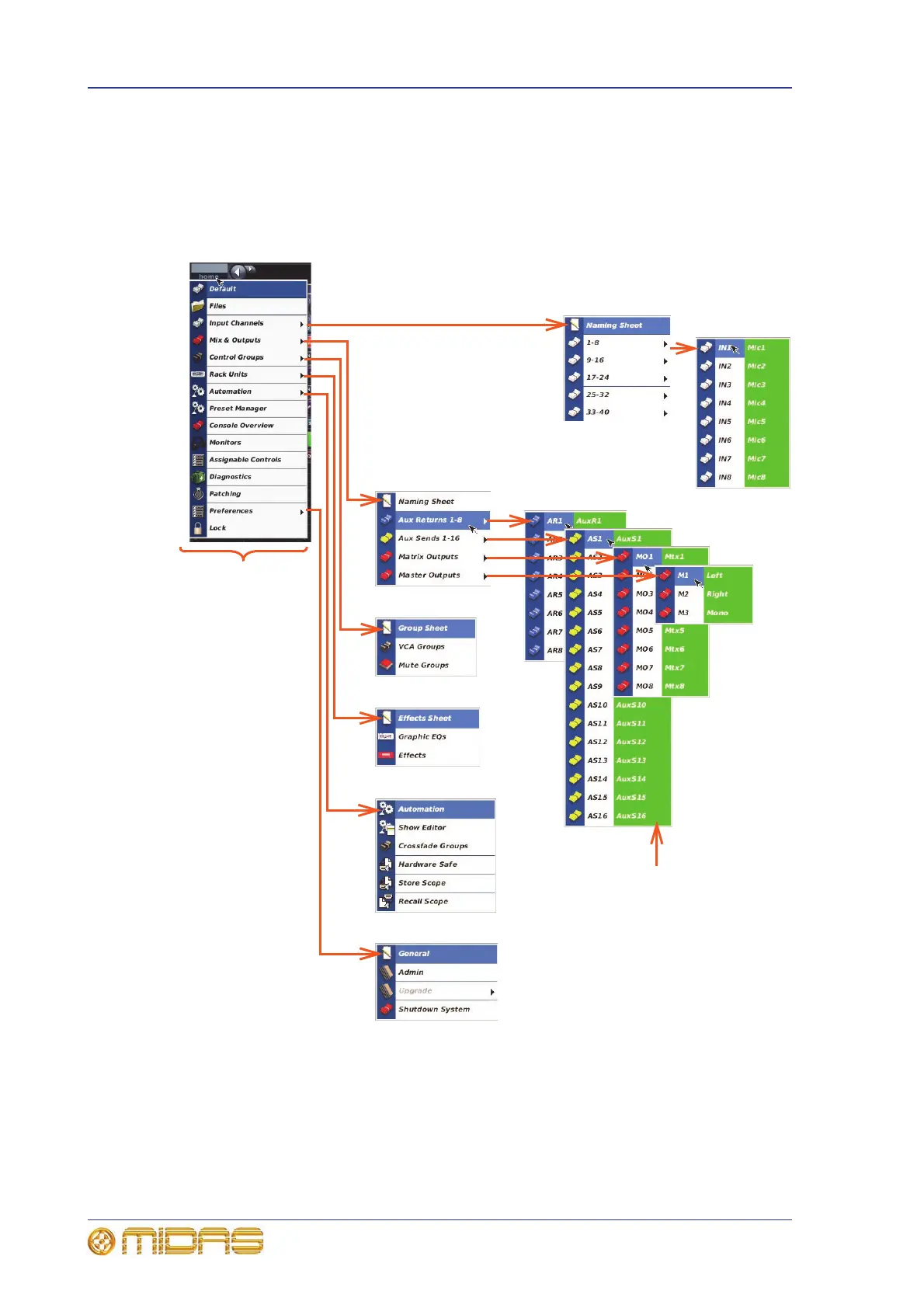
GUI menu flowchart
The GUI menu and all of its available submenus are shown in Figure 28 “GUI menu
flowchart” on page 294.
Icons to the left of the options help to identify the option type and aid navigation. A
black triangle to the right of a menu option shows that it has a submenu.
Figure 28: GUI menu flowchart
Note: Only the
submenu for inputs 1
to 8 is shown right, as
the submenus for the
other inputs (9 to 96)
are similar.
GUI menu
These colours match
the user-configured
colour for the
particular channel/
bus/group. Default
colour is green.

Table of Contents

Other manuals for Midas PRO1