Technical Information
114
G 5xxx
2 Function
2.1 General Operation
2.1.1 Touchtronic/Navitronic Controls
1. Make sure that the spray arms are not blocked.
2. Close the door.
3. Turn on the dishwasher by touching the
control.
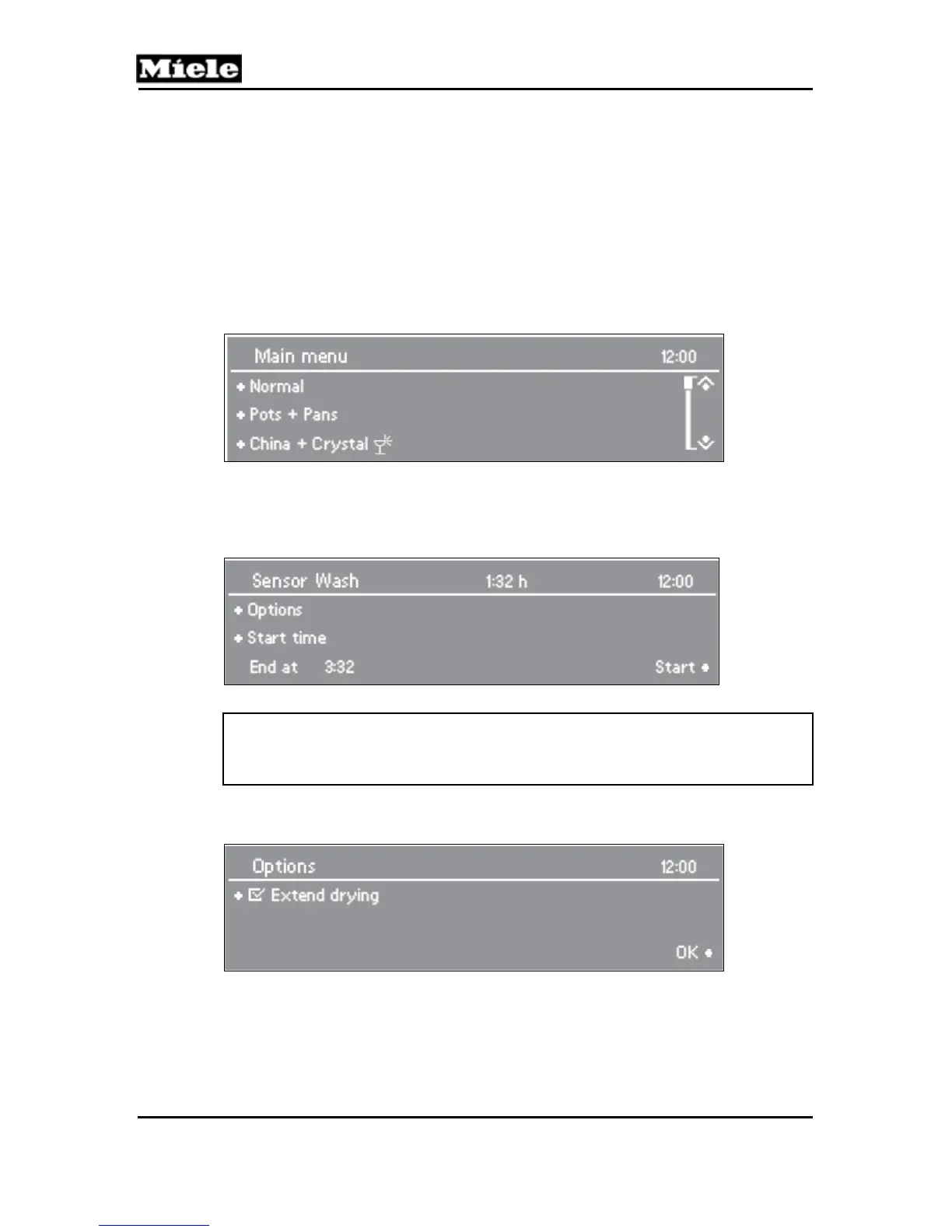
4. The main menu is shown in the display. See Figure 080-1.
5. If the memory function is selected, then the last selected program is displayed.
Figure 080-1: Touchtronic/Navitronic Main Menu
6. Select the desired program according to the type of load and soiling.
7. The display changes to the program menu.
8. Options can be added to the selected program. See Figure 080-2.
Figure 080-2: Selected Program Display
Note:
Information about the selected program can be displayed by touching the i
control.
9. Select the desired options; a √ will appear next to the option selected.
See Figure 080-3.
Figure 080-3: Selected Options
10. When finished customizing the program, confirm with OK.
11. Select Start.



 To Next Page