OM-281426 Page 40
F
Complete Parts List is available at www.MillerWelds.com
6-12. Spoolmate Run-In Speed (Menu 4 Of 12)
A complete Parts List is available at www.MillerWelds.com
OM-281426 Page 28
3-11. Spoolmate 24 Inch Calibration (Menu 3 Of 12)
Ref. 281252A
1
23
4 5
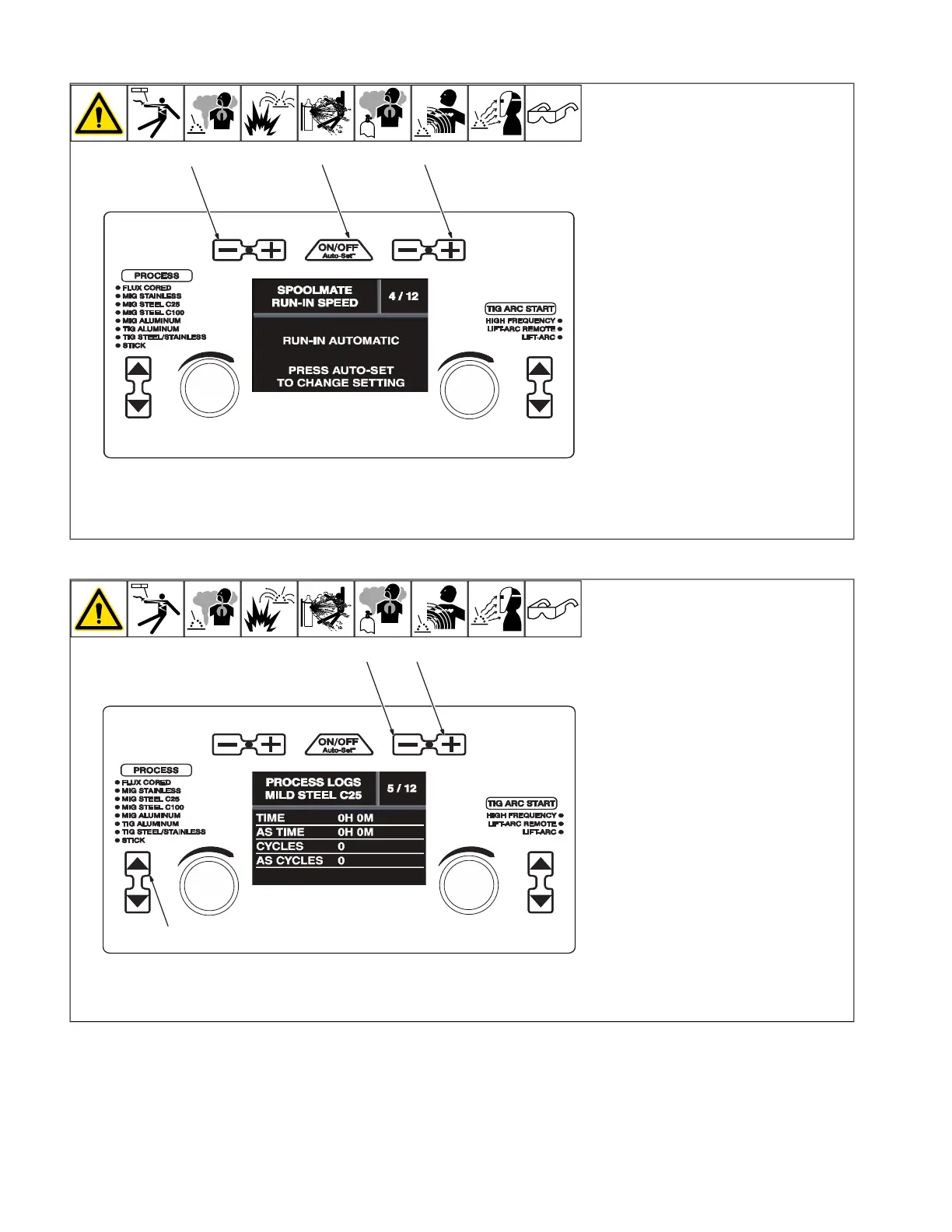
3-12. Spoolmate Run-In Speed (Menu 4 Of 12)
Ref. 281252A
1
2 3
1 Wire/Rod/Tungsten Minus (-) Button
2 Auto-Set Button
3 Material Thickness Minus (+) Button
Follow instructions in Section 6-8 to enter
the setup menu.
To change the run-in setting, press the Auto-
Set button.
Run-in is the speed of the wire prior to the
welding arc being struck.
When set to Automatic, the welder deter-
mines the optimal run-in speed for each
start.
When set to Disabled, the run-in speed is the
same as the weld wire speed.
To exit menu, simultaneously press and re-
lease the Wire/Rod/Tungsten Minus (-) but-
ton and Material Thickness Plus (+) button,
or turn unit off and on.
6-13. Process Logs (Menu 5 Of 12)
A complete Parts List is available at www.MillerWelds.com
OM-281426 Page 29
3-13. Process Logs (Menu 5 Of 12)
Ref. 281252A
1 2
3
1 Material Thickness Minus (-) Button
2 Material Thickness Plus (+) Button
3 Process Select
Follow instructions in Section 6-8 to enter
the setup menu.
Process Logs menu displays manual time,
Auto-Set time, weld cycles, and Auto-Set
cycles for the selected process.
To view other processes, use the Process
Select buttons to select the desired weld
process.
To exit menu, simultaneously press and re-
lease the Wire/Rod/Tungsten Minus (-) but-
ton and Material Thickness Plus (+) button,
or turn unit off and on.










 To Next Page