OM-281426 Page 46
F
Complete Parts List is available at www.MillerWelds.com
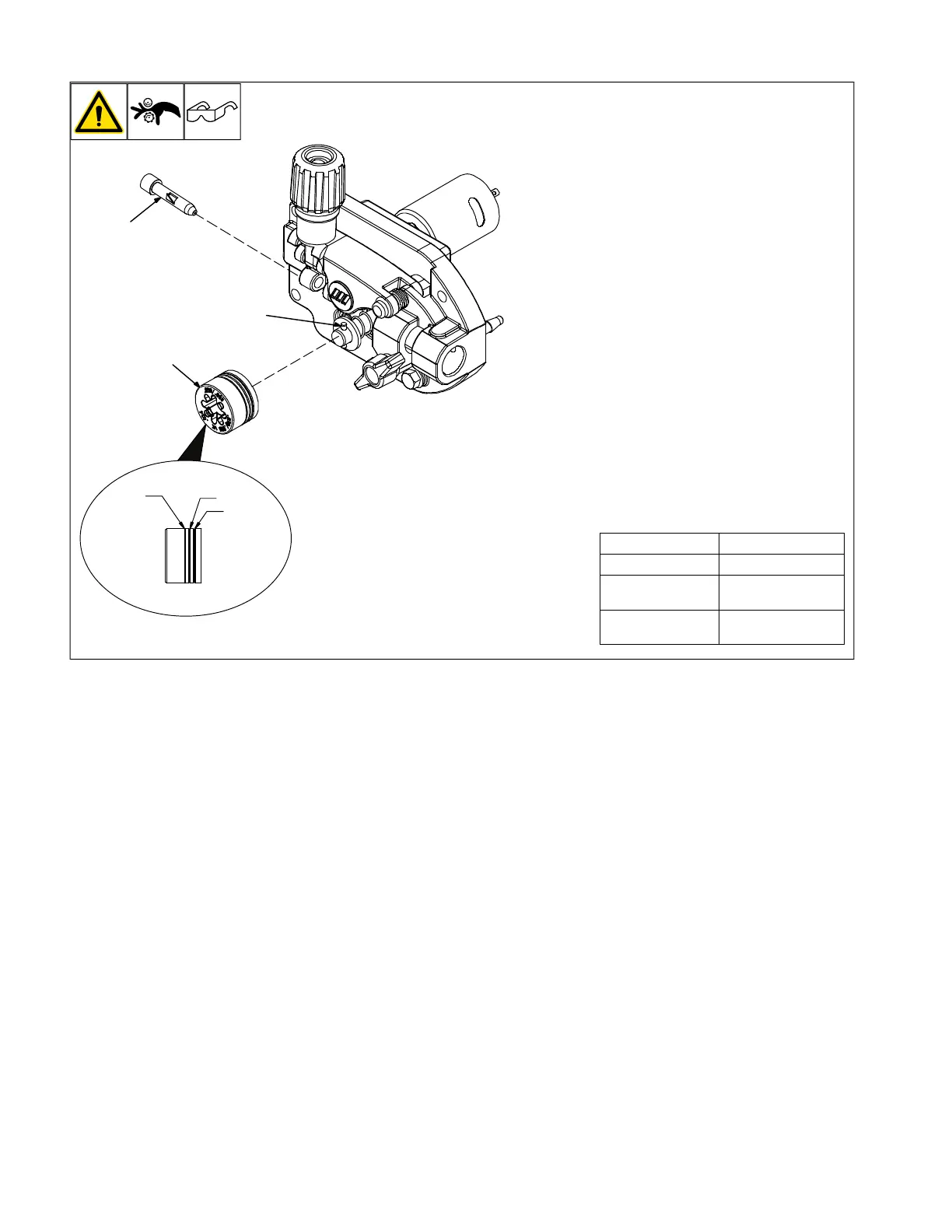
7-3. Changing Drive Roll Or Wire Inlet Guide
1 Inlet Wire Guide
Remove guide by pressing on barbed area
or cutting off one end near housing and pull-
ing it out of hole. Push new guide into hole
from rear until it snaps in place.
2 Drive Roll
The drive roll includes three different sized
grooves. The text aligned with the drive roll
retaining pin indicates the selected groove.
3 Retaining Pin
To secure drive roll, locate open slot and
push drive roll completely over retaining pin,
then rotate drive roll to desired slot.
4 .024 Groove
5 .030−.035 Groove
6 .030-.035 V-Knurled Groove
F
See Parts List for optional drive rolls.
Table 7–1. Drive Roll Grooves
And Wire Type Compatibility
Groove Compatible Wire
.024 .024 Solid Wire
.030−.035
.030−.035 Solid
Wire
.030−.035 V-
Knurled
.030−.035 Flux-
Core










 To Next Page