OM-281426 Page 42
F
Complete Parts List is available at www.MillerWelds.com
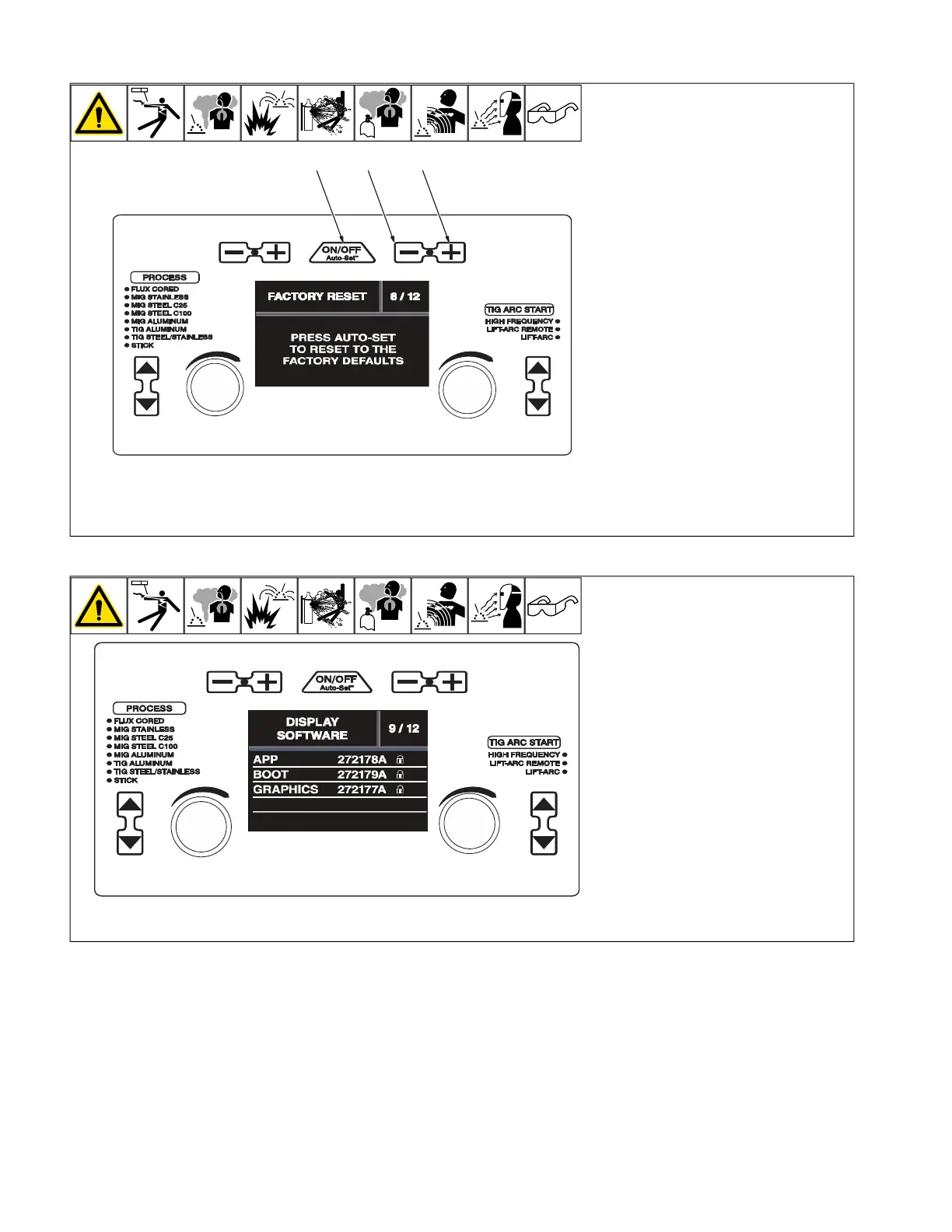
6-16. Factory Reset (Menu 8 Of 12)
A complete Parts List is available at www.MillerWelds.com
OM-281426 Page 31
3-16. Factory Reset (Menu 8 Of 12)
Ref. 281252A
1
2
3
3-17. Display Software (Menu 9 Of 12)
Ref. 281252A
1 Material Thickness Minus (-) Button
2 Material Thickness Plus (+) Button
3 Auto-Set Button
F
A Factory Reset will reset the primary
logs data, process logs data, error logs
data, selected process, and all process
settings. Motor calibration settings,
Spoolmate Calibration settings, and
software information will all be
retained.
Follow instructions in Section 6-8 to enter
the setup menu.
To perform a Factory Reset, press the Auto-
Set button.
To exit menu, simultaneously press and re-
lease the Wire/Rod/Tungsten Minus (-) but-
ton and Material Thickness Plus (+) button,
or turn unit off and on.
6-17. Display Software (Menu 9 Of 12)
A complete Parts List is available at www.MillerWelds.com
OM-281426 Page 31
3-16. Factory Reset (Menu 8 Of 12)
Ref. 281252A
1
2
3
3-17. Display Software (Menu 9 Of 12)
Ref. 281252A
F
Display Software information is for fac-
tory and service use only. The displays
that are shown are for reference only.
Follow instructions in Section 6-8 to enter
the setup menu.
To exit menu, simultaneously press and re-
lease the Wire/Rod/Tungsten Minus (-) but-
ton and Material Thickness Plus (+) button,
or turn unit off and on.










 To Next Page