24
How to Understand Simplicity system messages
Pack Alarm
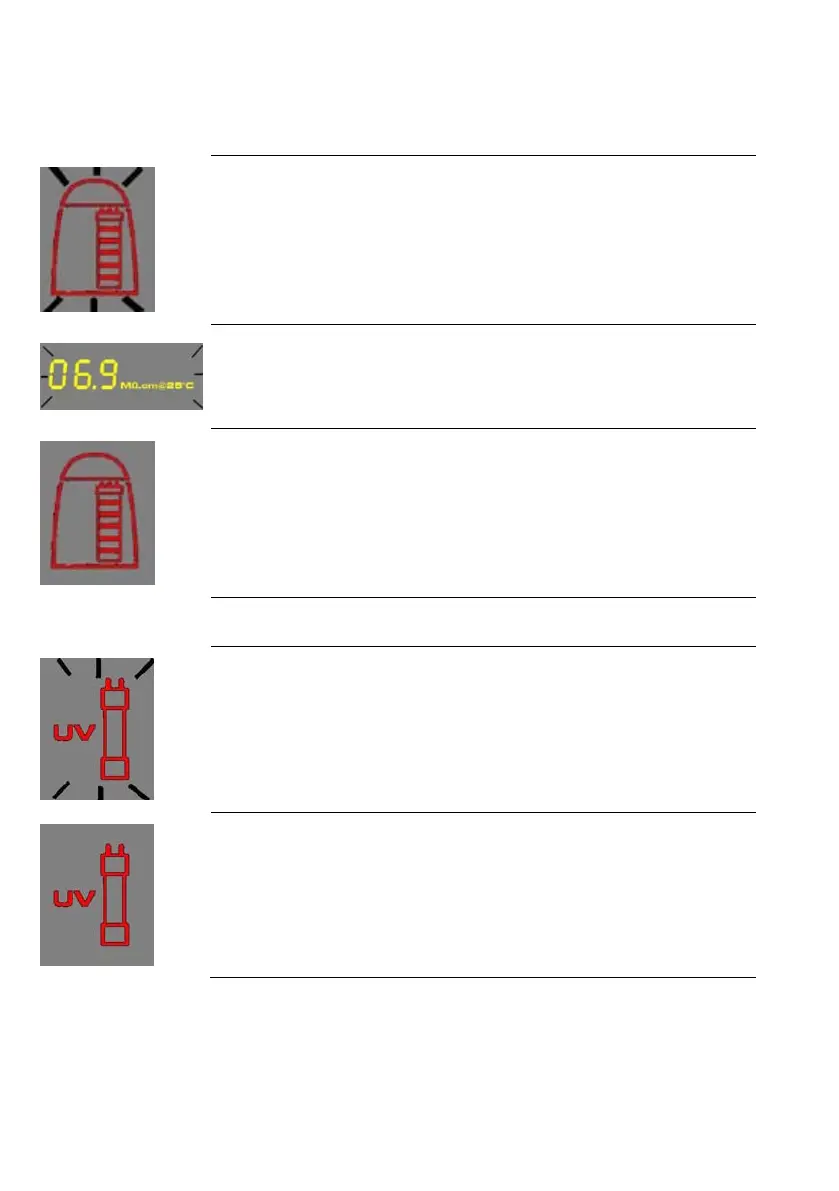
• The system will prompt you to change the SimpliPak cartridge cartridge using a red
Pack Alarm icon. The Display will show the red Pack Alarm blinking. The SimpliPak
cartridge is changed due to either the amount of time it has been used or from the
amount of water that has passed through it.
• When the Resistivity display is blinking, the red Pack Alarm will also be blinking. This
indicates that the SimpliPak cartridge should be replaced. This message is shown
when the Product resistivity is less than the Resistivity Setpoint. The Resistivity
Setpoint can be seen in menu option C02
• When the red Pack Alarm is displayed as a steady icon, the SimpliPak cartridge is
not installed correctly or not installed at all. If the SimpliPak cartridge has been
reinstalled and the Alarm is still displayed, then contact your technical support.
UV Lamp Alarm
• The system will prompt you to change the UV Lamp using a red UV Lam
The Display will show the red UV Lamp Alarm blinking. The message is shown when
the UV Timer displays 0 days. The UV Timer can be viewed in menu option C04. The
replacement of the UV Lamp involves the installation of a new UV Lamp and a
manual reset of the UV Timer.
• When the red UV Lamp Alarm is displayed as a steady icon, the UV Lamp is not
installed correctly or not installed at all. If the UV Lamp has been reinstalled and the
Alarm is still displayed, then contact your technical support.









 To Next Page