Maintenance
35
How to View or Reset the UV Lamp Timer (C04)
The UV Lamp Timer should be reset only after the UV Lamp has been replaced
(see Section How to Replace the UV
Lamp (UV System only))
. The UV Lamp Timer displays the time left until the UV Lamp needs to be replaced. The
Display will show the red UV Lamp Alarm icon blinking when the Timer reaches 0 days. This message is displayed
until the UV Lamp is replaced and the UV Lamp Timer is reset.
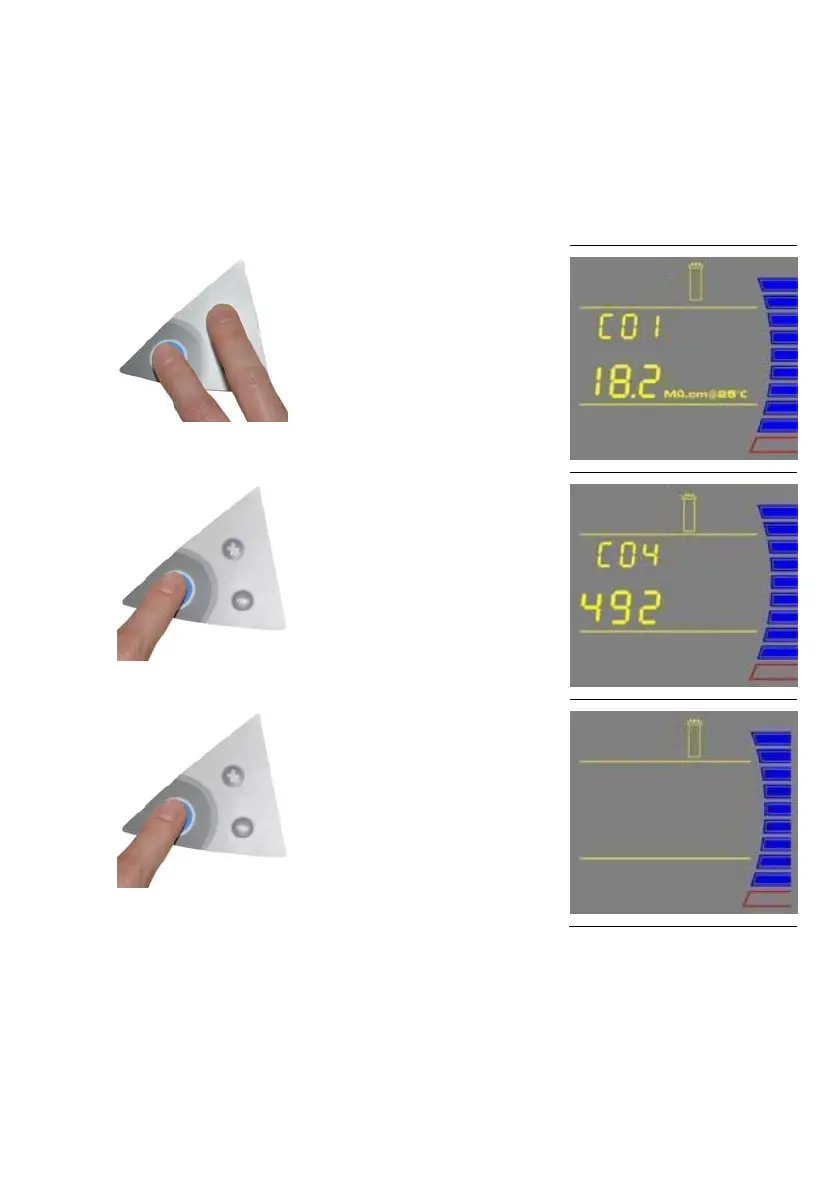
How to View the Remaining Days on the UV Lamp Timer
1
Press the Main and “+“ Buttons together
to enter the menu. The Display will show
C01.
2
Press the Main Button 3 times. The
Display will show C04 and the days left
on the UV Timer.
3
To exit the menu, press and hold the
Main Button for 2 seconds.
To display the next menu option, press
the Main Button once.









 To Next Page