PUMP ENERGY COST REDUCTION (P140 to P145)
These features enable a single pumping station (or multiple pumping stations in
series) to be emptied/filled as required, immediately prior to the high energy cost
period. The pump start/pump stop setpoints may also be modified to reduce pump
running time during this period.
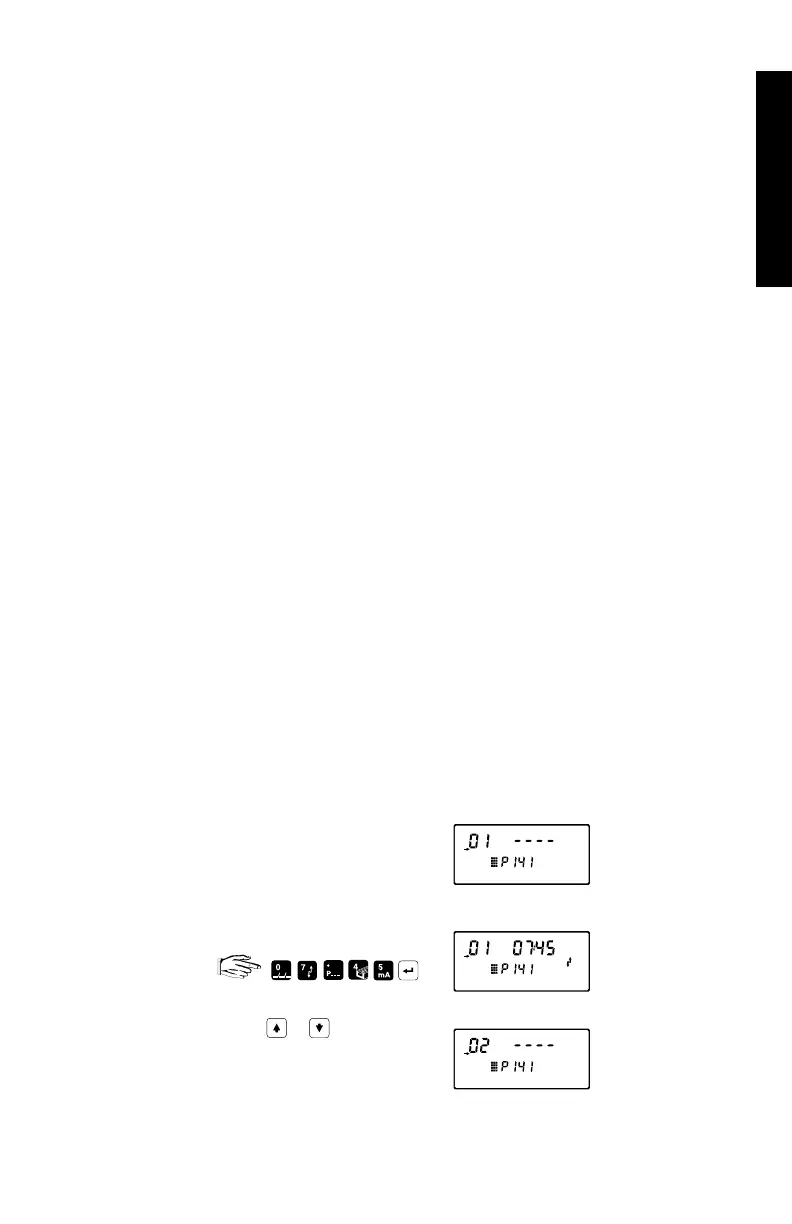
A maximum of ten energy periods can be programmed by indexing the peak start
(P141) and end (P142) for periods 1 through 10 and entering the desired times.
P140 (G) ENERGY SAVING
Use this feature to maximize pump use during low energy cost periods,
and limit use during high energy cost periods.
values: 0 = off (preset)
1 = on (do not pump during peak energy cost, if possible).
P141 (G) PEAK START TIME
Enter the time of day when high energy costs (to be avoided) start.
This value, in conjunction with Peak End Time, defines the high
energy cost period.
values
*: HH.MM format (preset = 00:00)
P142 (G) PEAK END TIME
Enter the time of day when high energy costs (to be avoided) end.
values
*: HH.MM format (preset = 00:00)
* To enter Peak Start and End
Enter the desired time
Scroll ( or ) or direct
access the desired
energy period.
e.g. peak start P141,
energy period 1,
start time blank
e.g. start time
7.45 am
e.g. energy
period 2
PARAMETERS
PL-507 83



 To Next Page