VOLUME PARAMETERS (P050 to P055)
If Readings proportional to volume are desired, adjust the following parameters.
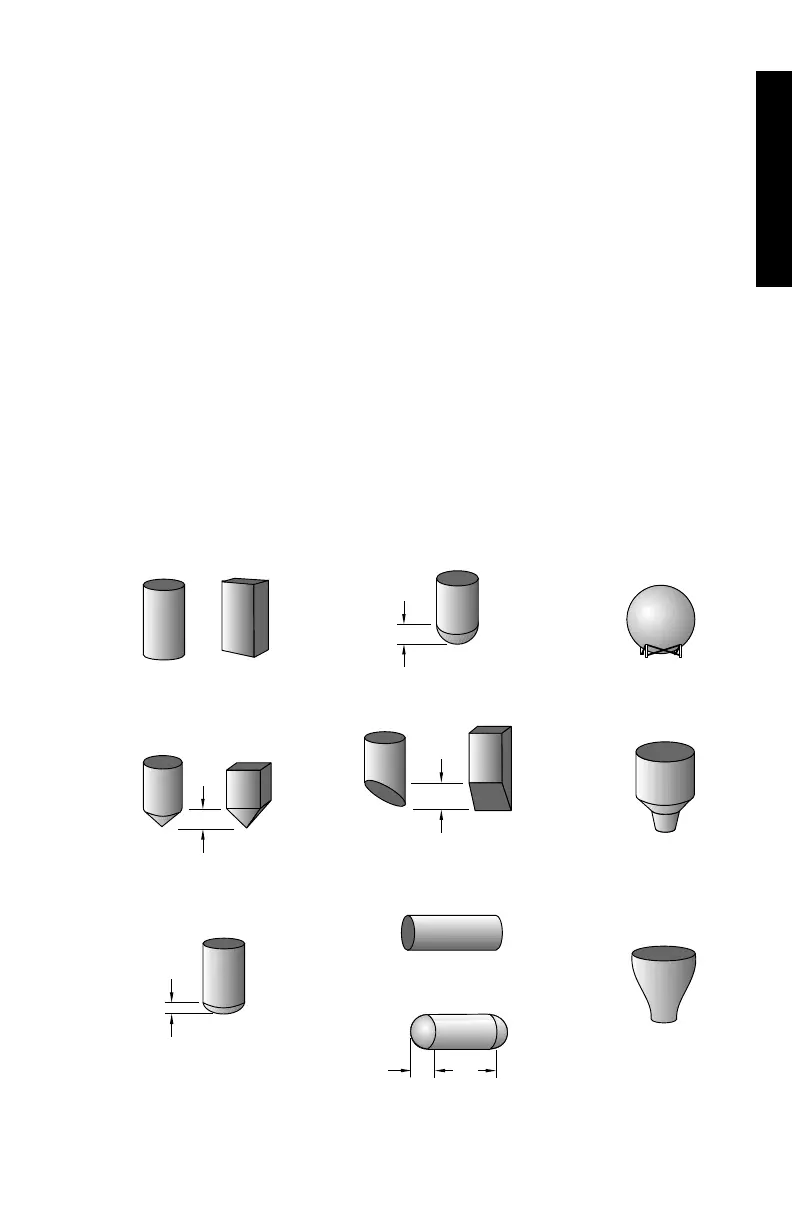
P050 TANK SHAPE
Enter the Tank Shape option that matches the vessel monitored.
If additional vessel dimension entry is required, the
associated parameters
(as indicated below) may be scroll accessed.
When Operation is "level" (P001 = 1), liquid (material) volume is calculated.
Alternatively, when Operation is "space" (P001 = 2), remaining vessel
capacity is calculated.
In the RUN mode, Readings are displayed in percent of (and mA outputs
are proportional to) maximum volume. To convert Readings to volumetric
units, see Max Volume (P051).
values: 0 = volume calculation not required (preset)
1 =
2 =
4 =
8 =
5 =
9 =
parabola bottom
cone / pyramid bottom
flat level bottom
half sphere bottom
flat sloped bottom
flat ends
Universal
Curved
6 =
parabola ends
A
3 =
A
10 =
L
A
7 =
or
A
or
A
PARAMETERS
PL-507 65



 To Next Page