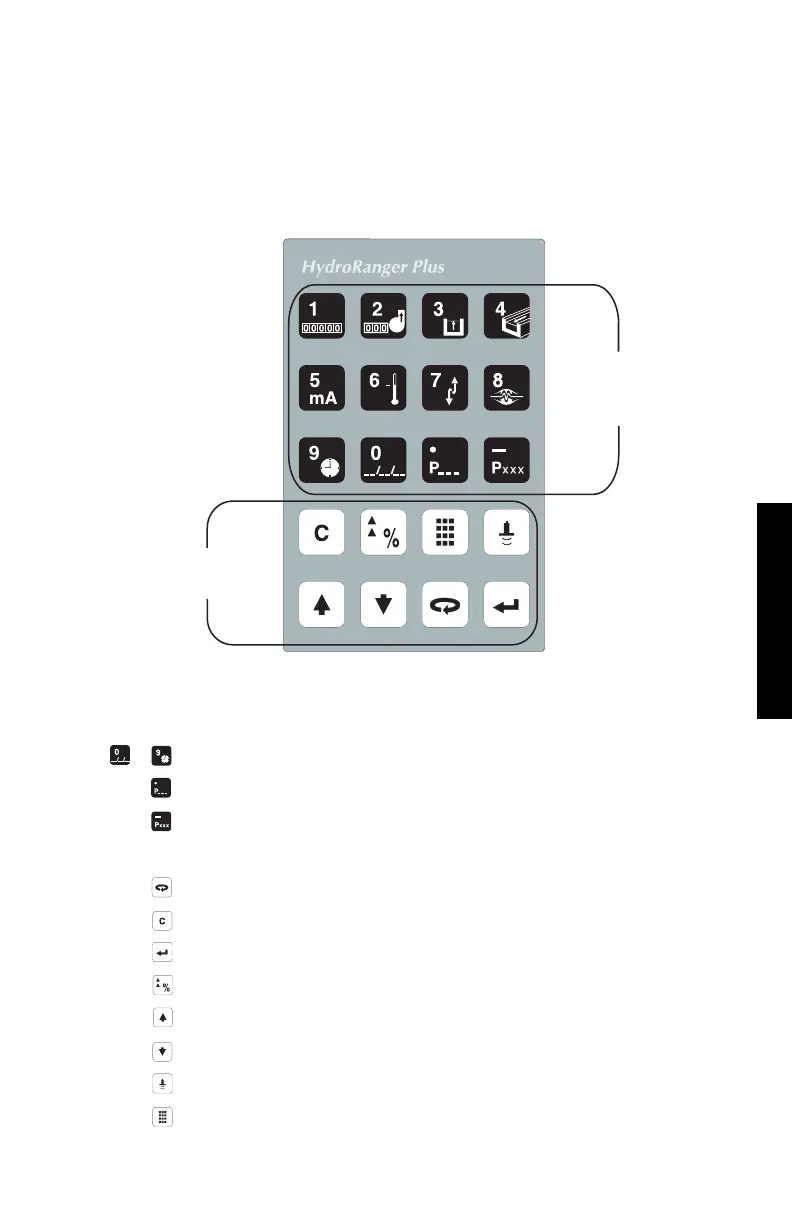
KEYPAD
These instructions are for hand programmer (keypad) use. Use the instructions
provided with the DOLPHIN interface package, if applicable.
Aim the HYDRO+ programmer infra-red transmitter at the HYDRO+ display within 0.3
m (12") of the display window. In the program mode, use the HYDRO+ programmer
keys to perform the following identified functions.
KEY NUMERIC ENTRIES
input a numeric value into the display field accessed.
input a decimal point (moves TVT Pointers left).
input a negative value (moves TVT Pointers right).
FUNCTION
shift access to another display field.
delete the current field value (initiate a parameter reset).
store the field values in memory (complete a parameter reset).
switch to % or Units (access Auxiliary Parameter Function).
increase the current field value.
decrease the current field value.
fire the transducer to take an ultrasonic measurement.
enter the RUN mode.
98/03/19
Numeric
Value
Keys
Function
Keys
to
PROGRAMMING
PL-507 29



 To Next Page