1-10
Chapter 1 Before Use
When Ink Level Low or Ink Near End is Displayed
This machine counts the consumed ink amount. Discrepancies in actual consumed ink amount can occur for some
reason. If the warning message appears, take appropriate actions as instructed on the operating panel.
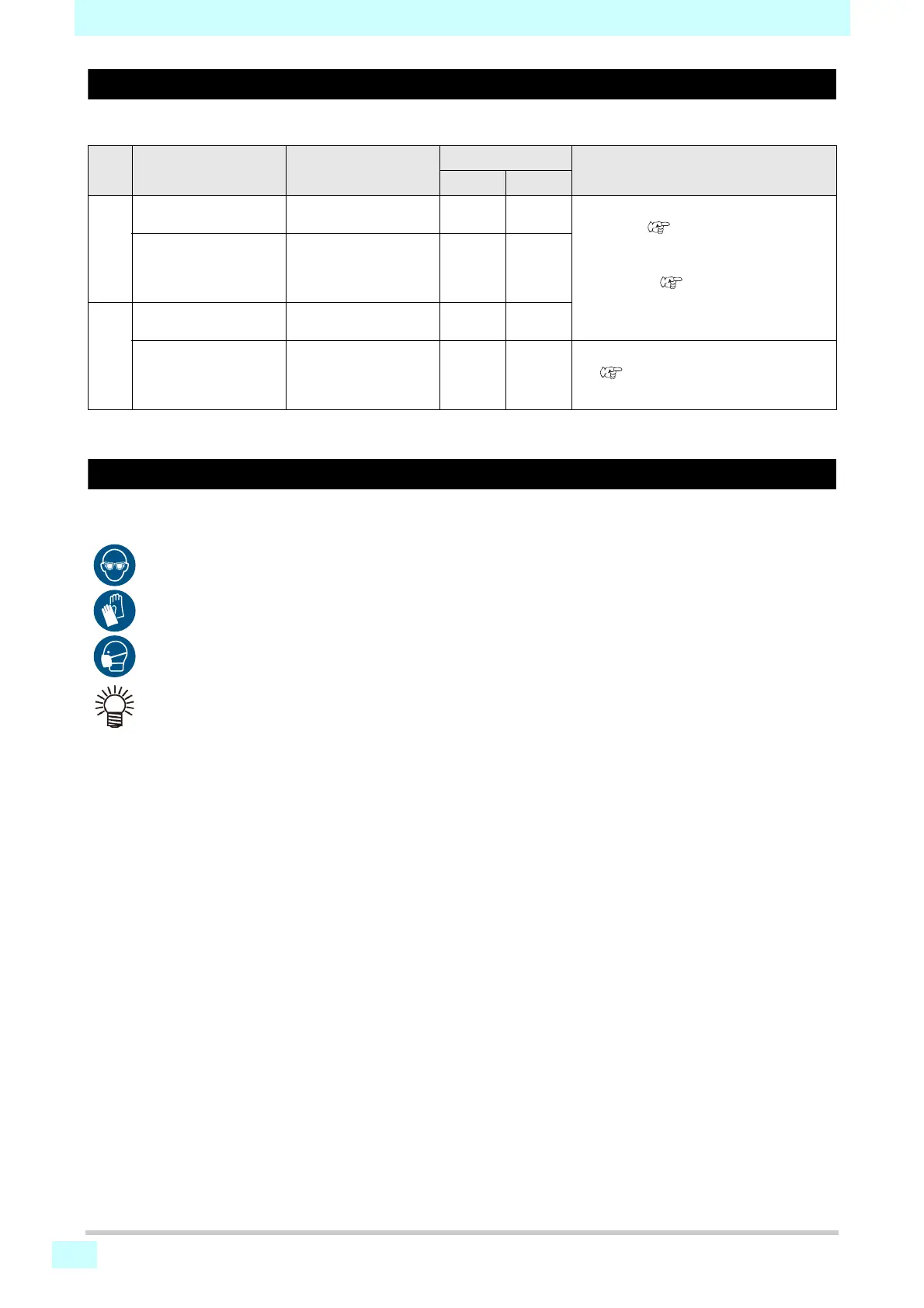
LED Message Display condition
*1
*1. The remaining ink amount is only a guide.
When Replace Inkpack (Ink End) is Displayed
The ink has run out. Replace with new Ink pack.
Thoroughly read the following and make sure you understand its contents.
Machine operation
Corrective action
Printing Cleaning
Lit in
yellow
Ink level low The ink remaining in the
cartridge is below 60 ml.
Possible Disabled
1. Remove the ink cartridge, and measure the
weight. (
P.3-10 「Correcting the Ink
Cartridge Case Weight」)
2. Enter the measured weight into the
machine. (
P.3-10 「Correcting the
Ink Cartridge Case Weight」)
INK NEAR-END The ink remaining in the
cartridge is below 60 ml
after the weight of the
cartridge is corrected.
Possible Disabled
Lit in
red
Ink level end The ink remaining in the
cartridge is below 30ml.
Disabled Disabled
Replace Inkpack (Ink End) The ink remaining in the
cartridge is below 30 ml
after the weight of the
cartridge is corrected.
Disabled Disabled
1. Replace the ink pack.
(
P. 1- 11 「Replacing Ink」)
• Pay close attention to ventilation and be sure to wear safety glasses, gloves, and a mask when handling ink, maintenance
liquid, waste ink, or other solutions used with the machine. Leaking ink may adhere to the skin or get into the eyes or
mouth.
• The ink in the ink pack cannot be used up completely. The ink pack is filled up with the amount of ink which is
slightly more than the indicated value. As ink end occurs when the indicated amount of ink is consumed, a small
amount of ink remains.












 To Next Page