3-7
1
2
3
4
5
6
Chapter 3 Settings
Machine Setup Menu
The Machine Setup menu provides a variety of convenient settings.
The following items can be set in the machine settings.
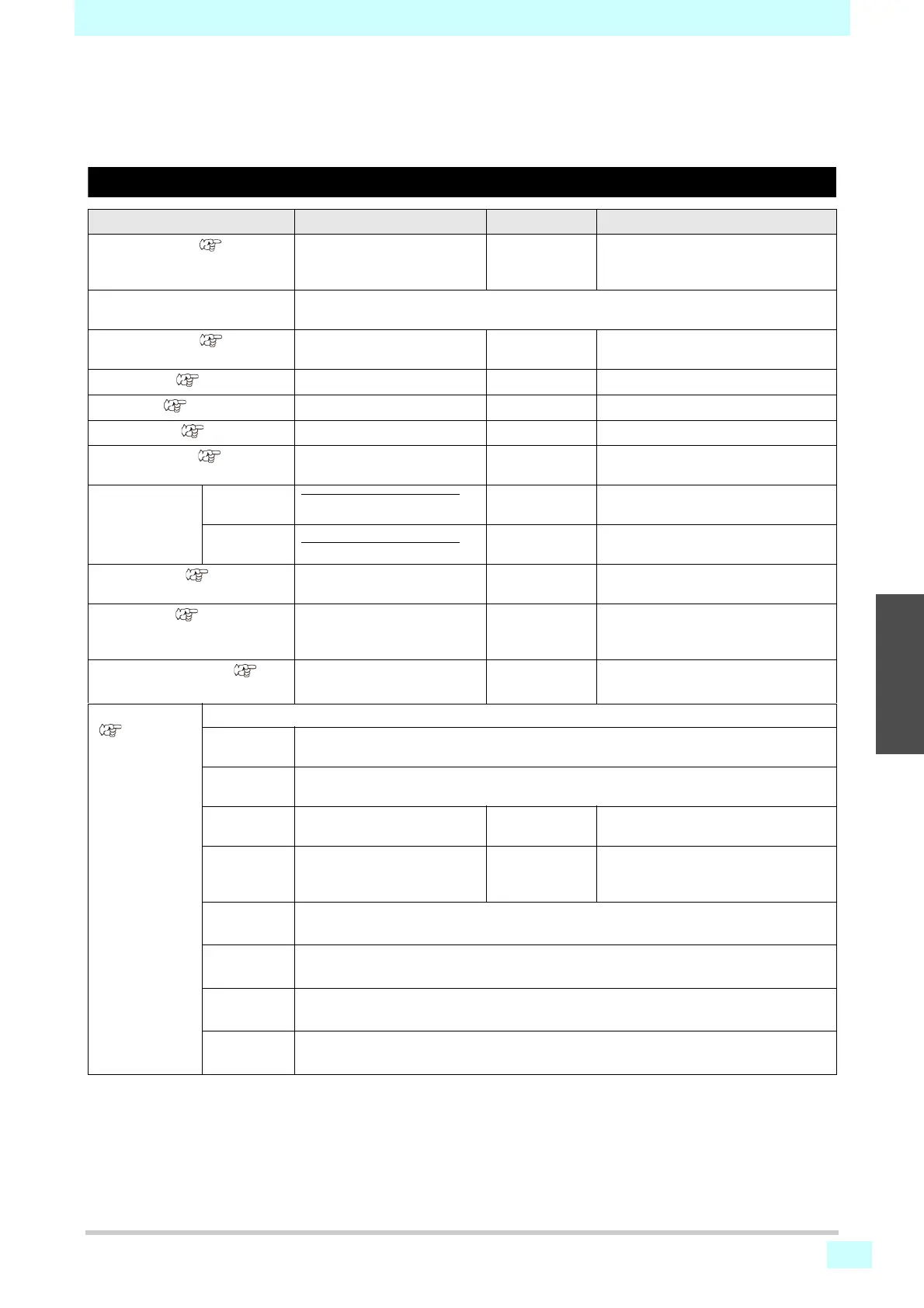
Machine setup menu table
Function name Setting value Default Setting Details
AUTO Power-off ( P.3-9)
5–60 min. 5 min. Automatically turns off the machine
after it has been left idle for the
specified time.
Drying/Exhaust Fan Set when the optional drying/exhaust fan is used. For details, refer to the fan operation
manual.
MEDIA REMAIN ( P.3-9)
ON / OFF OFF Enables management of the remaining
amount of media.
LANGUAGE ( P.3-9)
English Changes the display language.
TIME SET ( P.3-9)
+4 h to -20 hr. Japan time Sets the current time and date.
UNIT / TEMP ( P.3-9)
C (Celsius) / F (Fahrenheit) C Sets the unit for temperature display.
UNIT / LENGTH ( P.3-9)
mm / inch mm Sets the unit for length and area
display.
Eco cartridge Case Weight
Registers the eco cartridge case
weight.
Cartridge
Weight
Registers the cartridge weight.
KEY BUZZER ( P.3-10)
ON / OFF ON Sets an audible tone when keys are
pressed.
VIEW FEED ( P.3-10)
ON / OFF ON Sets whether media feeding is
performed in order to check test
printing results, for example.
SPACE FEED MODE( P. 3 -
10)
INTERMITTENT /
CONTINUOUS
INTERMITTENT Alters the feed method for blank space
included in image data.
Network
(P.3-11)
For configuring network settings.
Check IP
ADDRESS
Shows the machine's current IP address.
Check MAC
ADDRESS
Shows the machine's current MAC address.
DHCP ON / OFF Set to ON to use an IP address set by
the DHCP server.
AutoIP ON / OFF Set to ON to use an IP address set by
the AutoIP protocol. Note that DHCP is
given priority when DHCP is set to ON.
IP
ADDRESS
*1
Sets the IP address used by the machine.
DEFAULT
GATEWAY
*1
Sets the default gateway used by the machine.
DNS
ADDRESS
*1
Sets the DNS server address used by the machine.
SUB NET
MASK
*1
Sets the subnet mask used by the machine.











 To Next Page