4-5
2
2
4
5
6
Chapter 4 Maintenance
6
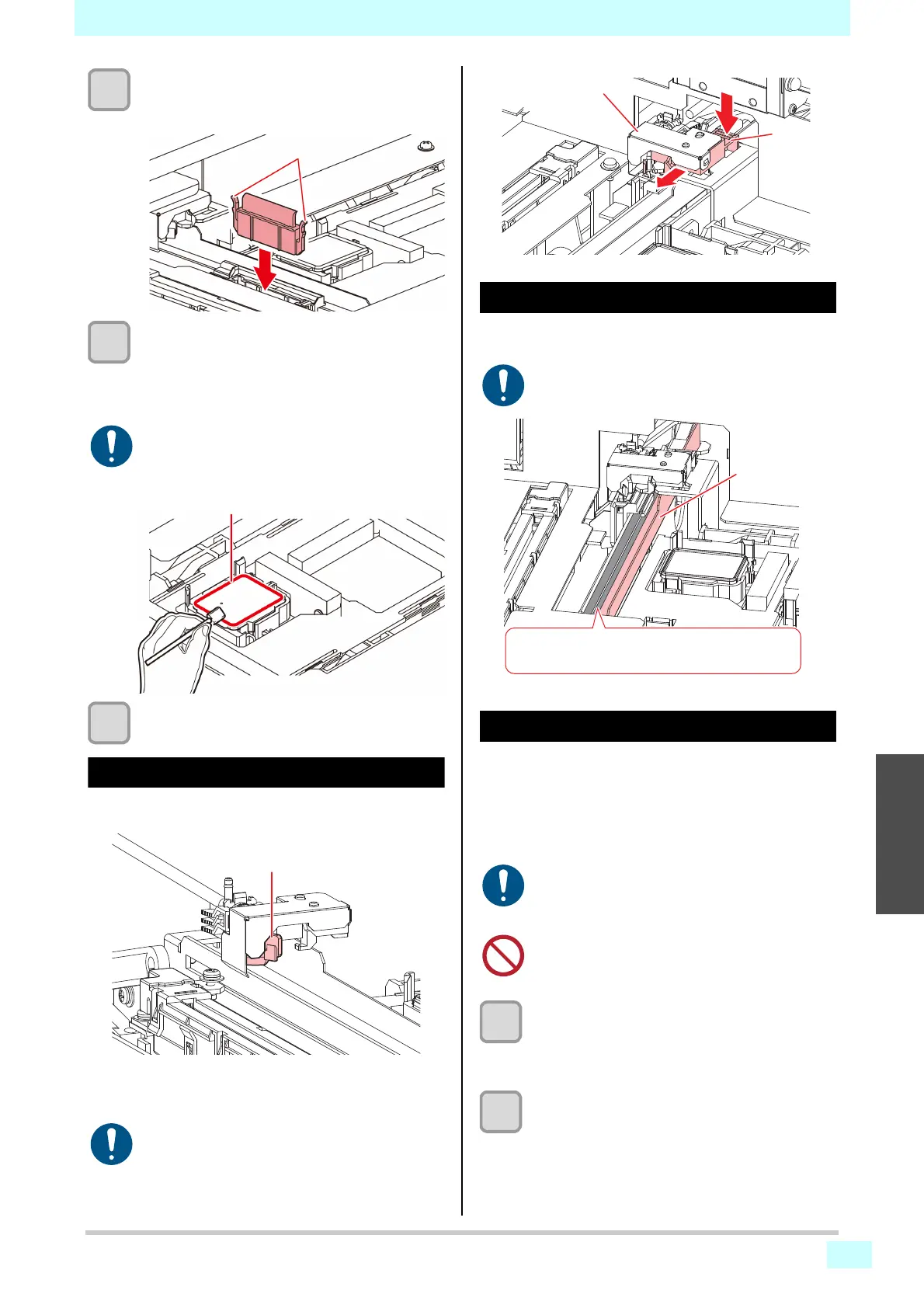
Return the wiper to its original position.
• Holding the wiper by the lugs at both ends, push it
in.
7
Clean the cap rubber.
• Wipe off any adhering ink or dust using a cleaning
stick or tweezers moistened with maintenance
liquid. Wipe off the maintenance liquid. Make sure
none remains.
8
Press the [ENTER] key after cleaning.
Cleaning the wiper cleaner
Wipe off any adhering ink or dust using a cleaning stick or
tweezers moistened with maintenance liquid.
Remove the lower part of the ink guard when cleaning the
wiper cleaner. Press the tabs and pull forward to remove
it.
Cleaning the wiper ink guard
Wipe off any adhering ink or dust using a cotton swab or
tweezers.
Cleaning under the carriage
The underside of the carriage becomes coated with ink
wiped off by the wiper. Continuing to use the dirty carriage
underside will rub dried ink and attached dust on to the
media, resulting in contaminated prints.
The print head uses an extremely delicate mechanism.
Take great care when handling it.
1
With the screen in local mode, select
[MENU] > [MAINTENANCE], and then press
the [ENTER] key.
• The Maintenance menu is displayed.
2
Select [STATION MAINT.] > [CARRIAGE
OUT] > [HEAD MAINT.], and then press the
[ENTER] key.
• The carriage moves to the maintenance space.
• When using tweezers, be careful not to dam-
age the wiper with them.
• If ink dry matter adheres to the cap rubber, it
may cause cleaning failure.
• Be careful not to pull out the tube.
• The area in gray in the illustration is coated with
grease. Be careful not to wipe it off and clean
carefully.
• Be careful to avoid leaving fragments from the
cleaning stick behind when cleaning. These
fragments will increase the risk of ejection fail-
ures (e.g., nozzle clogging or deflection).
• Never rub head nozzles.
Wiper ink guard
The gray area is coated with grease, be careful not
to wipe it off and clean carefully.












 To Next Page