Chapter 4 Maintenance
4-12
Nozzle recovery function
When nozzle clogging of specific nozzles cannot be
corrected, other nozzles working normally can be used
instead for printing. This is referred to as nozzle recovery.
1
With the screen in local mode, select
[MENU] > [MAINTENANCE], and then press
the [ENTER] key.
• The Maintenance menu is displayed.
2
Select [NOZZLE RECOVERY] > [PRINT],
and then press the [ENTER] key.
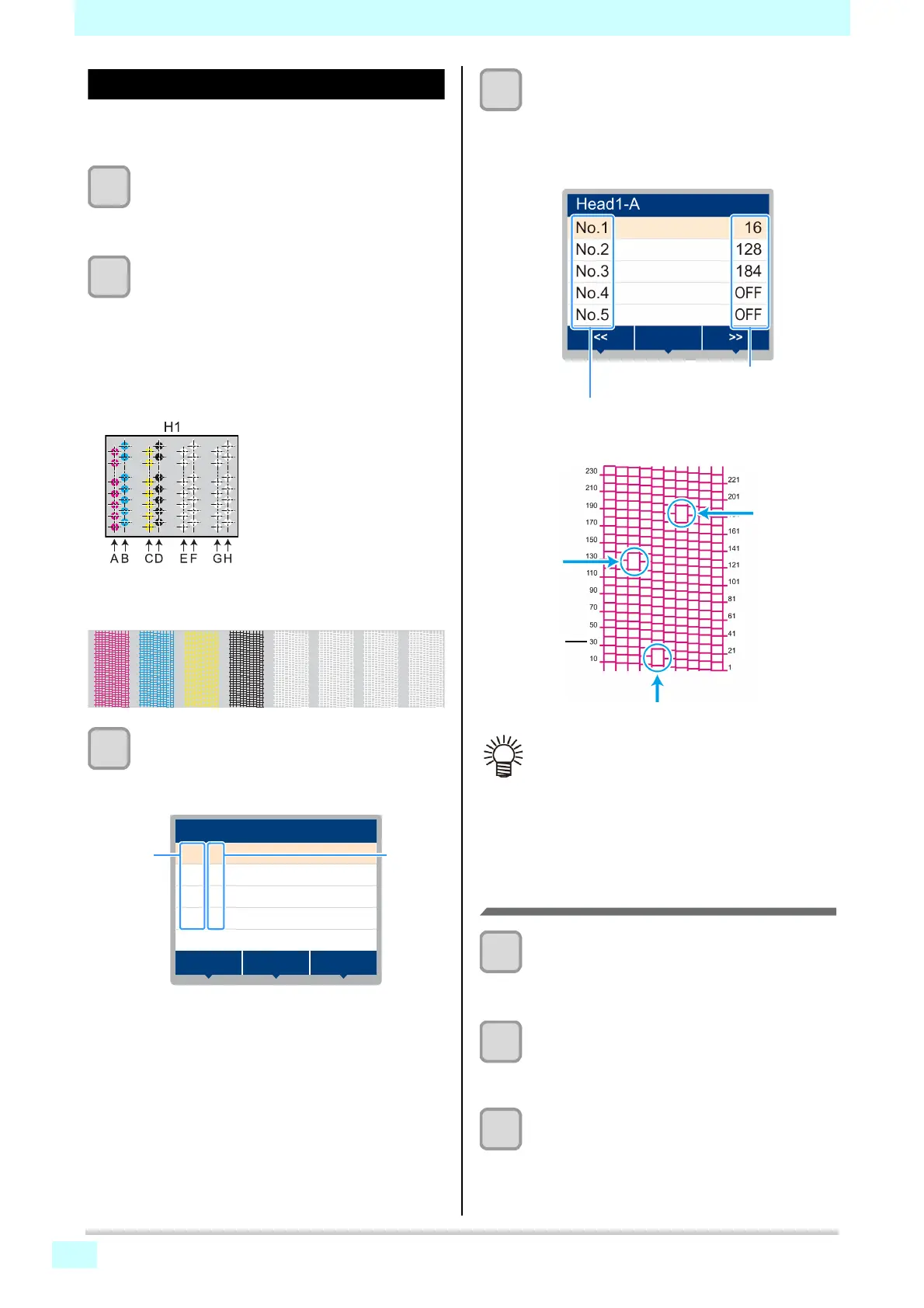
• A nozzle recovery pattern is printed.
• The Select Entry Nozzle screen appears once
printing is complete.
• Selecting "ENTRY" will skip printing and go to the
next step.
3
Select head numbers and nozzle rows for
nozzle recovery, and then press the
[ENTER] key.
• Select nozzle rows and press the [ENTER] key.
4
Enter nozzle numbers for nozzle recovery,
and then press the [ENTER] key.
(1) Select numbers to enter (1–10) by pressing the
[]/[] key, and then press the [ENTER] key.
(2) Enter nozzle numbers for recovery by pressing
[]/[] key, and then press the [ENTER] key.
Resetting your set values
1
With the screen in local mode, select
[MENU] > [MAINTENANCE], and then press
the [ENTER] key.
• The Maintenance menu is displayed.
2
Select [NOZZLE RECOVERY] > [RESET],
and then press the [ENTER] key.
• [Nozzle Recovery] is automatically selected.
• [RESET] is automatically selected.
3
Select nozzle rows to reset and press the
[ENTER] key.
• A reset confirmation message is displayed.
1
10
21
30
41
50
61
70
81
90
101
110
121
130
141
150
161
170
181
190
201
210
221
230
241
250
261
270
281
290
301
310
1
10
21
30
41
50
61
70
81
90
101
110
121
130
141
150
161
170
181
190
201
210
221
230
241
250
261
270
281
290
301
310
1
10
21
30
41
50
61
70
81
90
101
110
121
130
141
150
161
170
181
190
201
210
221
230
241
250
261
270
281
290
301
310
1
10
21
30
41
50
61
70
81
90
101
110
121
130
141
150
161
170
181
190
201
210
221
230
241
250
261
270
281
290
301
310
1
10
21
30
41
50
61
70
81
90
101
110
121
130
141
150
161
170
181
190
201
210
221
230
241
250
261
270
281
290
301
310
1
10
21
30
41
50
61
70
81
90
101
110
121
130
141
150
161
170
181
190
201
210
221
230
241
250
261
270
281
290
301
310
1
10
21
30
41
50
61
70
81
90
101
110
121
130
141
150
161
170
181
190
201
210
221
230
241
250
261
270
281
290
301
310
1
10
2
30
4
50
6
70
8
90
1
110
1
130
1
150
1
170
1
190
2
210
2
230
2
250
2
270
2
290
3
310
View from above the print head
H1-A H1-D H1-E H1-GH1-B H1-C H1-F H1-H
Nozzle pattern
Nozzle rows
SELECT ENTRY NOZZLE
H1-A
>
>
H1-B
>
H1-C
>
H1-D
>><<
>
****
• Up to 10 nozzles can be entered per nozzle row.
• Using this function does not alter the time
required for printing.
• Nozzle recovery is not reflected if printing in the
lowest pass. Moreover, only some nozzles may
be valid depending on the conditions. Perform a
trial print once to confirm.
Recovery nozzle no. / OFF
Number of entry: 1–10
Nozzle cloggin
no. 184
Nozzle
number
Nozzle clogging: no. 16
Nozzle
clogging
no. 128
Example of entering recovery nozzles







 To Next Page