Chapter 3 Settings
3-2
Setup Menu
From the setup menu, you can set the print conditions for media you normally use.
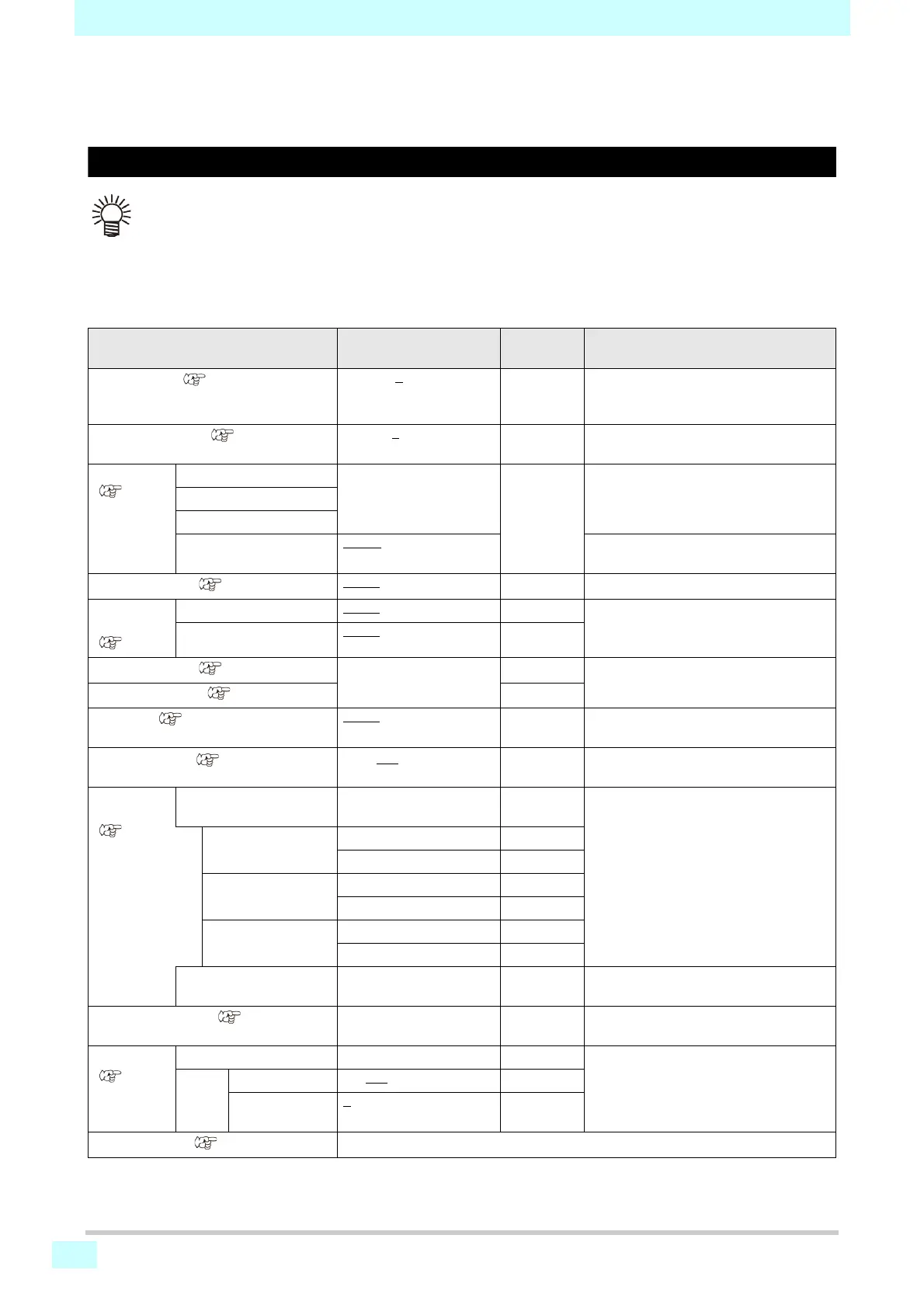
Setup menu table
• Each of the following setting items can be configured for operation according to setting values used during RIP print-
ing from a connected host computer.
• Setting items: Drying time / Margin (left/right) / Vacuum / Feed speed level
• Set each item to "Host" for operation according to the RIP settings. To give priority to settings made on the machine,
use a setting other than "Host."
• For instructions on setting up RIP software, refer to the RIP software instruction manual.
Function name Setting value
Without RIP
instructions
*1
*1. Setting values used for printing when no setting value is indicated by the RIP software (host), or if you give priority to setting values configured on
the machine.
Description
FEED COMP. ( P.3-3)
-9999 to 0
to 9999 Used to print a pattern for correcting the
media feed amount and then correcting
it.
DROP.POScorrect ( P.3-3)
-40.0 to 0
to 40.0 Used to adjust the drop position in
bidirectional printing.
HEATER
(P.3-4)
PRE OFF / 20–50°C Sets the temperature of each heater.
PRINT
POST
Off Time NONE
/ 0–90 min. Sets the time until the heater is turned off
after printing.
LOGICAL SEEK ( P.3-4)
HOST
/ ON / OFF ON Sets the scanning area during printing.
DRYING
TIME
(P.3-4)
SCAN HOST
/ 0.0–9.9 sec. 0 sec. Sets the time to wait for ink to dry.
PRINT END HOST
/ 0–120 min. 0 min.
MARGIN / LEFT ( P.3-5)
-10 to 85 mm 0 mm Sets a non-printing area along the right
and left edges of the media.
MARGIN / RIGHT ( P.3-5)
0 mm
VACUUM ( P.3-5)
HOST
/ WEAK /
STANDARD / STRONG
STRONG Sets the vacuum strength for the media.
FEED SPEED
*2
( P.3-5)
*2. Set to 100% or more for faster printing, but note that sufficient drying time cannot be ensured, which may affect print quality.
10 to 100 to 200%
100% Changes the media feed speed in
printing and other tasks.
AUTO
CLEANING
(P.3-5)
OFF, FILE,
LENGTH, TIME
Sets operation of automatic head
cleaning before or during printing.
FILE INTERVAL 1–1000
TYPE NORMAL / SOFT / HARD
Length INTERVAL 0.1–100.0 m
TYPE NORMAL / SOFT / HARD
TIME INTERVAL 10–120 min.
TYPE NORMAL / SOFT / HARD
Cleaning Check ON / OFF Sets whether to check the nozzles after
auto cleaning.
INTERVAL WIPING ( P.3-6)
3–255 min., OFF Sets operation of wiping performed
during printing.
MAPS
(P.3-5)
AUTO Changes the effect of "MAPS."
MANU
AL
Speed 50–100
%
Smoothing
Level
0
–100%
SETUP RESET ( P.3-3)
Settings 1-4 can be reset individually.











 To Next Page