Chapter 5 Troubleshooting
5-4
Warning/Error Messages
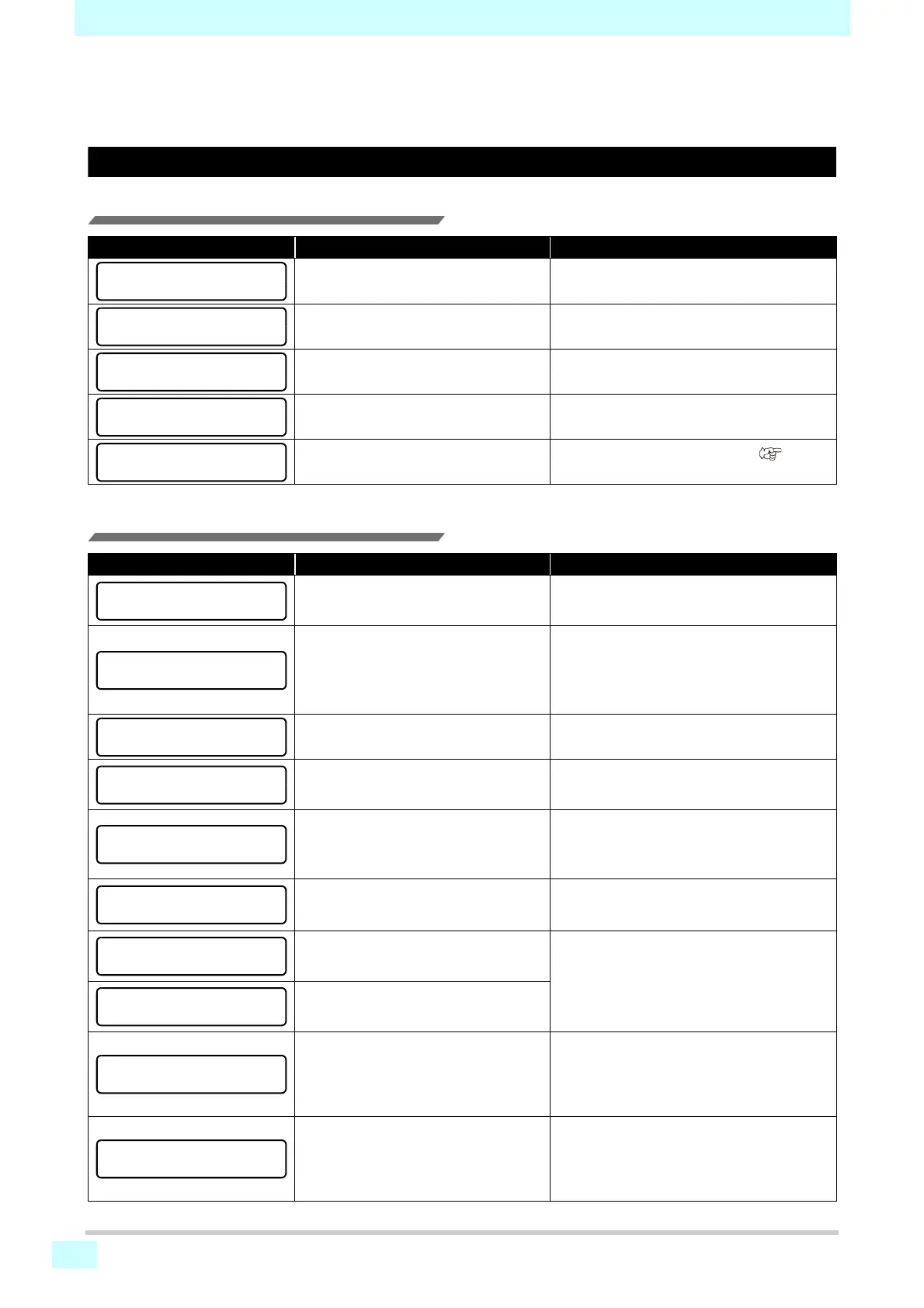
If a problem arises, the buzzer sounds and a message is displayed. Take appropriate measures based on the message.
Warning messages
Errors when performing operations
Messages displayed in local mode
Message Cause Corrective action
Operation cannot be performed because
no media was detected.
• Try again after media is detected.
The motor was deactivated because the
cover was opened, for example.
• Return to local mode and try the operation
again after initialization.
An ink error occurred.
• Try again after replacing with new ink car-
tridges.
The cover is open.
• Try again after closing the cover.
Data was received.
• Try again after clearing the data (
P. 2 -
12
).
Message Cause Corrective action
Multiple ink errors (unusable ink) have
occurred, preventing ink supply (printing,
cleaning, etc.).
• Replace with new ink cartridges.
The waste ink tank count has exceeded
the specified amount.
• Check the amount of waste ink in the waste
ink tank.
• Perform maintenance and waste ink tank
replacement, and then reset the amount of
waste ink.
The wiping count has exceeded the
specified amount.
• Perform maintenance, station maintenance,
and wiper replacement.
Displayed on startup following [ERROR
710 HEATER TEMP ERROR], after the
power is manually turned off.
• If Error 710 appears again, contact your
dealer, or our sales office or call center.
No media is loaded. Otherwise, sensor
failure has occurred.
• Load media.
If the message appears when media is
loaded, contact your dealer, or our sales
office or call center.
Print data was received in local mode.
• Switch to remote mode and start printing.
Otherwise, clear the data and cancel print-
ing.
Temperature in the environment where
the machine is installed is too high, pre-
venting stable printing.
• Adjust the ambient temperature to be within
the specified range (20–35°C).
Temperature in the environment where
the machine is installed is too low, pre-
venting stable printing.
No maintenance washing liquid cartridge
is loaded.
Wiper washing and tube/nozzle washing
(auto maintenance operations) cannot
be performed.
• Load a maintenance washing liquid car-
tridge.
There is no remaining maintenance liq-
uid.
Wiper washing and tube/nozzle washing
(auto maintenance operations) cannot
be performed.
• Replace with a new cleaning solution car-
tridge.
INVALID OPERATION
:!MEDIA UNDETECTED
INVALID OPERATION
:MOTOR POWER OFF
INVALID OPERATION
:INK ERROR
INVALID OPERATION
COVER OPEN
INVALID OPERATION
DATA REMAIN
HEATER TEMP ERROR
POWERED OFF
Wash liquid cartridge none











 To Next Page