Chapter 3 Settings
3-8
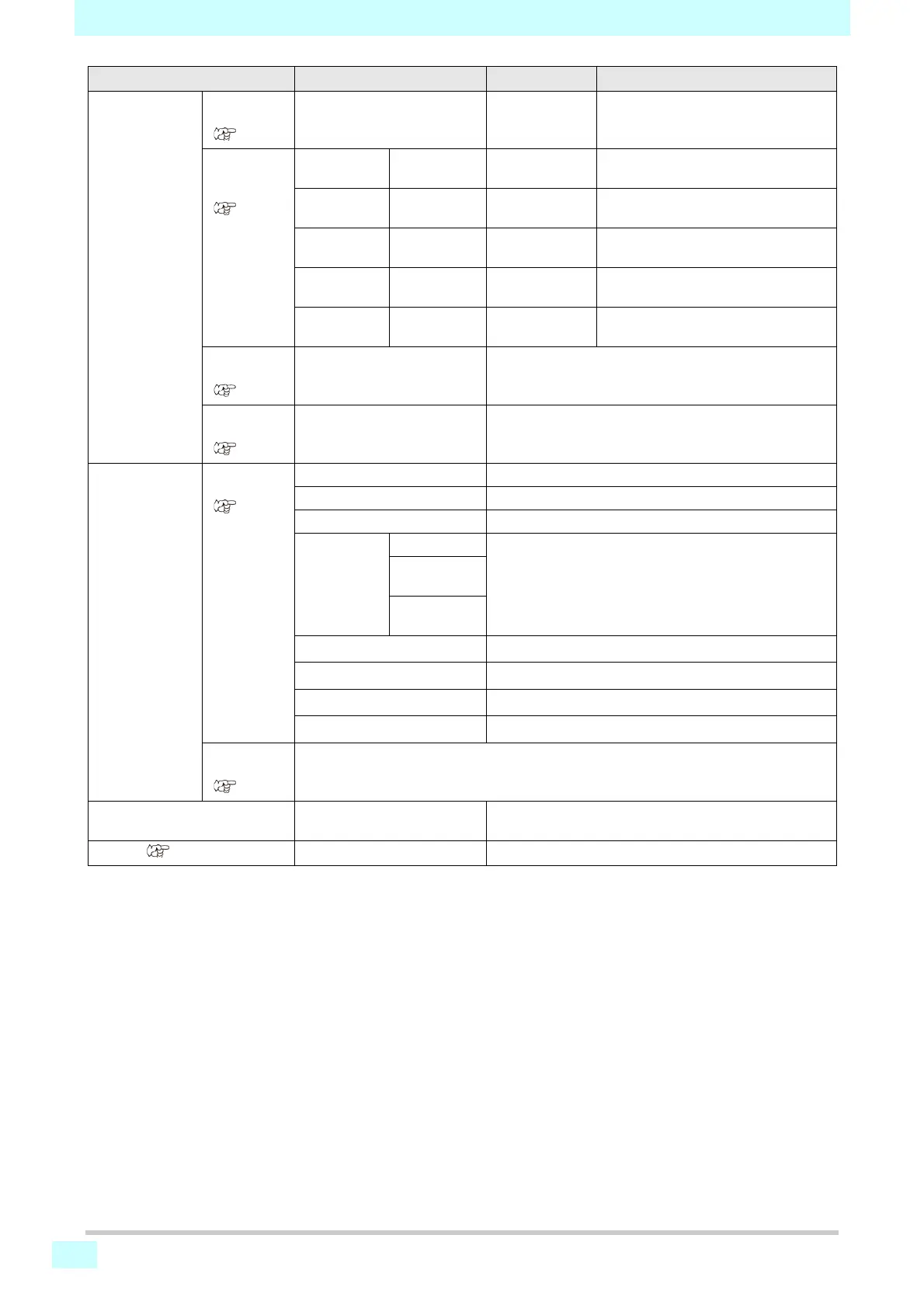
EVENT MAIL TRANSMIT
TEST
(P.3-12)
ON / OFF OFF Sets whether to send email when a
specified event occurs.
SELECT
EVENT
SELECT
(P.3-12)
PRINT
START
ON / OFF OFF Sets whether to send email when
printing starts.
PRINT END ON / OFF OFF Sets whether to send email when
printing ends.
ERROR
EVENT
ON / OFF OFF Sets whether to send email when
errors occur.
WARNING
EVENT
ON / OFF OFF Sets whether to send email when
warnings occur.
OTHER
EVENT
ON / OFF OFF Sets whether to send email when
events other than the above occur.
MAIL
ADDRESS
(P.3-12)
Sets the recipient email
address for event mail.
Alphanumeric characters and symbols (up to 96
characters)
MESSAGE
SUBJECT
(P.3-12)
Sets the text for the subject of
event mail.
Alphanumeric characters and symbols (up to 8
characters)
EVENT MAIL SERVER
SETUP
(P.3-12)
SMTP ADDRESS Sets the SMTP server.
SMTP PORT No. Sets the SMTP port number.
SENDER MAIL ADDRESS Sets the sender email address.
Authentication OFF Sets the method of SMTP server authentication.
POP before
SMTP
SMTP
Authentication
USER NAME
*2
Sets the user name for authentication.
PASS WORD
*2
Sets the password for authentication.
POP3 ADDRESS
*3
Sets the POP server address.
APOP
*3
Sets APOP on or off.
TRANSMIT
TEST
(P.3-13)
Sends a test email.
Auto Remote ON / OFF Sets whether to automatically switch to REMOTE mode
and start printing if data is received locally.
RESET ( P.3-15)
Restores the default values of all setting items.
*1. Available when both DHCP and AutoIP are set to OFF.
*2. Available only when Authentication is not OFF.
*3. Available only when Authentication is POP before SMTP.
Function name Setting value Default Setting Details









 To Next Page