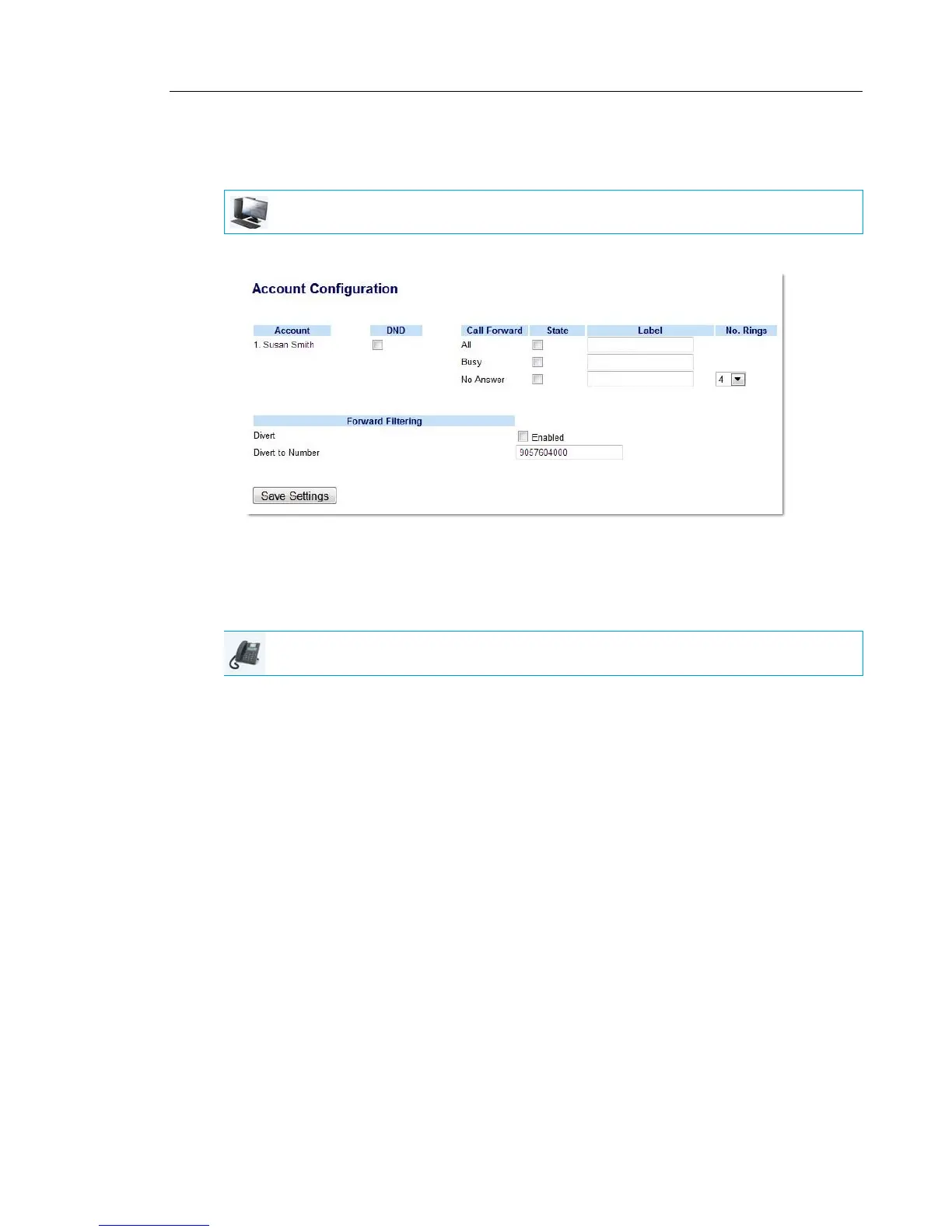
To Deactivate Call Forwarding of Filtered Calls
Use the following procedure to deactivate call forwarding of filtered calls:
1. Click on Basic Settings->Account Configuration.
2. Remove the checkmark in the “Enabled” box beside the “Divert” option under “Forward
Filtering”.
3. Click Save Settings.
1. Press the Options key, the 2 navigation key, and then the Enter key to enter the Call
Forward menu
or
Press the Call Forward programmable key.
2. Press the 2 navigation key three times to select Forward Filtering.
3. Press the Change key to enter the Call Forward Mode Forward Filtering menu.
4. Press the 2 navigation key to highlight the Call Forward State menu.
5. Press the Change key to enter the Call Forward State menu.
6. Press the Next key to toggle the Call Forward State option from ON to OFF.
7. Press the Set key.
8. Press the Done key.
9. Press the Confirm key to apply the changes.
An X will be displayed beside Fwd Filtering indicating call forwarding of all filtered calls is
to be deactivated.
10. Press the Done key again.
11. Press the Confirm key again.
MITEL WEB UI
IP PHONE UI



 To Next Page