63
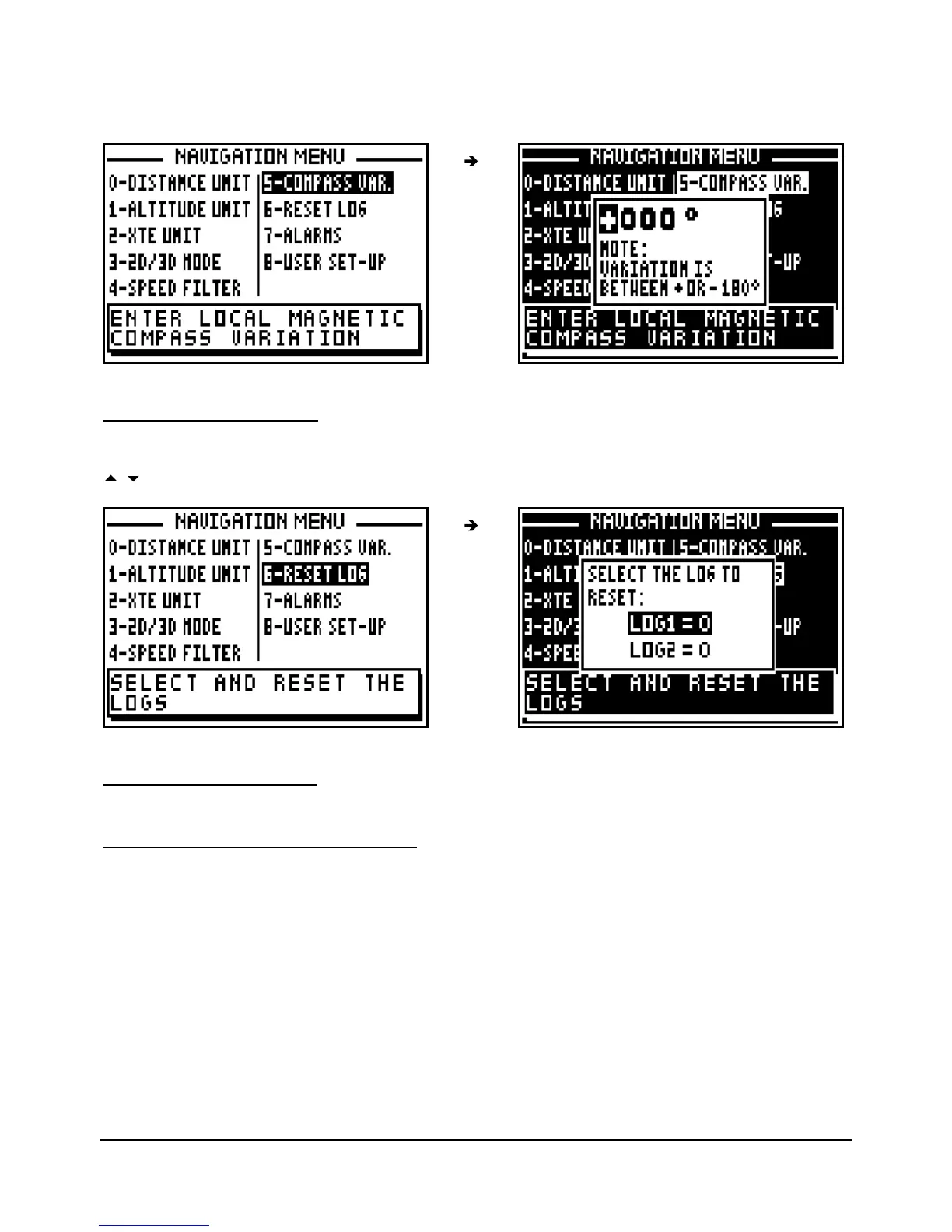
From the NAVIGATION MENU, press key 4 (or select 4-COMPASS VAR. and press
Enter
). If
necessary use the 1 key to change the sign from + to -, then enter the compass variation using
the numeric keys and press
Enter
t
o validate.
7.2.7
–
RESET TRIP LOGS
From the NAVIGATION MENU, press key
5
(or select 5
-
RESET LOG and press
Enter
). Use the
arrow keys to select the log to reset (LOG1 or LOG2) and press Enter
.
7.2.8.
–
SET THE ALARMS
7.2.8.A
–
WAYP
OINT ARRIVAL ALARM
The arrival alarm sounds to warn you of your arrival at your destination waypoint or to inform
you that you have completed the leg of a route.
The adjustable options are:
ON/OFF = On Off of the audible alarm (the visual alarm and the passage to the following
waypoint in the ROUTE function are always active).
MODE = the audible alarm gives out BEEPS for a duration of 10 seconds or for an unlimited
time until the user presses a key on the keyboard.



 To Next Page