MANUAL-75-v2.0 35 of 82
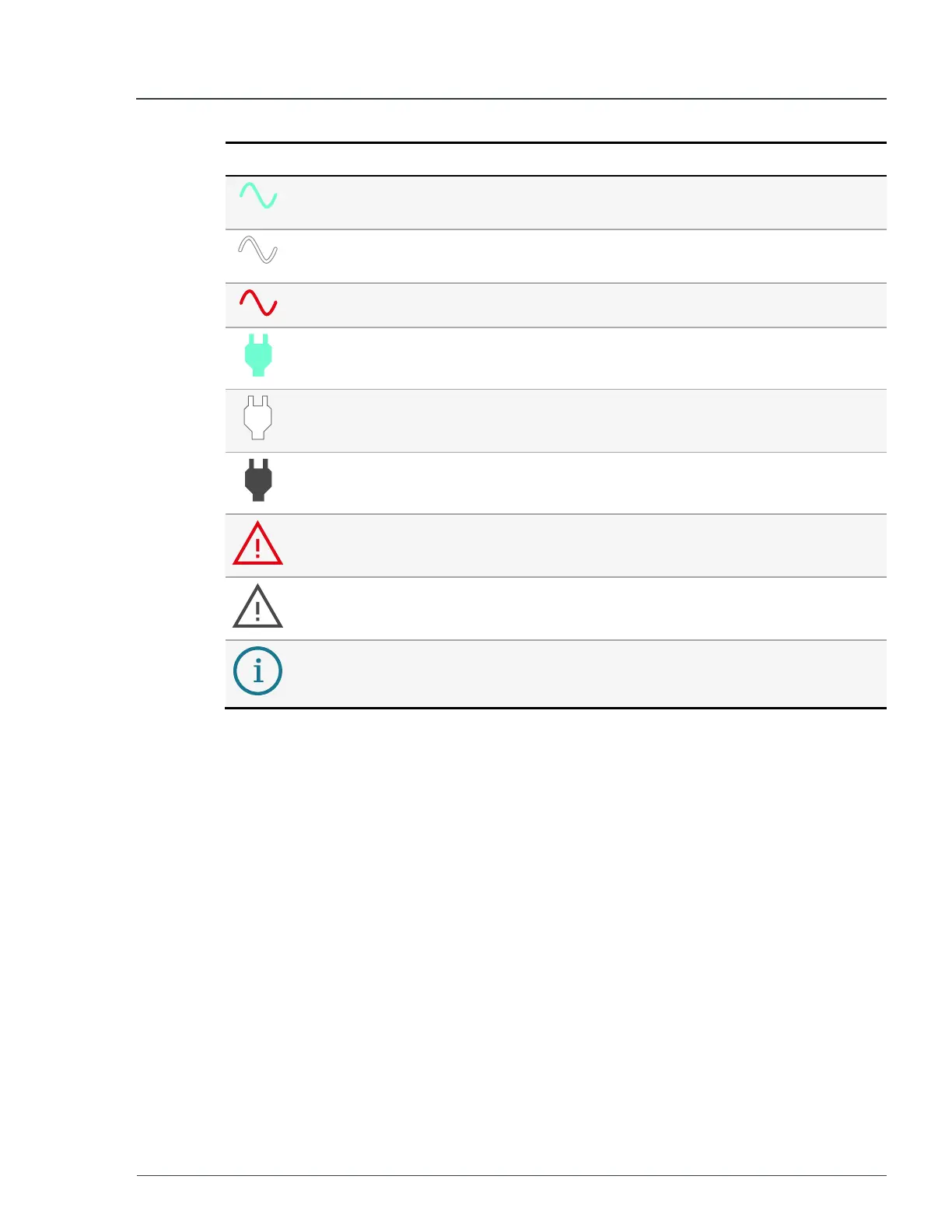
Icon Description Meaning
Power wave
green
The MPU operating normally and displays the set voltage.
Power wave
white
The MPU is in standby. The voltage is set but not outputting.
Power wave red There is a voltage mismatch error.
Plug green The MPU is charging.
Plug white The MPU is connected to a charging supply but not initialized.
Plug grey No charging connection established.
Warning red There is a system fault.
Warning grey No system errors detected.
Info blue There is a voltage mismatch warning.
2.6.2 Voltage mismatch behavior
Voltage mismatch behavior occurs under the following conditions.
l
Mismatch occurs when a user changes the voltage mode before confirming
using a button press.
l
If a voltage mismatch happens while the system is in
STANDBY
, the display
shows:
l
Blue info icon is normally where the fault icon would is located.
l
Text indicating that you have confirmed the new voltage by pressing
switch one.
l
If a voltage mismatch happens while the system is in
RUN
, the display shows:
l
Red fault icon.
l
Red voltage icon (wave next to the voltage value).
2 Hardware description MP75-600 - User Manual


 To Next Page