Bolt X Quick Start Guide
54
Checking if Yaskawa YRC1000 Output File is set
to Flair
The Yaskawa YRC1000 is set to communicate with Flair in the factory. If
for some reason, this has changed then the robot will fail to communicate
with Flair. The file names used for Flair is Flair2Motoman.out. To check
this setting:
1. Turn on the robot (YRC1000).
2. In the Pendant, select MAIN MENU → JOBS → JOB.
3. The Job name should be FLAIR. If the Job name is RTOS then the
system needs to configured for Flair. Contact MRMC if this is the
case.
Resolving Position Error on Track
If after hard acceleration or deceleration, the robot doesn’t go to accurate
Home position. Or if after an emergency stop, the robot stopped too
quickly and fails to Home position later, the coupling between the
gearbox and track motor might be lose and should be tightened. To do so:
1. Ensure that the tack pinion is not in mesh.
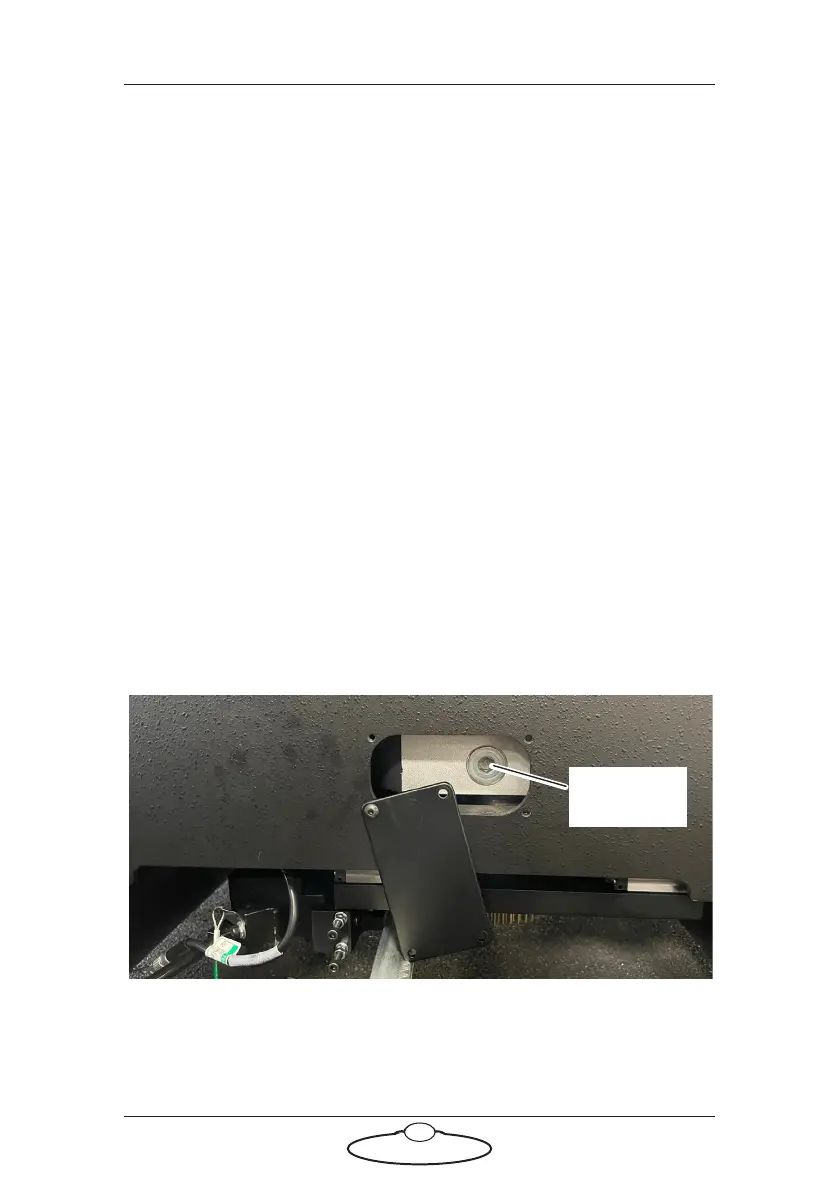
2. Access the coupling by opening the hatch in the Bolt X base and
removing the screw, as shown.
Remove the
screw



 To Next Page