• Mount the sensor on top of the duct to allow water and
dirt to naturally drip off the sensor within the duct and
prevent clogging.
• That allows the dual module sensor calibration gas tubing to be
routed to the read-out module. Any gas-compatible tubing can
be used (not supplied in Kit).
• Keep this tubing as straight and short as possible.
• Beyond any filter or cleaning unit.
• Away from the lowest point on the duct, which tends to collect
additional dirt and dust.
• Away from any fans or blowers.
The Ultima Gas Monitor with Duct Mount Kit requires some
assembly before mounting. It is necessary to temporarily remove
the sensor from the module housing and install the sealing
gaskets. All necessary hardware is provided in the Kit.
Mounting the Single Module Model
1. Locate the duct to be sampled.
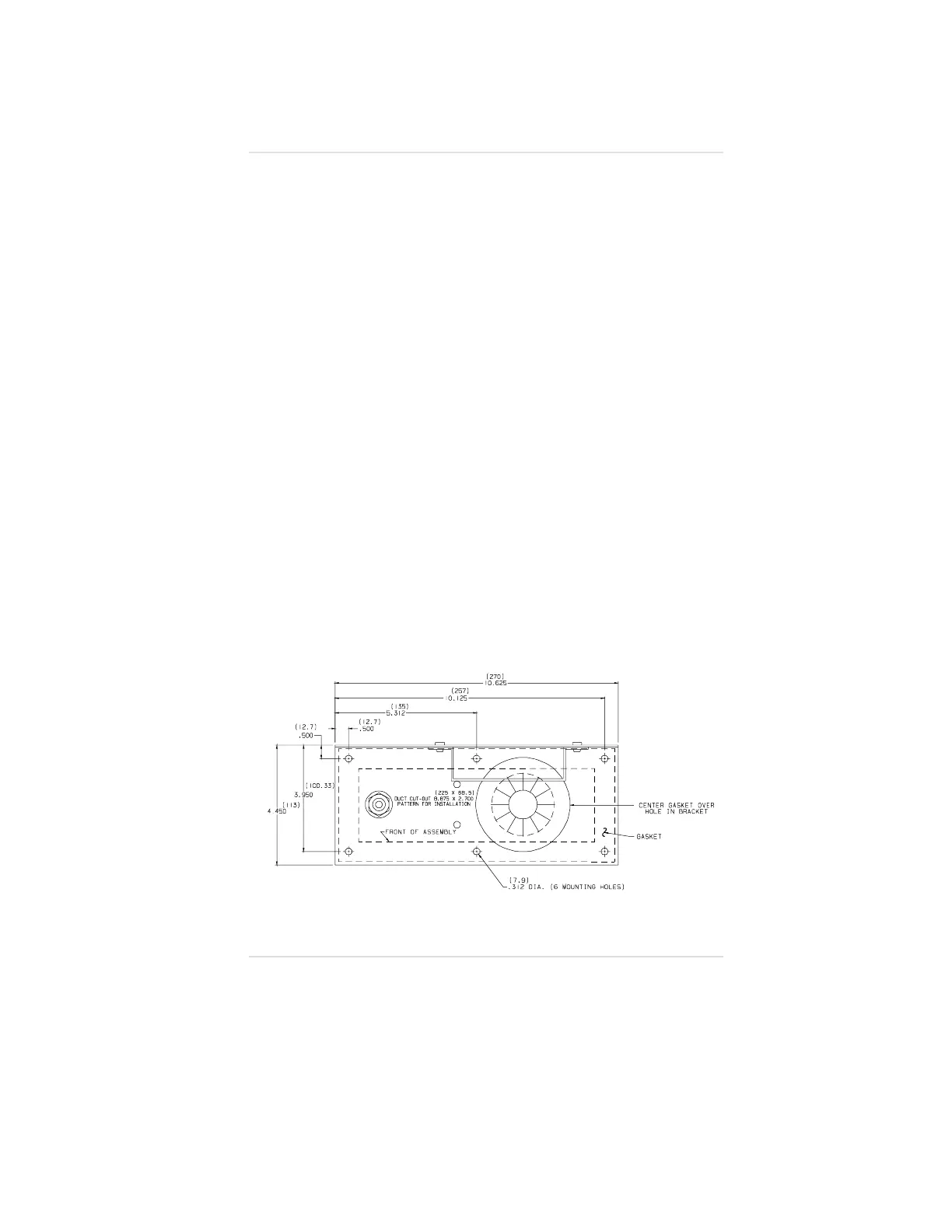
2. Using dimensions from FIGURE A-2, cut a rectangular hole
[8.875 by 2.7 inches (225 by 68.5 mm)] in the duct.
• The gasket on the bottom of Duct Mount Kit must sit flat
on the duct.
• If necessary, pre-drill the fastener holes.
• Do not remove the gasket paper lining on the Duct
Mount Kit at this time
Figure A-2.
Duct Template
Appendix A, Optional Ultima Duct Mount Kit
A-3



 To Next Page