“Confidential, Do Not Duplicate without written authorization from NEC.”
7-14
ADJUSTMENTS AND INSPECTIONS ATTRIBUTABLE TO THE REPLECEMENT OF ELECTRICAL AND OPTICAL PARTS
2. Update
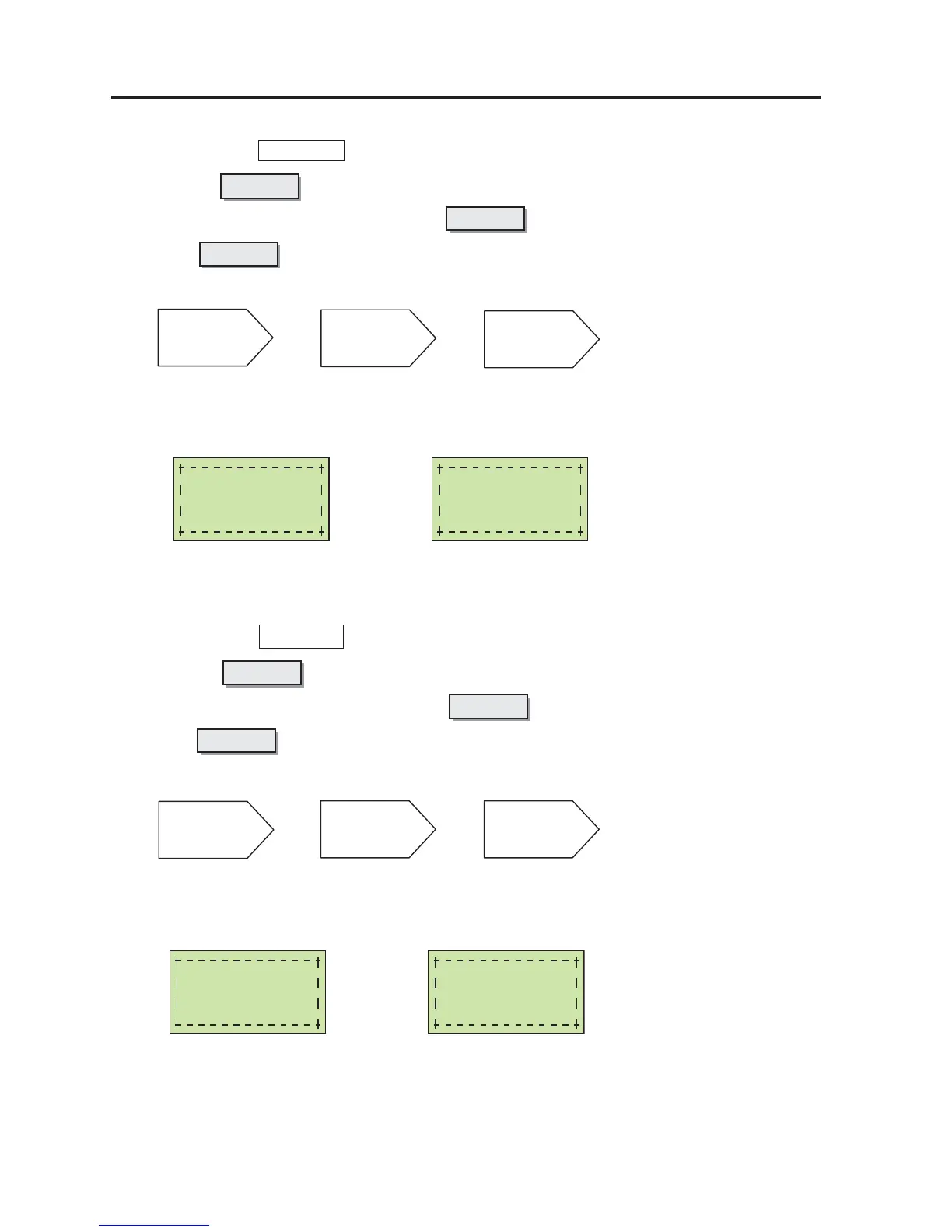
2-1. Firm (Projector " MENU CTL " key operation)
1 Pressing the key, turn ON the Power SW.
2 When the Status LED is turned green, press the key.
3 Press the key.
123
CANCEL
CANCEL
UP
POWER SW
+
CANCEL
CANCEL
UP
LCD display
Firmware Update
∗
Firm writing End of Firm writing
Firmware Update
Completed
4 Turn OFF the Power SW.
Note) Failure in writing: Power LED keeps blinking in red.
⇒⇒
⇒⇒
⇒ Retry writing.
2-2. Data (Projector " MENU CTL " key operation)
1 Pressing the key, turn ON the Power SW.
2 When the Status LED is turned green, press the key.
3 Press the key.
123
CANCEL
CANCEL
MENU
POWER SW
+
CANCEL
CANCEL
MENU
LCD display
Data Update
∗
Data Update
Completed
Data writing End of Data writing
4 Turn OFF the Power SW and remove the Compact Flash memory.
Note) Failure in writing: Power LED keeps blinking in red.
⇒⇒
⇒⇒
⇒ Retry writing.
After the completion of Firm and Data writing, make the Projector assume the "Standby" condition.
According to "Information → Version" of the LED menu, check the version for the three items specified below.
BIOS / Firmware / Data


 To Next Page