Copyright © 2011 NEXCOM International Co., Ltd. All Rights Reserved.
7
NSA 5130 User Manual
Chapter 1: Product Introduction
Getting to Know NSA 5130
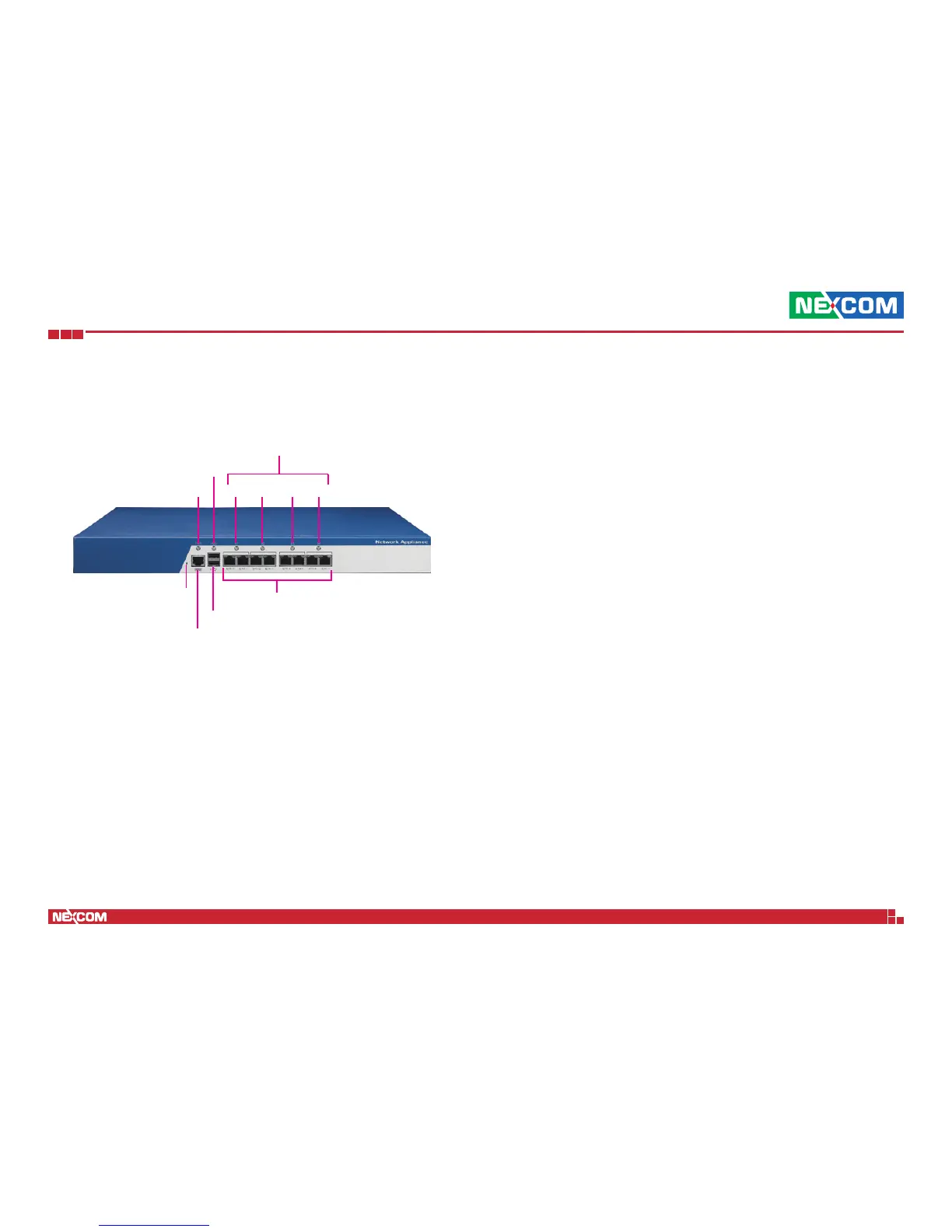
RJ45 type
console LAN port
HDD LED
Power LED
USB ports
Power LED
Indicates the power status of the system.
HDD LED
Indicates the status of the hard drive.
LAN/Bypass Status LEDs
Indicates the status of the LAN/Bypass (F3/F7 bit2 to bit5).
USB Ports
Used to connect USB 2.0/1.1 devices.
Console LAN Port
Used to connect RJ45 type Console port.
GPIO Software Button
This is a GPIO software button.
Copper LAN Ports
Used to connect LAN network devices.
Front Panel
Copper LAN ports
GPIO software
button
Bit2 Bit3 Bit4 Bit5
LAN/Bypass Status LEDs
F3/F7 address


 To Next Page