Electrical System 48Service Manual – SC2000
Battery Charge State Display
(Signicant levels for machine operation)
INDICATION
TRANSITION THRESHOLD (VOLT)
CONSEQUENCE
WET GEL
1 22V 22.2V Little remaining run time, no block.
2 20.4V 21.6V Brush OFF
3 19.4V 20.6V Vacuum system OFF
4 18.4V 19.6V Drive system OFF
Checking/Replacing Fuses
1. Drivethemachineonaleveloorandremovetheoperatorkey.
2. Disconnect the red battery connector by pressing the emergency push-button.
3. Lift the recovery tank.
4. Remove the 3 screws and remove the upper cover.
5. Remove the 2 screws and remove the electronic board front cover.
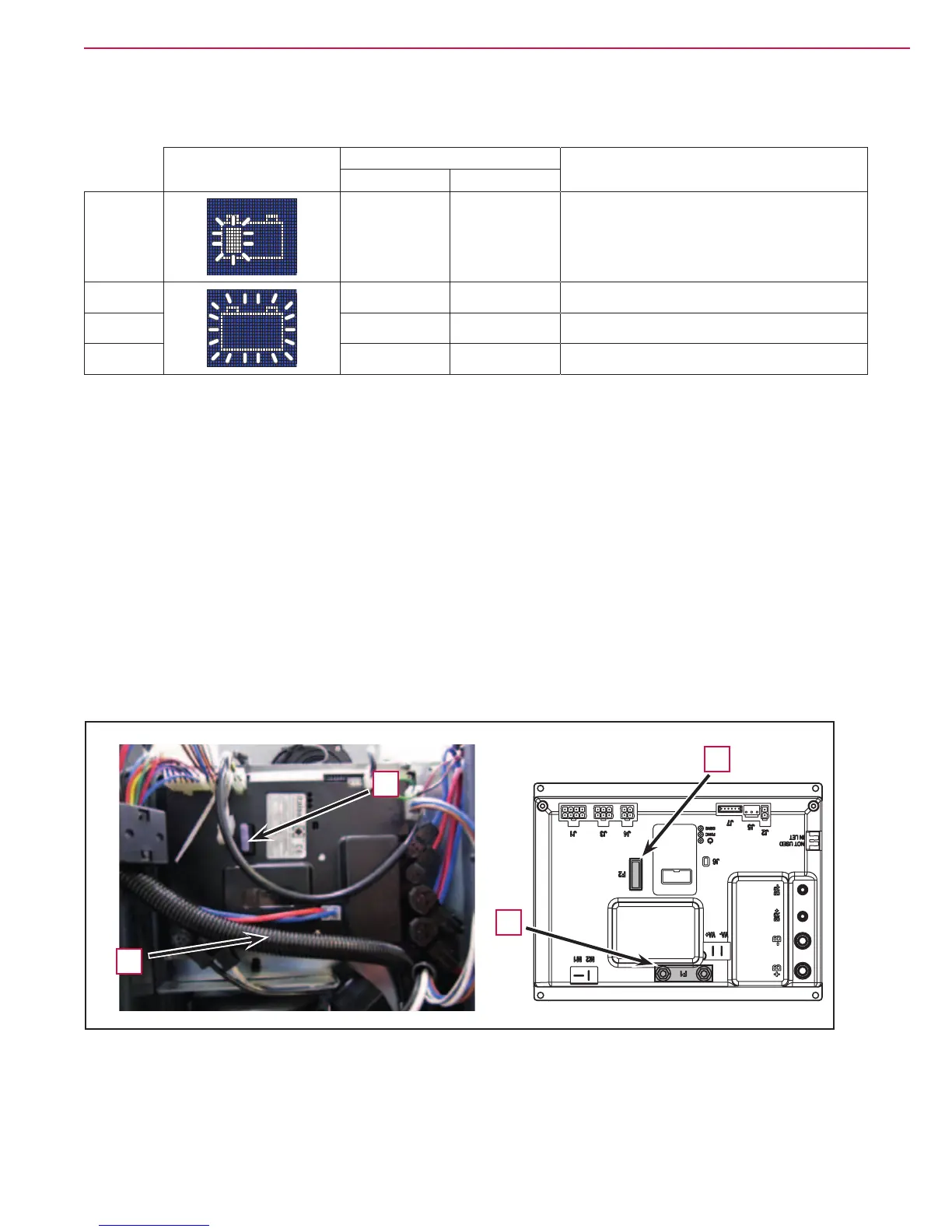
6. Check/replace the following fuses (Figure 7):
◦ (F1) 100A midi fuse - Function electronic board (A).
◦ (F2) 3A blade fuse - Signal circuits (B).
7. Place the function electronic board assembly in its housing, tighten the mounting screws and install the
electronic component compartment cover.
Figure 7
B
B
A
A



 To Next Page
 Loading...