Scrub System, Disc 70Service Manual – SC2000
Checking/Replacing Brush Motor Carbon Brushes
Check
1. Remove the brush deck.
2. Remove any dust and dirt from around the brush motor carbon brushes.
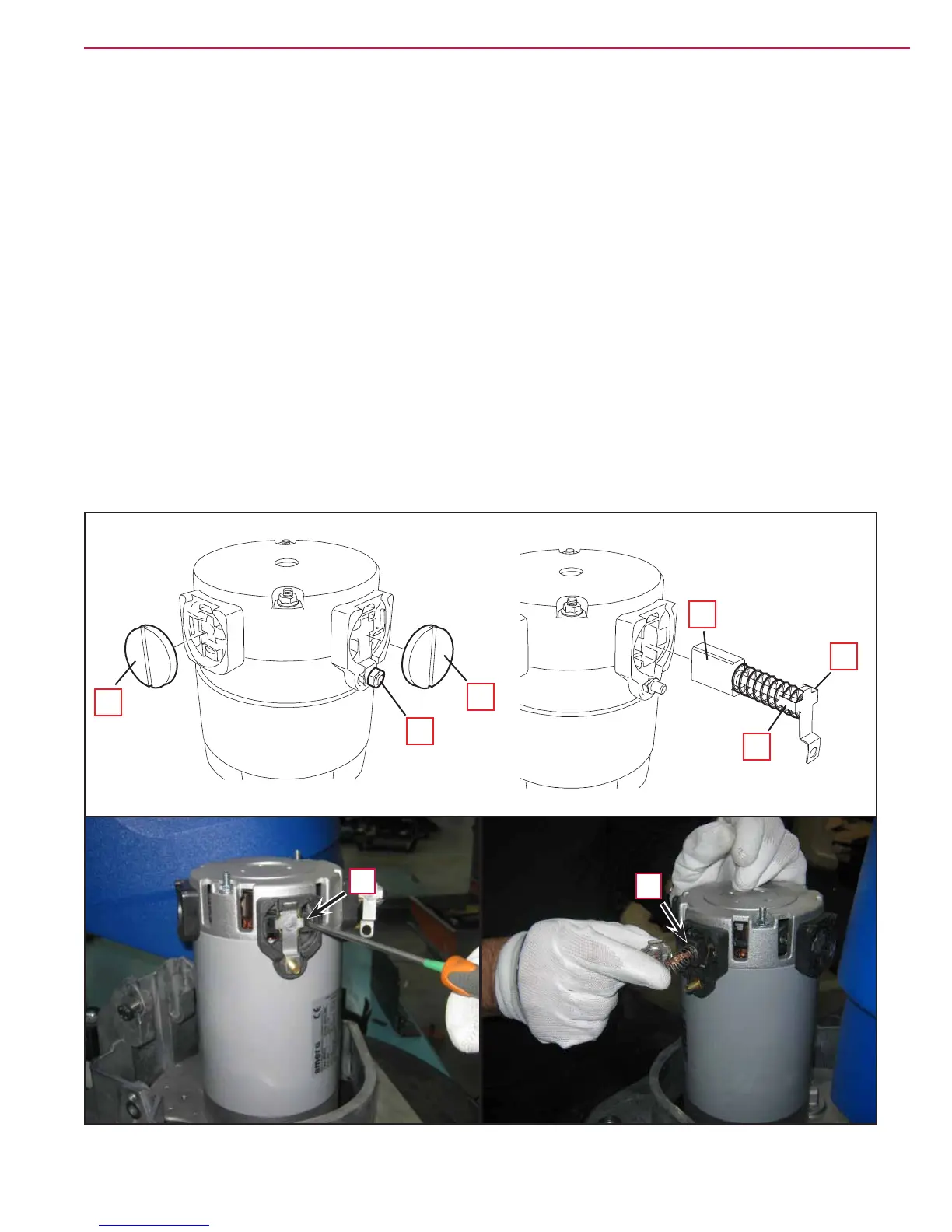
3. Remove the four protective covers (A) (Figure 10) by disconnecting the clips.
4. Remove the carbon brush nuts (B) with the lead-in wires.
5. Disengage the tabs (C) and remove the carbon brushes (D).
6. Check the carbon brushes (D) for wear. The carbon brushes are worn out when:
◦ They do not make sufcient contact with the armature of the brush motor due to their wear
◦ When their contact surface is not intact
◦ When the residual stroke is below 0.12 in (3 mm)
◦ When the thrust spring etc. is broken
7. Replace the carbon brushes as an assembly.
Reassembly
8. Assemble the components in the reverse order of disassembly.
A
A
B
D
C
C
Figure 10
D
C



 To Next Page
 Loading...