26
www.norcold.com
2118, 2118IM, 2118IMD Series
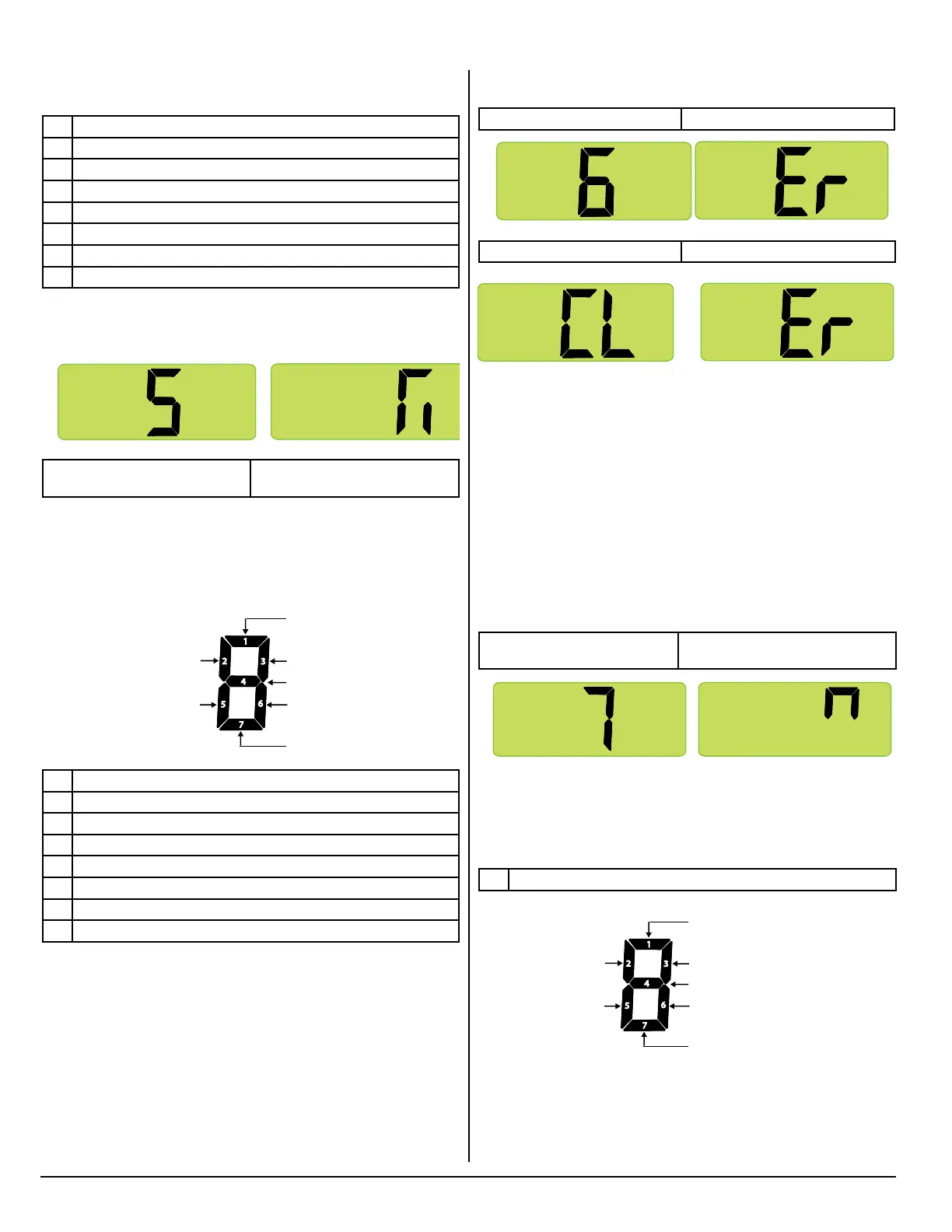
Press the MODE button to bring up screen 6.
Screen 6 (Initial view) Screen 6 (Second view)
Screen 6 (Third view) Screen 6 (Fourth view)
Screen 6 provides a way to erase fault history from memory. To
erase the fault history:
■ Press and hold the Temperature Set button (approximately ve
(5) seconds) until “CL” shows on the screen.
■ Once “CL” is displayed, release the Temperature Set button.
■ Press and hold Temperature Set button (approximately ve (5)
seconds) until “Er” is displayed again. At this point, the fault his-
tory has been cleared on both Screen 4 and Screen 5.
Screen 7. Power Board Inputs
Press the MODE button to bring up screen 7.
Screen 7 (Initial view) Screen 7 (Second view)
All segments shown as being on
Screen 7 displays “live” power board inputs using lighted LED
segments. Refer to illustration below for “live” input denitions of
the individual LED segments. If a power board input is active or
“live,” its assigned input LED segment will be on.
Individual Segment Identification
LED segment will be on.
Individual Segment Identification
1 Ignition fault.
2 Door ajar.
3 DC voltage low.
4 DC voltage high.
5 AC mode selected but not available.
6 AC relay stuck closed.
7 AC heater failed open.
Screen 5. Stored Fault History
Press the MODE button to bring up screen 5.
Screen 5 (Initial view) Screen 5 (Second view)
All segments shown as being on
Screen 5 also displays stored fault history using lighted LED seg-
ments. Refer to illustration below for fault history denitions of the
individual LED segments. If a fault occurred, its assigned fault
history LED segment will be on.
Individual Segment Identification
1 Thermistor failure.
2 Flame present with gas off.
3 Not used.
4 Not used.
5 Service required error has occurred.
6 AC voltage has been high.
7 Not used.
Screen 6. Erasing Fault History
Diagnostic Mode, cont’d.
Diagnostic Screen 5 (Initial View)
Diagnostic Screen 5 (Second View)
1
2
3
5
6
7
4
Flame present
with gas off
Service required
error has occured
Thermistor failure
Not used
Not used
AC voltage has been high
Not used
NOR000125A-5
Diagnostic Screen 5 (Initial View)
Diagnostic Screen 5 (Second View)
1
2
3
5
6
7
4
Flame present
with gas off
Service required
error has occured
Thermistor failure
Not used
Not used
AC voltage has been high
Not used
Diagnostic Screen 6 (Initial View)
Diagnostic Screen 6 (Second View)
NOR000125A-6
Diagnostic Screen 6 (Third View)
Diagnostic Screen 6 (Initial View)
Diagnostic Screen 6 (Second View)
NOR000125A-6
Diagnostic Screen 6 (Third View)
Diagnostic Screen 7 (Initial View) Diagnostic Screen 7 (Second View)
1
2
3
5
6
7
4
Flame is sensed
Not used
Food compartment light
is off and door is closed
Thermistor is sensing fin temperature
Not used
Not used
Not used
NOR000125A-7
Diagnostic Screen 7 (Initial View) Diagnostic Screen 7 (Second View)
1
2
3
5
6
7
4
Flame is sensed
Not used
Food compartment light
is off and door is closed
Thermistor is sensing fin temperature
Not used
Not used
Not used
Diagnostic Screen 6 (Initial View)
Diagnostic Screen 6 (Second View)
NOR000125A-6
Diagnostic Screen 6 (Third View)



 To Next Page