文件编号:NR-TP-0715-008 版本:1.0
- 15 -
The monitor uses high-resolution color TFT LCD, which can clearly show the physiological
parameters and waves and other information of patients and provide patient information,
alarm information, clock, monitor status and other tips. The figure below is the standard
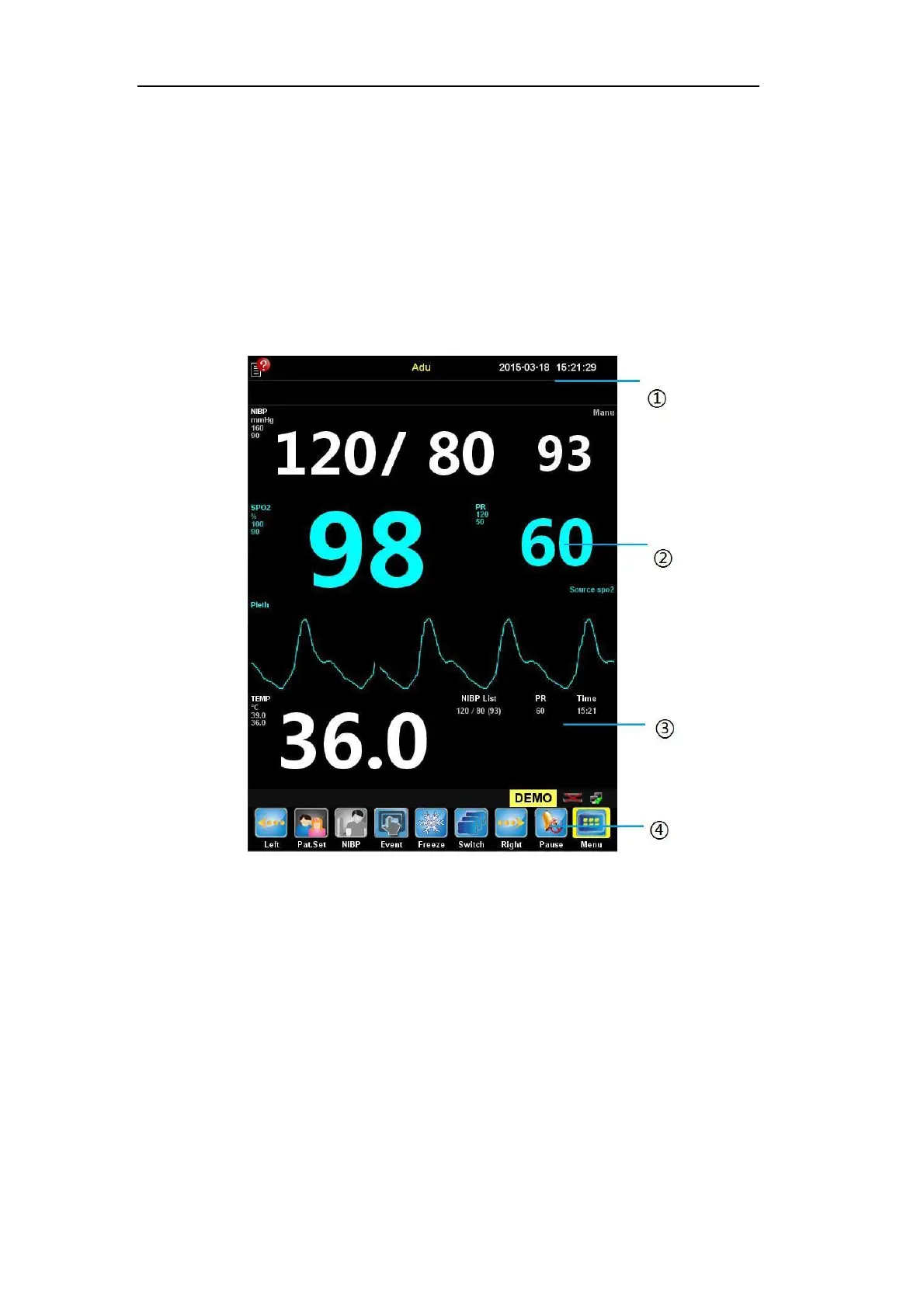
interface (demo mode) of the monitor in the normal monitoring state.
The screen of the standard interface is divided into four areas:
○
1 Info area,
○
2 Parameter
area and wave area,
○
3 NIBP list
○
4 Smart hotkey area.
Fig. 2-4 Standard Interface (Demo Mode)
1. Introduction of info area (
○
1 )
The info area includes patient information, alarm status icon, physiological alarms and
technical alarms from left to right.
2. Parameter area and wave area (
○
2 )
It consists of small parameter areas, which show the corresponding parameter
measurement value and current upper and lower alarm limits of each parameter module.
The parameters are shown in fixed positions, that is, from top to bottom and from left to
right:
ECG parameter area


 To Next Page