文件编号:NR-TP-0715-008 版本:1.0
- 64 -
12.5 ECG Setup
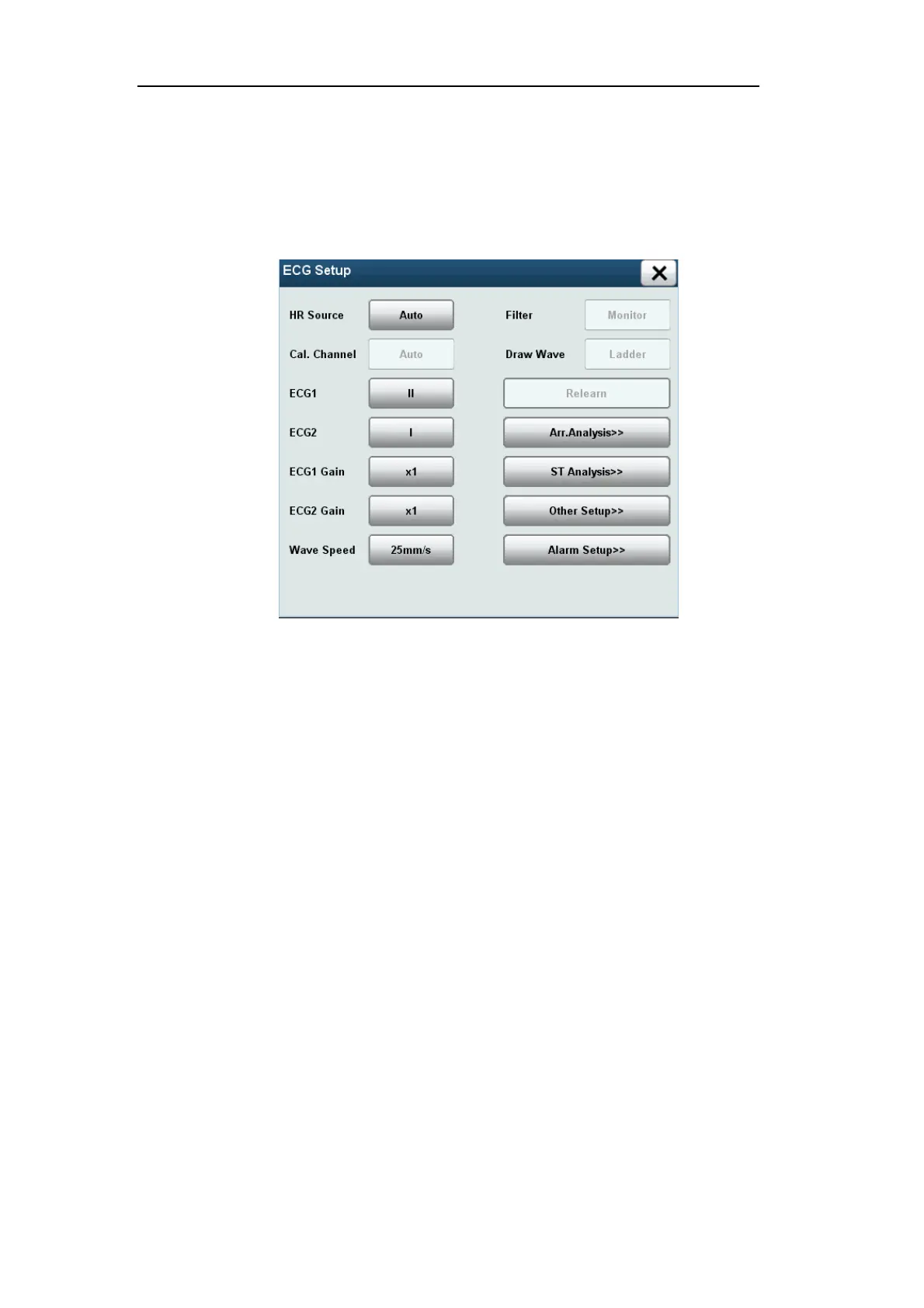
Click the ECG parameter area or wave ECG area to pop up the [ECG Setup] menu, which is
as shown below. You can set the ECG through the [ECG Setup] menu.
Fig. 7-6 [ECG Setup] Menu
Select [HR Source], and set the heart rate source:
[Auto]: Automatically select HR source.
[ECG]: Select ECG monitoring as the HR source.
[SPO2]: Select SpO2 monitoring as the HR source.
Select [Cal.Channel] and select heart rate calculation channel.
Select [ECG1] / [ECG2] to set the display wave channel. Select ECG1/ECG2, and set the
names of upper ECG wave and lower ECG wave on the screen.
ECG1/ECG2 should not be the source of the same wave.
Select [ECG1 Gain] / [ECG2 Gain] and set the ECG wave gain. When the wave is
shorter, increase the wave gain factor appropriately; when the wave is high or the peak
cannot be displayed, reduce the wave gain appropriately.
Select [Wave Speed], and set the wave speed.
Select [Filter], and set the filter mode:
[Monitor]: Monitor mode
[Diagnostic]: Diagnostic mode
[Surgery]: Surgery mode


 To Next Page