文件编号:NR-TP-0715-008 版本:1.0
- 19 -
You can directly click on the touch screen to quickly and easily accomplish some operations.
4.1.4 Using Soft Keyboard
Click on the edit box, and the system will display the soft keyboard on the screen; you can
turn the shuttle or use the touch screen to select characters one by one, and input data. Use
the Back key to delete a single character; use the Enter key to confirm that you have finished
entering and close the soft keyboard.
4.1.5 Using Menu
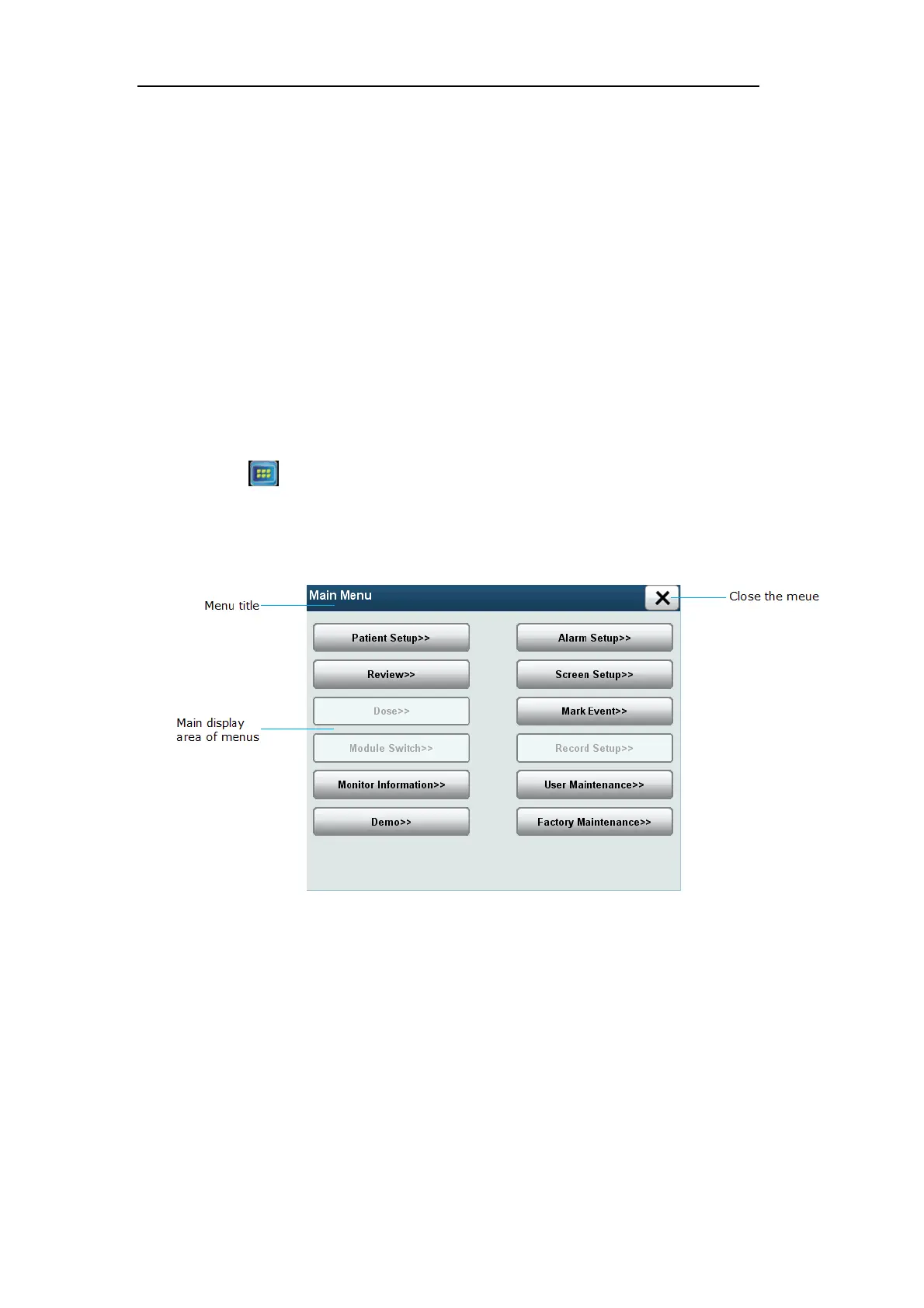
Select the [Menu] key on the monitor interface via the shuttle or directly the touch
screen to open the [Main Menu] as shown below. Through the main menu, you can complete
most of the operations and settings.
Fig. 3-1 [Main Menu]
The style of other menus is basically similar to the [Main Menu], and generally consists of
the following components:
Menu title: a summary of the current menu.
Close menu: Close the current menu, exit the current menu or close the current menu
and return to the previous menu.
Main display area: display options, buttons or prompt messages. The symbol ">>"
indicates that selecting this option can enter the corresponding submenu.
Confirmation key area: Some menus contain a confirmation key area to confirm the


 To Next Page