文件编号:NR-TP-0715-008 版本:1.0
- 22 -
Select [User Maintenance >>] →enter the password and confirm → [User Maintenance]
menu;
Select [Unit Setup >>] → [Unit Setup] menu;
Select [Height], and select the unit [cm] / [inch] as needed.
Select [Weight Unit], and select the unit [kg] / [lb] as needed.
Select [Press.Unit], and select the unit [mmHg] / [kPa] as needed.
Select [Temp Unit], and select the unit [°C] / [°F] as needed.
4.2.6 Network Setup
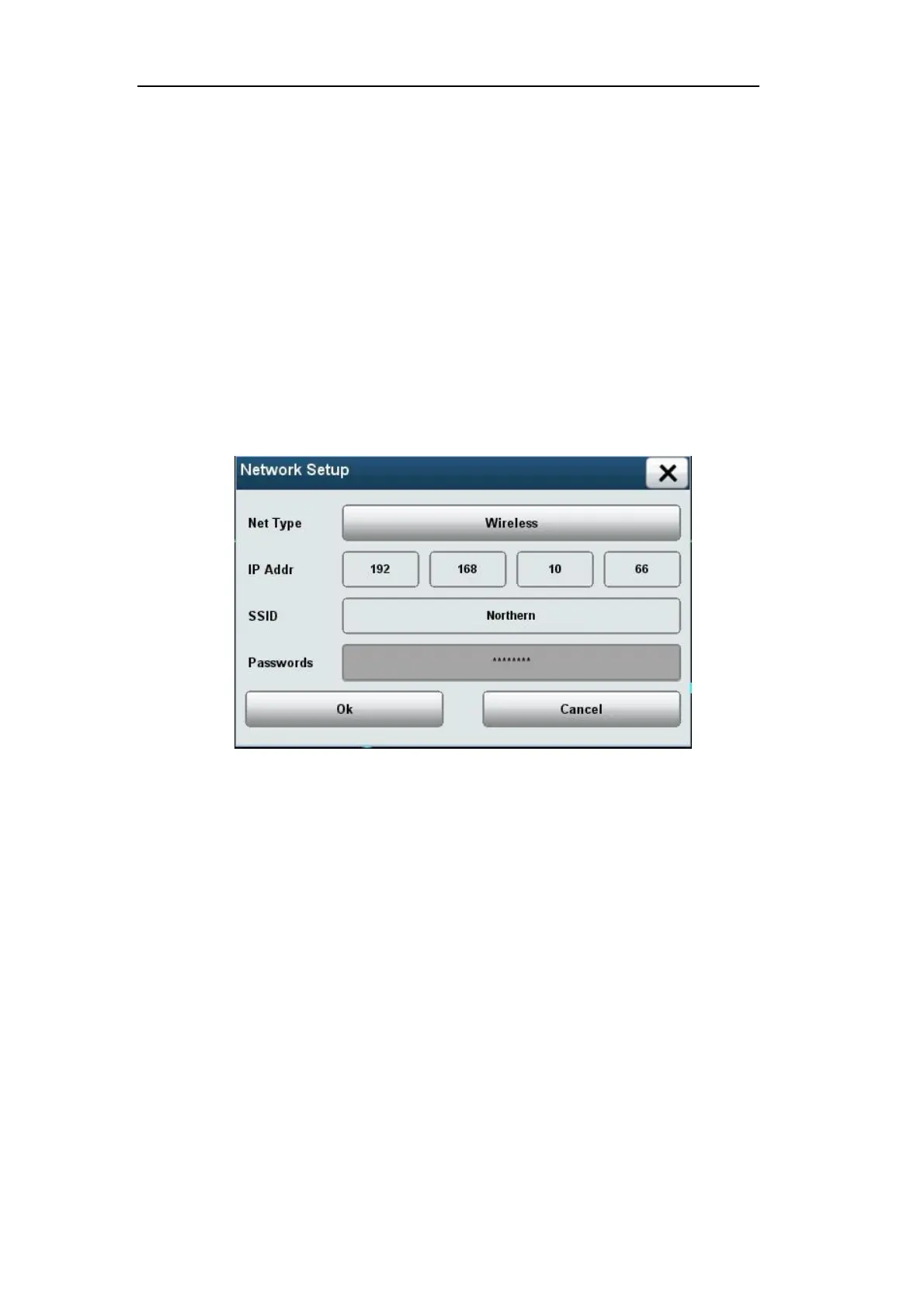
Press【Main Menu】→【UserMaintenance】→【Network Setup】to connect the monitor
with CMS.
4-2Network Setup
1.Press【Net Type】to choose the network type.
2.Press【IP Add】to set the IP address of the monitor.
3. If the network type is wireless, type then network name in【SSID】and type the password
in【Passwords】and press【OK】key. If the network type is wired, then ignore【SSID】and
【Passwords】


 To Next Page