文件编号:NR-TP-0715-008 版本:1.0
- 28 -
Chapter6 User Interface
The monitor has four working interfaces, which are “Normal Screen”, “Big Numerics”,
“ECG 7-Lead Half-Screen” and “ECG 7-Lead Full-Screen”. The user can select the working
interface according to needs, and get different screen information. Below describes the
working interfaces.
6.1 Selecting User Interface
Select the user interface as follows:
Select [Switch] smart hotkey→[Screen Setup];
Select [Screen Select], and select the user interface according to needs:
[Normal Screen]: Standard interface.
[Big Numerics]: Big font interface.
[ECG 7-Lead Half-Screen]: ECG 7-lead half-screen.
[ECG 7-Lead Full-Screen]: ECG 7-lead full screen.
6.2 Interface Introduction
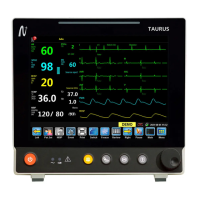
6.2.1 Normal Screen
The normal screen is as shown in 6-1:


 To Next Page