文件编号:NR-TP-0715-008 版本:1.0
- 67 -
[30min]: observe the trend of the last 120 hour at 30min interval.
[60min]: observe the trend of the last 120 hour at 60min interval.
Browse the trend chart in the following method:
Select and to move the trend cursor.
Select and to turn pages to left or right and move the trend chart.
The cursor top displays the current time corresponding to the current cursor
position, and the left of the trend chart window displays the parameter values of the
time, which will change automatically with the move of trend cursor.
13.2 Reviewing Trend Table
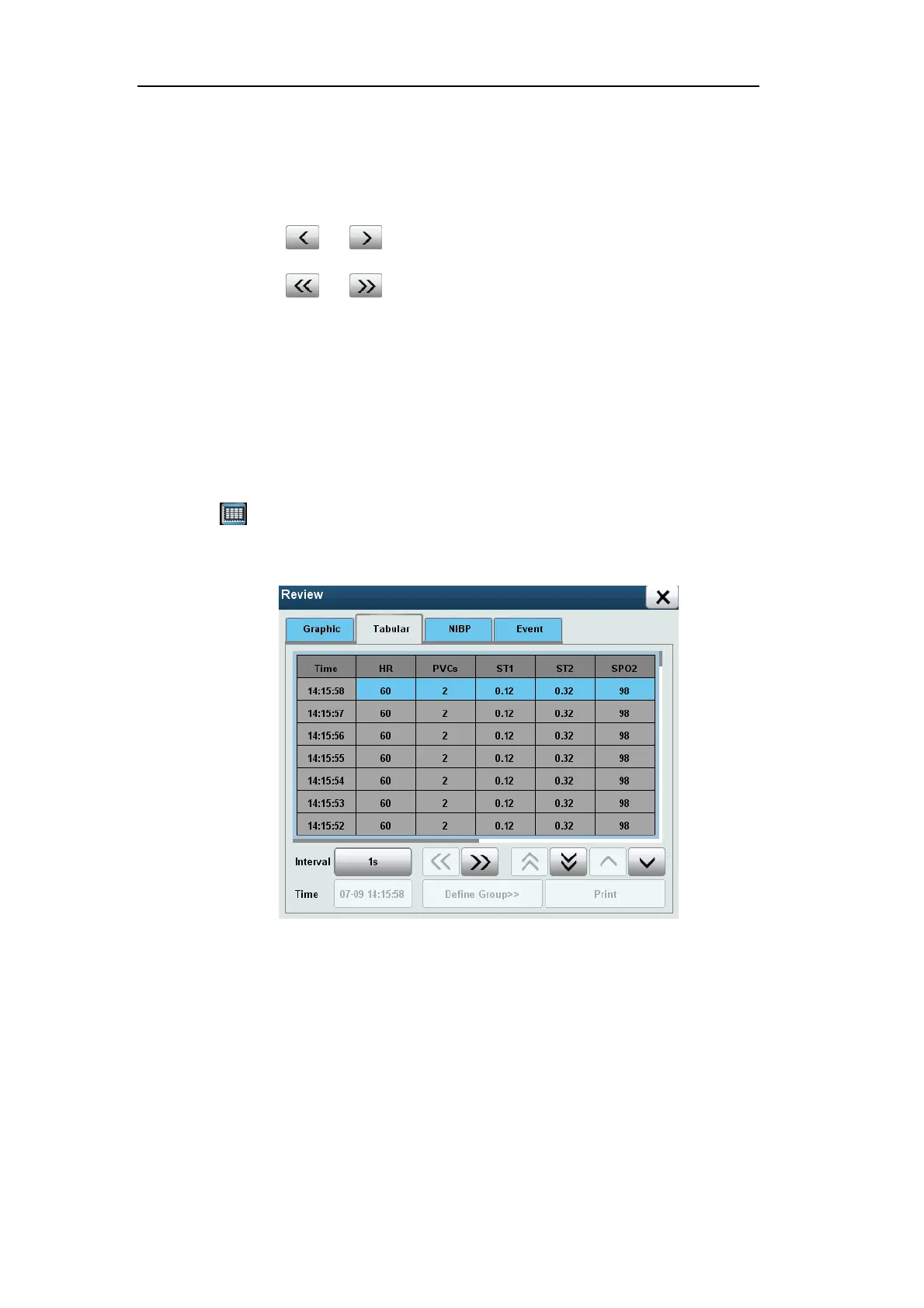
Select [Review] smart hotkey to enter [Review] menu, select [Tabular] and enter the
following window.
Fig. 13-2 Trend Table
Select [Interval], and select the option as needed:
[1s]: observe the data of the last hour at 1sec interval.
[5s]: observe the data of the last eight hours at 5sec interval.
[1min]: observe the data of the last 120 hour at 1min interval.
[5min]: observe the data of the last 120 hour at 5min interval.
[10min]: observe the data of the last 120 hour at 10min interval.
[30min]: observe the data of the last 120 hour at 30min interval.


 To Next Page